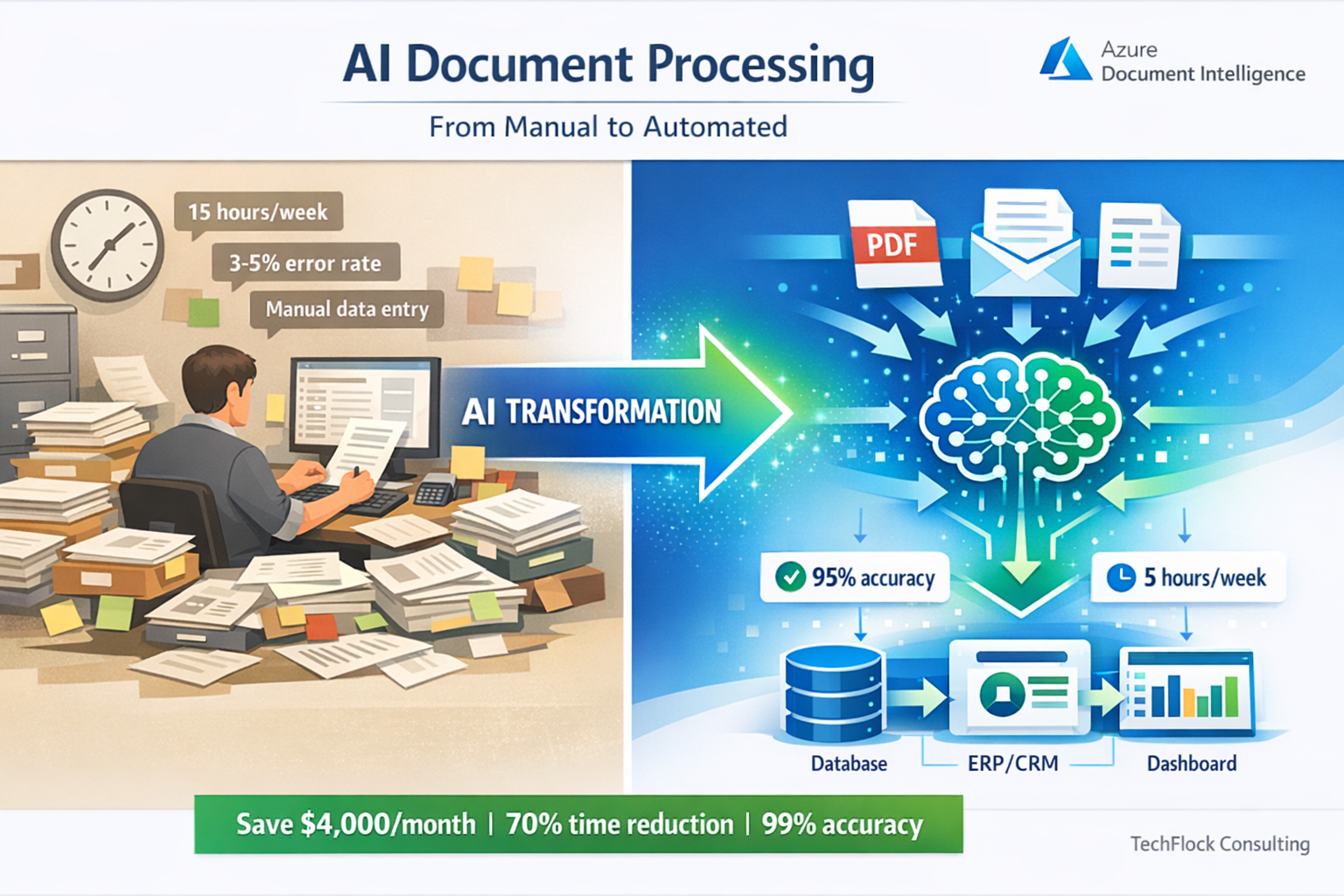
Melbourne law firm processes 200+ client contracts monthly. Their junior associates spend 15 hours each week manually extracting key terms, dates, obligations, and clauses into the case management system. That’s 60 hours monthly at $80/hour = $4,800 in labor costs, plus the opportunity cost of associates not working on higher-value tasks.
We implemented AI document processing using Azure Document Intelligence. System now extracts the same information in minutes with 95% accuracy, requiring only 5 hours monthly for review and edge case handling. Labor savings: $4,000/month. ROI timeline: 3 months including implementation costs.
This isn’t science fiction - it’s happening right now across Australian businesses in healthcare, logistics, professional services, and manufacturing. AI document processing has matured from experimental technology to practical business tool delivering measurable ROI.
After implementing document processing solutions for maybe 15 Australian businesses over the past three years, I can tell you exactly what works, what doesn’t, and how to avoid the expensive mistakes I’ve seen others make.
What is AI Document Processing? (Plain English)
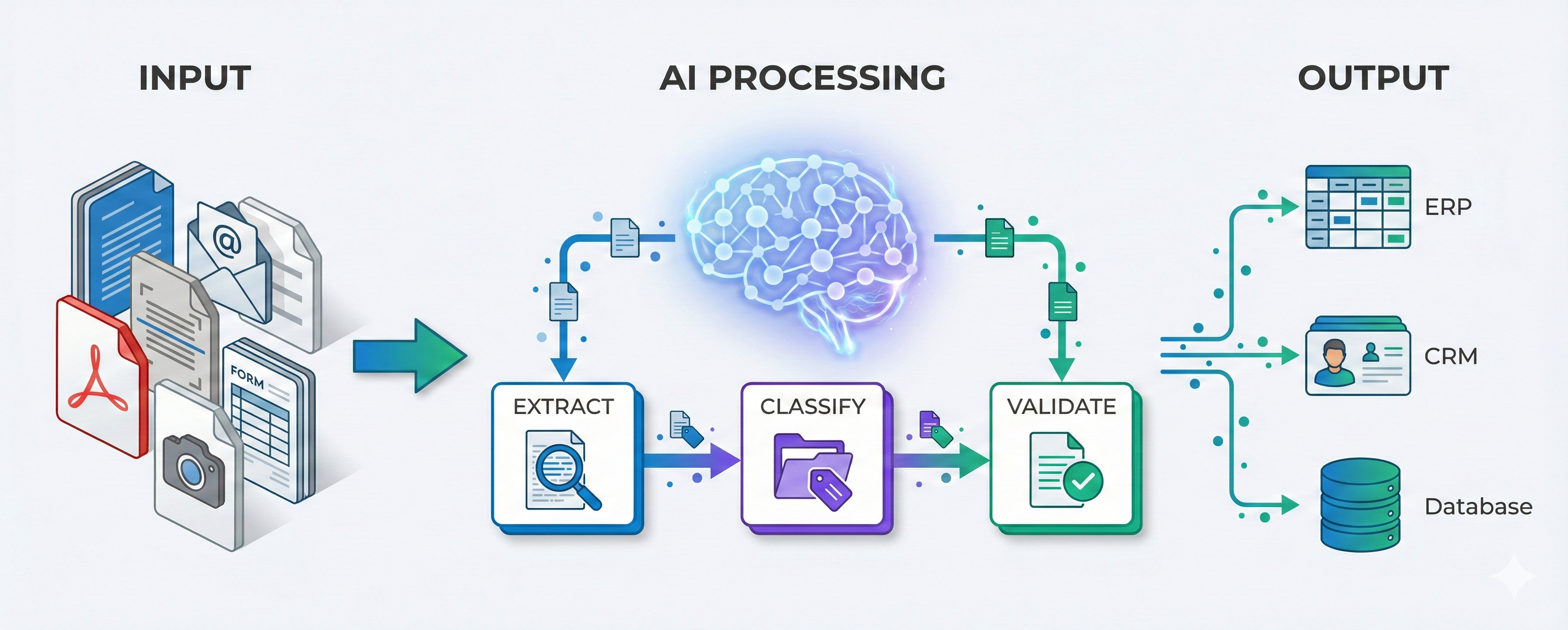
AI document processing uses machine learning to automatically read, understand, and extract information from documents. Unlike traditional OCR (Optical Character Recognition) that simply converts images to text, AI understands document structure, context, and relationships between data fields.
Think of traditional OCR as taking a photo of a document and converting it to text. It can tell you there’s text, but not what that text means. AI document processing understands that “Invoice Date: 15/03/2024” means the invoice was issued on March 15, 2024, and can automatically populate that field in your accounting system.
What AI handles well:
Structured documents like invoices, purchase orders, and tax forms work exceptionally well. The AI learns standard layouts and field locations, extracting data with 90-98% accuracy. Semi-structured documents like contracts, medical records, and legal agreements require more sophistication but modern AI handles these effectively. Even unstructured documents like emails, letters, and reports can be processed, though accuracy varies by content complexity.
What still challenges AI:
Handwritten text, especially cursive, still challenges most systems (though accuracy improves constantly). Very old or degraded documents with poor image quality may require pre-processing or manual review. Documents in languages the AI wasn’t trained on will need custom model training. Highly specialized industry jargon or domain-specific terminology sometimes requires custom models.
Real-World Use Cases Across Industries
Healthcare: Patient Record Processing
Brisbane medical clinic receives 150+ patient referral letters daily via fax and email. Receptionists manually enter patient details, referring doctor information, medical history, and urgency flags into patient management system - 3 hours daily of data entry.
We implemented AI processing that automatically extracts patient demographics, referral reasons, urgency indicators, and medical history from incoming referrals. System creates draft patient records requiring only quick review before saving. Data entry time: reduced from 3 hours to 30 minutes daily. Annual savings: $48,000 in staff time.
AI also flags urgent cases automatically based on keywords like “immediate attention required” or “suspected cardiac.” This eliminated cases of urgent referrals sitting in queue while staff processed non-urgent paperwork.
Logistics: Shipping Documentation
Sydney freight forwarder processes 400+ shipping documents daily including bills of lading, customs declarations, and commercial invoices. Each document requires extracting 20-40 data fields for customs compliance and shipment tracking.
Manual processing required 6 full-time staff. We implemented AI that handles 85% of documents fully automatically, with 15% requiring human review for unusual cases or quality issues. Staffing requirement reduced to 2.5 FTE (one for AI training and oversight, 1.5 for exception handling). Annual savings: $280,000 in salaries and overhead.
AI also reduced errors significantly. Human data entry errors averaged 3-5% (often causing customs delays and penalties). AI error rate: under 1% after initial training period.
Professional Services: Contract Analysis
Accounting firm manages hundreds of client service agreements needing annual review for renewal dates, rate changes, and scope adjustments. Associates spent 40+ hours monthly reviewing contracts and updating tracking spreadsheet.
AI document processing now automatically extracts key contract terms: renewal dates, notice periods, fee structures, deliverables, and termination clauses. System creates structured database queryable by any parameter. Monthly time requirement: 6 hours for review and updates. Firm also now catches renewal opportunities they previously missed, adding $120,000 annual revenue from timely renegotiations.
Manufacturing: Quality Control Documentation
Melbourne manufacturer maintains extensive quality control records for regulatory compliance. Each batch requires documentation including raw material certificates, test results, inspection reports, and operator logs. Regulatory audits require quick retrieval of specific batch records from years of archives.
Manual filing and retrieval took significant time, and misplaced documents caused audit delays. AI document processing now automatically categorizes, extracts key data, and indexes all quality documents. Audit preparation time dropped from 3 days to 4 hours. Regulatory compliance improved from periodic violations (resulting in warnings) to zero violations over 18 months.
Technology Options: AWS, Azure, Google Compared
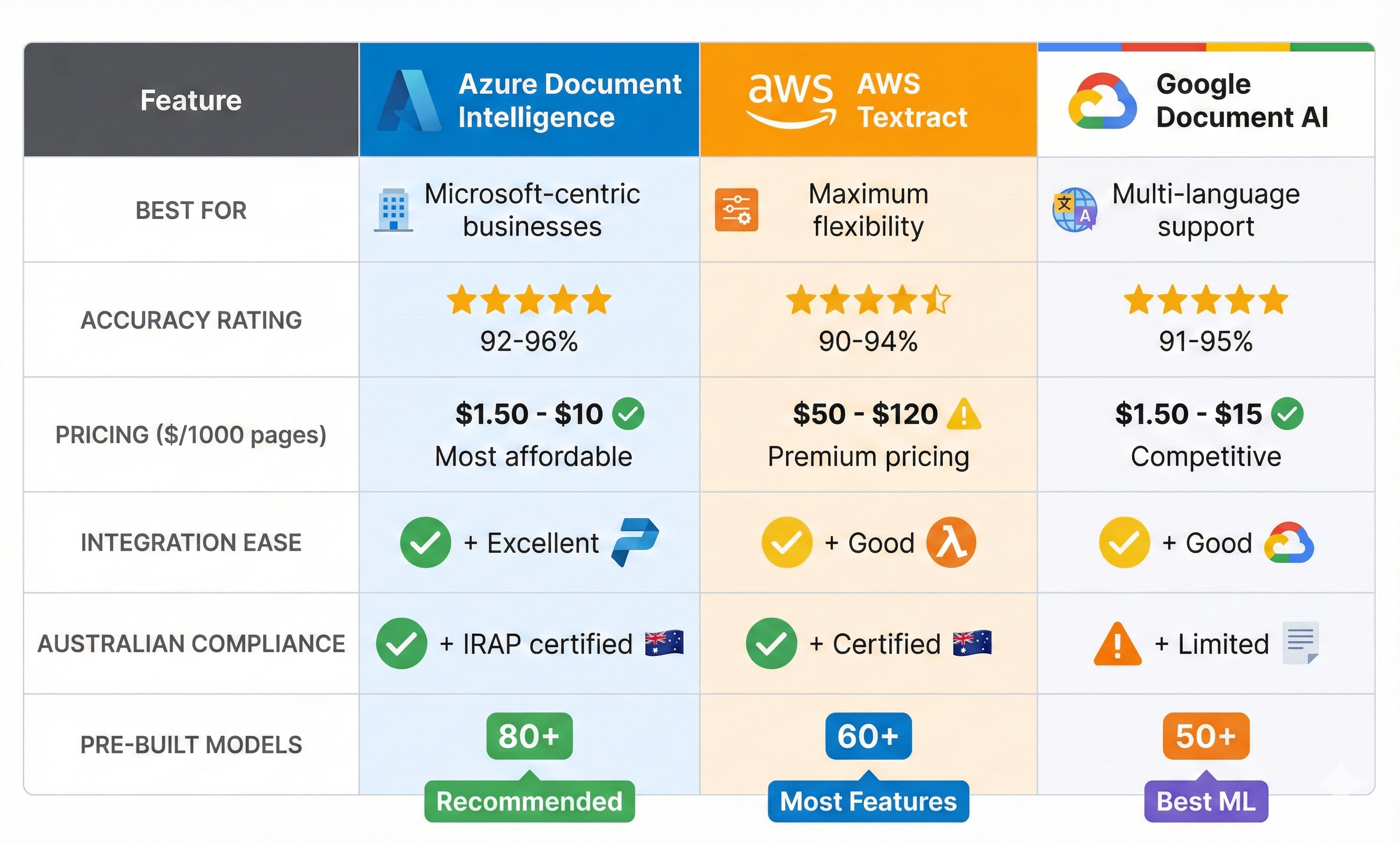
Three major platforms dominate: AWS Textract, Azure Document Intelligence (formerly Form Recognizer), and Google Document AI. Here’s how they compare based on my implementation experience.
Azure Document Intelligence
Best for: Microsoft-centric businesses, especially those using Power Platform or Dynamics.
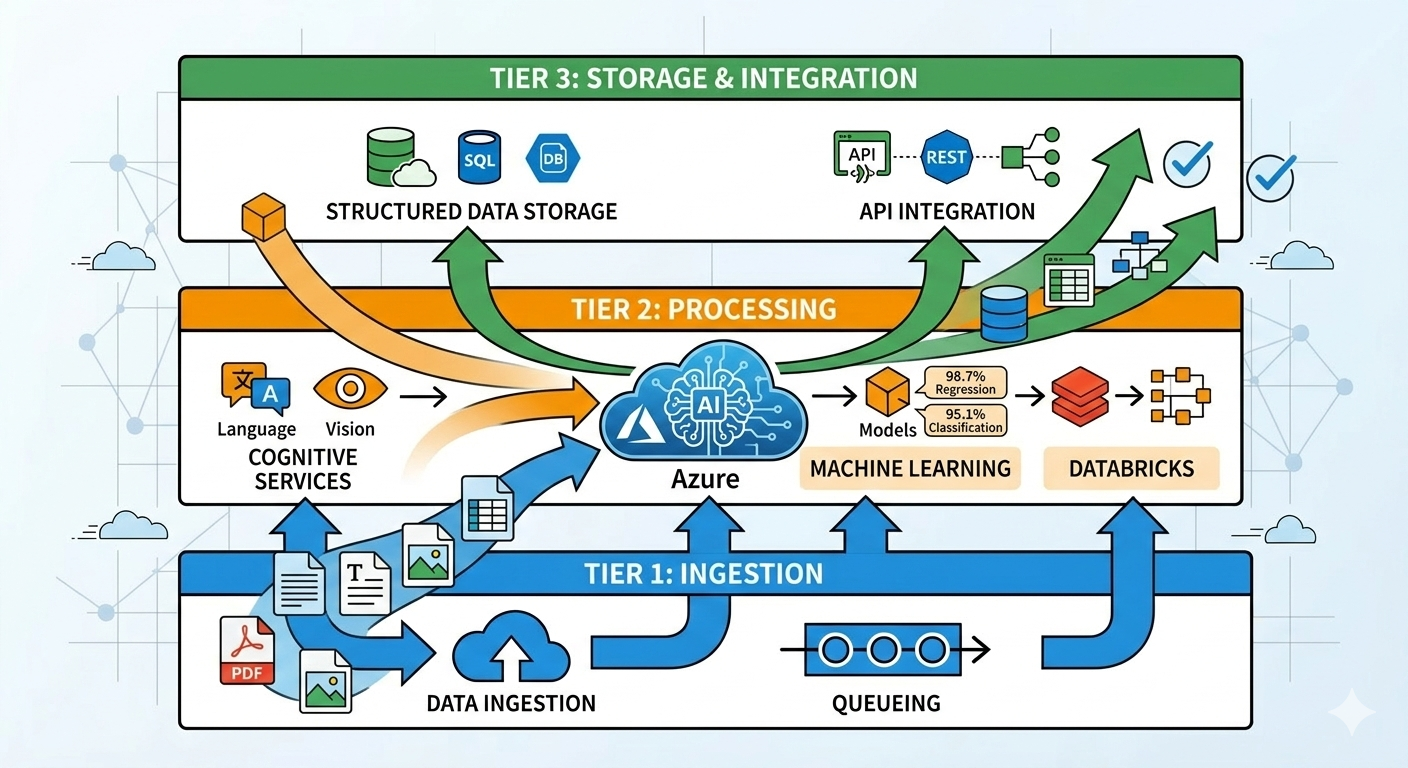
Azure’s solution offers excellent accuracy, particularly for forms and structured documents. Pre-built models handle invoices, receipts, identity documents, and tax forms out of the box with impressive accuracy (typically 92-96% for common document types). Custom models train quickly and integrate seamlessly with Power Automate for business process automation.
Perth accounting firm used Azure Document Intelligence integrated with Power Automate to process client tax documents. When clients upload documents via email or portal, Power Automate triggers AI processing, extracts relevant data, creates records in Dataverse, and alerts accountants when documents need review. Entire flow required minimal coding - mostly Power Automate configuration.
Pricing: Pay-per-document model starting at $1.50 per 1,000 pages for pre-built models, $10 per 1,000 pages for custom models. For the accounting firm processing 8,000 pages monthly, cost is approximately $120-160/month.
Strengths: Excellent Power Platform integration, strong pre-built models, good Australian data residency compliance, straightforward pricing.
Limitations: Less flexible than AWS for highly custom scenarios, smaller ecosystem of third-party integrations.
AWS Textract
Best for: Businesses already on AWS infrastructure, or those needing maximum flexibility and customization.
AWS offers more granular control and advanced features. Their Queries feature lets you ask natural language questions of documents (“What is the invoice total?” “Who is the policy holder?”). AnalyzeExpense API handles receipts and invoices with specialized extraction. AnalyzeID extracts data from identity documents.
Melbourne healthcare provider chose AWS Textract because their entire infrastructure runs on AWS. Integration with Lambda functions, S3 storage, and custom applications was straightforward. They process medical claims, extracting diagnosis codes, procedure codes, and billing information with 94% accuracy.
Pricing: Pay-per-page model. Simple text detection costs $1.50 per 1,000 pages. Form and table extraction costs $50 per 1,000 pages. Custom queries add additional costs. For complex processing, expect $80-120 per 1,000 pages.
Strengths: Very flexible, excellent for custom workflows, strong integration with AWS ecosystem, sophisticated features for complex documents.
Limitations: More expensive than Azure for standard use cases, requires more technical expertise to implement optimally, steeper learning curve.
Google Document AI
Best for: Businesses already using Google Cloud or those prioritizing machine learning sophistication.
Google’s solution leverages their deep ML expertise. Platform offers both pre-trained processors and custom model training with AutoML. Particularly strong for documents with complex layouts or multiple languages.
I’ve implemented Google Document AI less frequently than AWS or Azure, primarily because fewer Australian mid-market companies use Google Cloud as their primary platform. However, for businesses already on Google Cloud, it’s an excellent option with competitive pricing and strong capabilities.
Pricing: Similar to Azure, pay-per-document model starting at $1.50 per 1,000 pages for standard processors, with custom processors costing more.
Strengths: Excellent multi-language support, sophisticated ML capabilities, strong for complex document layouts, integrates well with Google Workspace.
Limitations: Smaller presence in Australian enterprise market, fewer pre-built models for common business documents compared to Azure.
My Recommendation for Australian Mid-Market
For most Australian mid-market businesses, Azure Document Intelligence is my top recommendation. Combination of strong accuracy, Power Platform integration, straightforward pricing, and good Australian compliance makes it the practical choice for probably 70% of use cases.
Choose AWS Textract if you’re already heavily invested in AWS infrastructure or need sophisticated custom processing beyond standard document types. Choose Google Document AI if you’re on Google Cloud or need exceptional multi-language capabilities.
Implementation Costs and Timeline
Understanding realistic costs and timelines prevents disappointment and helps with accurate budgeting. Here’s what I’ve seen across 15ish implementations over three years.
Project Costs by Complexity
Simple implementation (single document type, pre-built models, basic workflow):
- Timeline: 4-6 weeks
- Cost: $15,000-$25,000
- Example: Invoice processing using Azure pre-built invoice model with Power Automate workflow
Medium complexity (multiple document types, some customization, integration with existing systems):
- Timeline: 8-12 weeks
- Cost: $35,000-$60,000
- Example: Medical referral processing with custom model training and integration with patient management system
High complexity (many document types, extensive custom models, complex business rules, enterprise system integration):
- Timeline: 16-24 weeks
- Cost: $80,000-$150,000
- Example: Contract lifecycle management system with AI extraction, validation rules, approval workflows, and ERP integration
What Goes Into These Costs
Discovery and requirements phase typically takes 1-2 weeks and costs $5,000-$10,000. This includes document analysis, workflow mapping, system integration planning, and ROI calculation. Skipping proper discovery is the most common reason projects fail or overrun budgets.
Custom model training requires 100-1,000 sample documents for effective training (depending on document complexity). Plan for 3-6 weeks and $8,000-$25,000 for training and validation. Pre-built models eliminate this cost but only work for standard document types.
System integration connects AI processing with existing software. Simple integrations (Power Automate to Dataverse) take 1-2 weeks and cost $3,000-$8,000. Complex integrations (custom APIs, legacy systems, multiple data destinations) can take 4-8 weeks and cost $15,000-$40,000.
Testing and validation ensure accuracy before going live. Budget 2-4 weeks and $5,000-$12,000 for comprehensive testing including edge cases, error handling, and user acceptance testing.
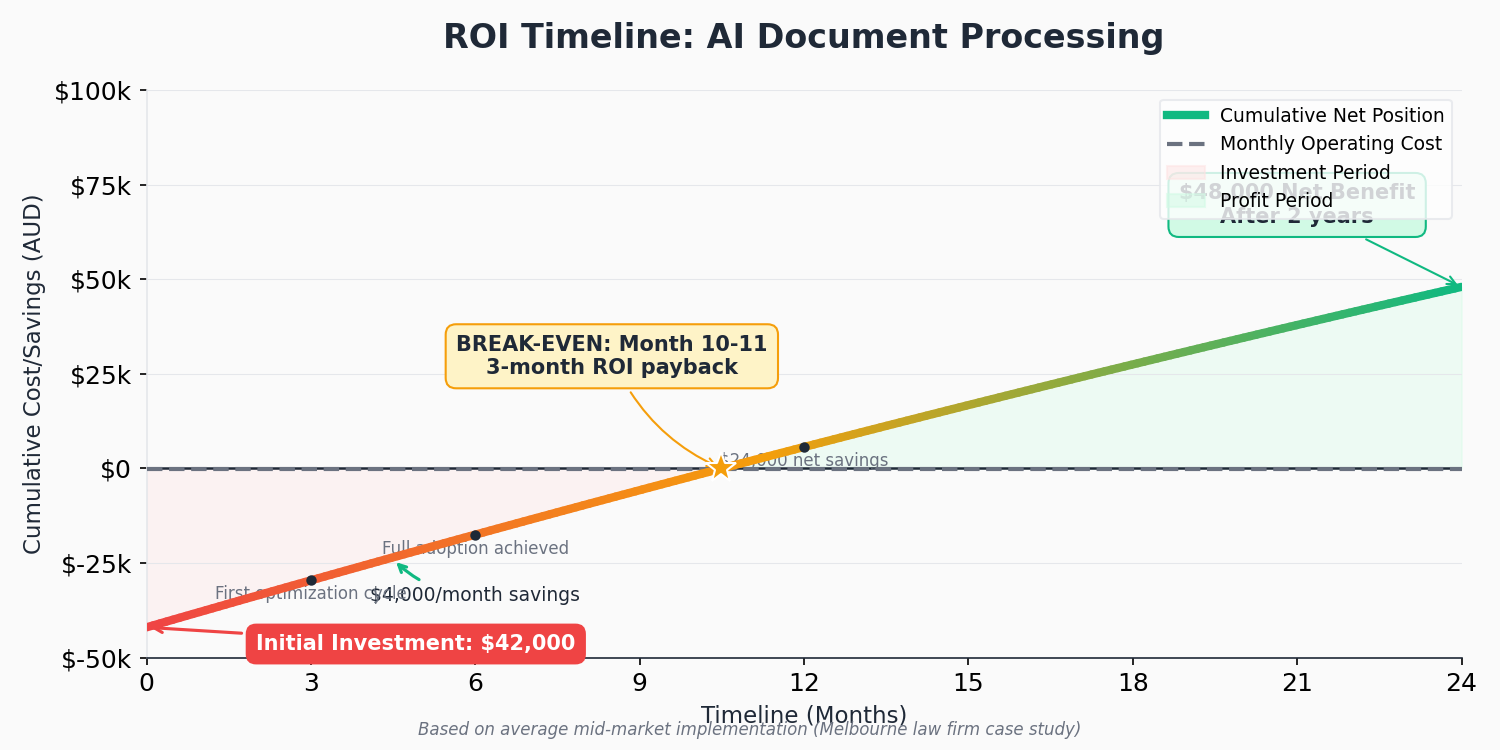
Melbourne law firm had medium-complexity project. Timeline: 10 weeks. Cost: $42,000 (including $12,000 for custom model training on their specific contract templates, $18,000 for development and integration, $8,000 for discovery and testing, $4,000 for training and documentation). Monthly operating cost: $200 (AI processing fees). Monthly savings: $4,000. Payback period: 10.5 months.
ROI Calculation and Expectations
Understanding ROI helps justify investment and set realistic expectations. Here’s how to calculate expected returns.
Direct Cost Savings
Calculate current labor costs for manual document processing. If staff spend 20 hours weekly on data entry at $40/hour fully loaded cost (salary plus overheads), that’s $41,600 annually. AI typically reduces this by 70-85%, saving $29,120-$35,360 annually.
Don’t forget error correction costs. Manual data entry errors cost money through rework, customer complaints, regulatory issues, or missed opportunities. If errors cost your business $1,000 monthly in various impacts, AI reducing errors by 80% saves $9,600 annually.
Processing time reduction delivers indirect value. If current processing takes 3 days and AI reduces it to same-day processing, faster turnaround can improve customer satisfaction, enable faster business decisions, and potentially increase revenue through better service levels.
Typical ROI Timelines
Simple projects (pre-built models, basic workflows) typically achieve ROI in 6-12 months. Medium complexity projects achieve ROI in 12-18 months. Complex projects might take 18-30 months to fully pay back, but often deliver strategic benefits beyond pure cost savings.
Sydney freight forwarder’s ROI calculation: Implementation cost of $55,000. Annual savings of $280,000 in labor plus $45,000 in reduced error costs = $325,000 total annual benefit. ROI timeline: 2 months. After first year, ongoing AI processing costs ($800/month) are negligible compared to benefits.
Hidden Benefits Often Overlooked
Staff can redirect time from tedious data entry to higher-value work. Law firm’s associates now spend those 15 hours weekly on billable legal work or business development instead of data entry. At $200/hour billing rate, that’s $156,000 additional annual revenue potential.
Better data quality enables improved analytics and business intelligence. Clean, consistent data from AI processing supports better reporting and decision-making. Several clients report making better business decisions because they finally have reliable data to analyze.
Scalability without headcount becomes possible. Manual processing limits growth - more documents means more staff. AI processing scales without proportional cost increases, enabling business growth without linear staffing costs.
Compliance and audit readiness improve significantly. AI creates consistent audit trails, timestamps every decision, and maintains documentation automatically. Several clients mentioned passing audits more easily after implementing AI processing.
Implementation Best Practices (What Actually Works)
After implementing 15ish document processing projects, certain patterns consistently lead to success while others predict failure.
Start with High-Volume, High-Value Documents
Don’t try to automate everything at once. Identify your highest-volume document types that consume most manual processing time. Start with one document type, prove ROI, then expand to others.
Brisbane medical clinic started with referral letters only (150+ daily, clear ROI). After proving success over 3 months, they expanded to pathology results, then radiology reports. Staged approach reduced risk and allowed learning from early phases.
Starting with too many document types simultaneously is most common mistake leading to project failure or budget overruns. Complexity increases exponentially with each additional document type, especially if they require different processing logic.
Invest in Proper Training Data
AI is only as good as its training data. For custom models, you need 100-1,000 diverse, representative samples. Don’t train only on perfect examples - include edge cases, variations, and poor-quality documents the system will encounter in production.
Perth logistics company initially trained their model on 50 pristine example bills of lading. Accuracy in testing: 96%. Accuracy in production: 72%. Problem: Real-world documents included handwritten notes, stamps covering text, and low-quality faxes not represented in training data. After retraining with 300 diverse real examples including poor quality scans, production accuracy improved to 91%.
Allocate budget and time for proper training data collection and labeling. Cutting corners here guarantees poor results and project failure.
Design for Human-in-the-Loop
Don’t aim for 100% automation. Design workflows where AI handles 80-90% automatically and routes uncertain cases to humans. This achieves better results than trying for full automation.
Implement confidence scoring where AI indicates how certain it is about each extracted field. Route low-confidence extractions for human review. For Melbourne law firm, AI confidently processes 85% of contracts fully automatically. Remaining 15% (unusual clauses, ambiguous language, poor scan quality) go to associates for review. This hybrid approach achieves 99% accuracy overall - better than either pure AI or pure manual processing.
Build exception handling into workflows from day one. Documents will arrive in unexpected formats, quality will vary, and edge cases will emerge. Good exception handling process turns potential problems into minor inconveniences.
Plan for Ongoing Model Maintenance
AI models drift over time as document formats change, business processes evolve, or new document variations appear. Budget for quarterly model reviews and retraining as needed.
Sydney freight forwarder reviews model performance monthly. When accuracy dips below 90% for any document type, they investigate and retrain if needed. Over 18 months, they’ve retrained models three times (once for new customs form version, once when major supplier changed invoice format, once to handle new document types from international expansion).
Ongoing maintenance costs typically run $500-$2,000 per quarter depending on processing volumes and number of document types.
Ensure Compliance and Security
For regulated industries (healthcare, finance, legal), ensure your AI processing meets data protection requirements. In Australia, this means Privacy Act compliance, and for healthcare, ensuring systems meet relevant healthcare privacy standards.
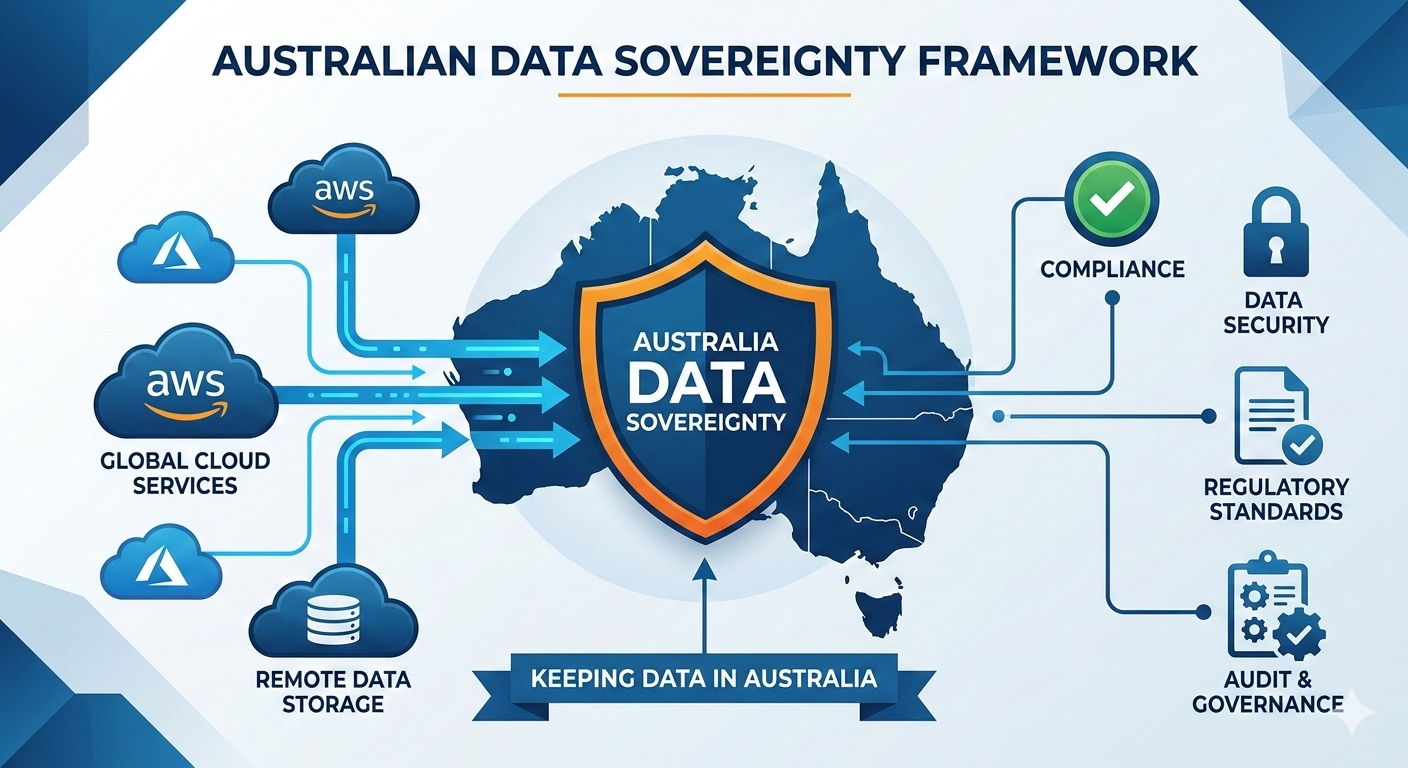
Both Azure and AWS offer Australian data residency options ensuring data doesn’t leave Australia. For most businesses, this is essential. Verify that training data, model storage, and processing all stay within Australian regions if you handle sensitive data.
Document your AI processing in compliance documentation. Regulators want to understand how automated systems make decisions. Maintain audit trails showing which documents were processed automatically versus manually reviewed.
Common Pitfalls (And How to Avoid Them)
Expecting 100% Accuracy Immediately
AI models require training and refinement. Initial accuracy might be 70-80% even with good training data. After several refinement cycles incorporating real production feedback, accuracy improves to 90-95%. Budget for 2-3 months of refinement post-launch.
Perth accounting firm got frustrated when initial accuracy was 78% despite good training data. We explained this is normal and implemented feedback loop where staff corrections fed back into model retraining. After two retraining cycles over 8 weeks, accuracy reached 94%, and team became advocates for the system.
Underestimating Change Management
Staff fear AI will eliminate their jobs. Communicate clearly that AI handles tedious data entry while they focus on higher-value work. Brisbane medical clinic initially faced resistance from receptionists worried about job security. Management clearly explained roles would shift to patient care coordination and complex case handling. After seeing benefits (less tedious work, more interesting tasks), staff became enthusiastic supporters.
Training is essential. Budget time for staff to learn new workflows, understand when to override AI decisions, and know how to handle exceptions. Inadequate training leads to workarounds and system abandonment.
Poor Integration Planning
AI document processing delivers maximum value when integrated with existing systems. Extracting invoice data into CSV file that someone manually imports into ERP delivers minimal benefit. Automatic API integration that populates ERP in real-time delivers transformational value.
Budget appropriately for integration work. It often represents 30-40% of total project cost but delivers 80% of business value.
Ignoring Document Quality
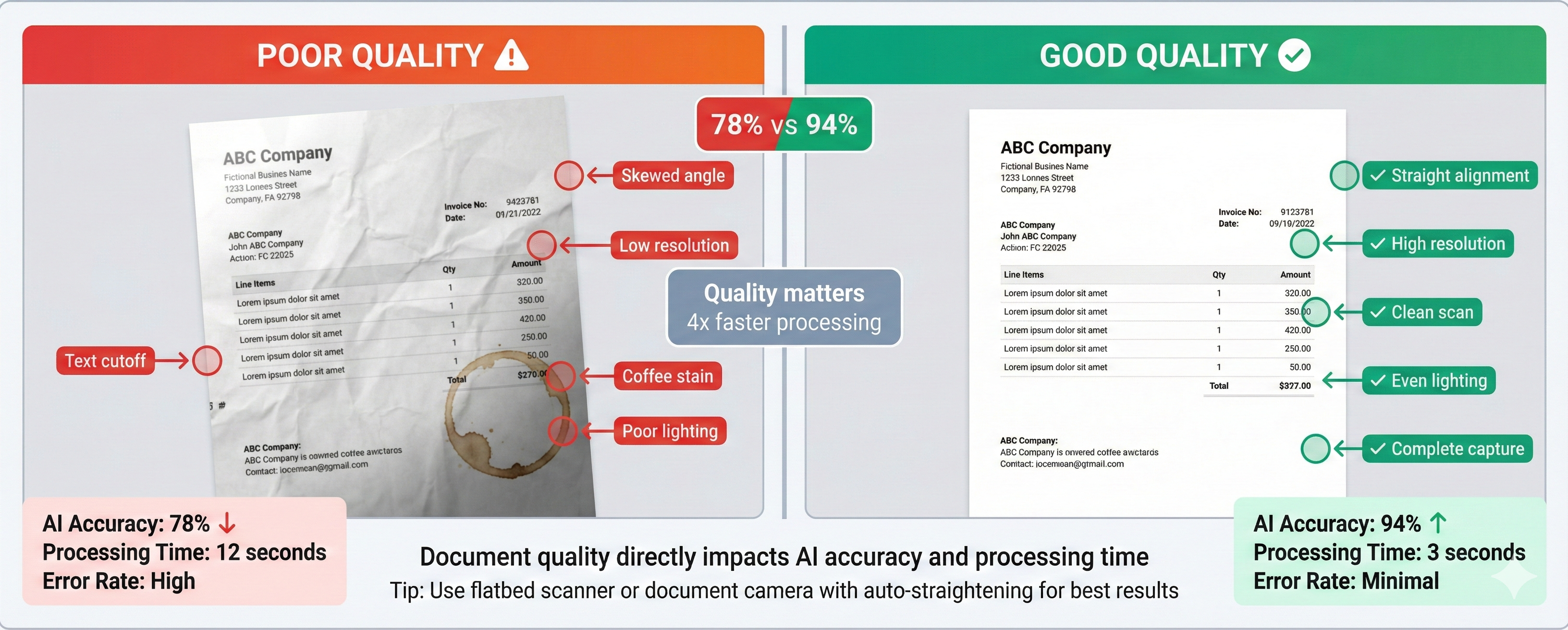
AI performs best with good quality input documents. If documents are poor-quality faxes, badly scanned images, or photographed with phone at odd angles, accuracy suffers dramatically.
Sometimes it’s worth investing in better document capture before implementing AI. Melbourne manufacturer bought a $2,000 document scanner with automatic straightening and enhancement. This improved AI accuracy from 83% to 93% - well worth modest scanner investment.
Getting Started: Your Evaluation Checklist
If you’re processing 50+ documents weekly of same type, spending 10+ hours weekly on manual data entry, or experiencing frequent errors from manual processing, AI document processing likely makes financial sense.
Evaluation questions:
Identify your highest-volume document types and calculate current processing costs (labor hours times hourly cost). Estimate AI processing accuracy potential (structured forms: 90-95%, semi-structured documents: 85-92%, unstructured: 75-85%). Calculate potential savings (current cost minus estimated AI cost including operating expenses). Determine ROI timeline (implementation cost divided by monthly savings).
For most businesses spending 20+ hours weekly on document processing, ROI is clear. A $40,000 implementation saving $3,000 monthly pays for itself in 13 months and delivers $36,000 annual benefit afterwards.
Pilot project approach:
Start small with pilot processing one document type. Budget $15,000-$25,000 and 6-8 weeks. Use pilot to prove ROI, learn technology, and build internal capability before expanding to additional document types.
Brisbane medical clinic started with $22,000 pilot for referral letters only. After proving $4,000 monthly savings over three months, they expanded investment to $55,000 total for comprehensive document processing across all major document types.
The Competitive Advantage Reality
AI document processing is rapidly moving from competitive advantage to competitive necessity. Businesses automating document processing can operate more efficiently, scale without proportional headcount increases, and compete more effectively against larger competitors.
Technology has matured beyond early-adopter phase. It’s now reliable, affordable, and practical for Australian mid-market businesses. If you’re still processing documents manually, you’re at competitive disadvantage against businesses that have automated.
Question isn’t whether to implement AI document processing, but when and how. Waiting another year means 12 more months of unnecessary labor costs, processing delays, and data entry errors.
Your Next Step:
We offer free AI document processing assessments where we’ll review your specific document processing workflows, calculate realistic ROI, and recommend best approach for your business. No pressure, just honest analysis based on 15+ successful implementations.