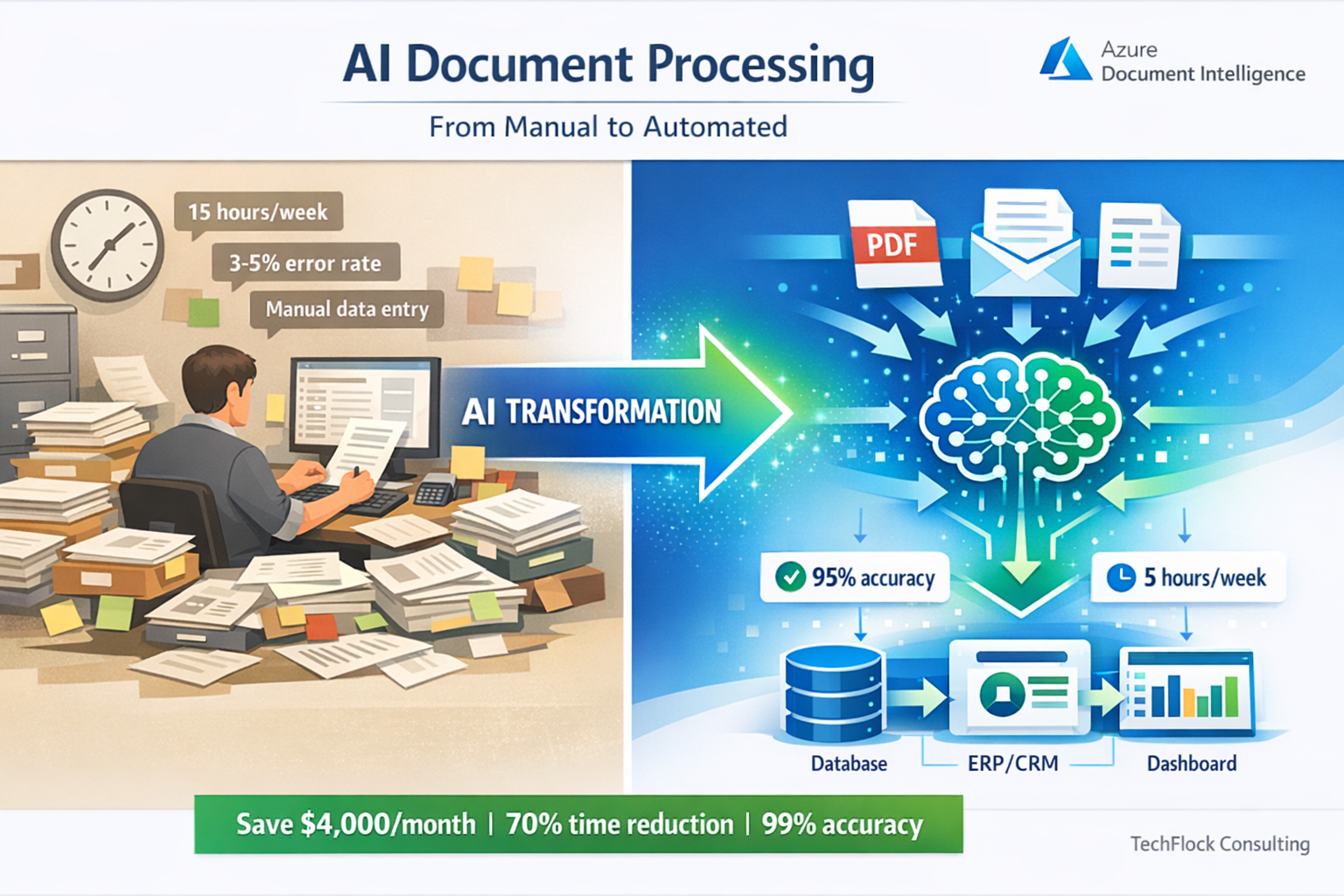
Melbourne logistics company called me mid-2024. They were manually processing 800+ delivery confirmation documents daily. Scanning PDFs, typing data into their system, checking addresses, validating signatures.
Eight people, full time, just data entry from delivery documents.
They’d seen demos of Azure Document Intelligence. Impressive accuracy. Vendor quoted $45,000 to implement.
I asked the question nobody else had: “What happens when the AI gets it wrong?”
Vendor’s answer: “The AI is 95% accurate.”
My response: “That’s 40 wrong documents per day. Who fixes them? How do they know which ones are wrong?”
Six months later, their system processes 800+ documents daily. Total staff: one person reviewing flagged exceptions.
Cost to build: $18,500. Monthly Azure costs: $340. Staff time saved: 7.5 FTE.
But the interesting part isn’t the AI accuracy. It’s the error handling, the confidence scoring, the human review workflow, and the gradual learning system that improves accuracy over time.
After implementing 40+ Azure AI solutions since 2019, I’ve learned that production AI systems succeed or fail based on everything around the AI, not the AI itself.
This guide covers what actually matters when building production Azure AI systems - not the marketing demos, the real implementation challenges and solutions.
Understanding Azure AI Services: What’s Actually Available
Azure AI services have evolved significantly since Cognitive Services launched. Current offerings fall into three main categories.
Azure OpenAI Service is GPT-4, GPT-3.5, and other OpenAI models running in Azure datacenters. You get the same models as ChatGPT but with enterprise controls, data residency in Australia, and integration with Azure services.
Use cases: document summarization, content generation, conversational interfaces, code generation. Good for tasks requiring reasoning and natural language understanding.
Brisbane legal firm uses this for initial contract review - AI reads contracts, flags unusual clauses, summarizes key terms. Lawyers review AI output instead of reading every contract word-by-word. Cuts initial review time by 60%.
Azure AI Document Intelligence (formerly Form Recognizer) extracts data from documents. Invoices, receipts, forms, contracts - anything with structured or semi-structured data.
Pre-built models handle common documents without training. Custom models learn your specific document formats. Runs at scale processing thousands of documents hourly.
Perth mining company processes safety inspection forms - AI extracts equipment IDs, inspection results, defect descriptions. Previously manual data entry taking 15 minutes per form. Now automated, two minutes review time for exceptions only.
Azure AI Vision, Speech, and Language services handle specific AI tasks. Image classification, object detection, speech-to-text, text translation, sentiment analysis.
Adelaide healthcare provider uses Speech-to-Text for clinical notes. Doctors dictate during patient visits, AI transcribes to electronic health records. Accuracy good enough that doctors just correct errors rather than typing from scratch. Saves 20-30 minutes daily per doctor.
What’s not included: Training custom machine learning models from scratch. That’s Azure Machine Learning, different service requiring data science expertise. Most businesses don’t need this - pre-built models and Azure OpenAI handle 90% of practical business use cases.
The Architecture Pattern That Actually Works
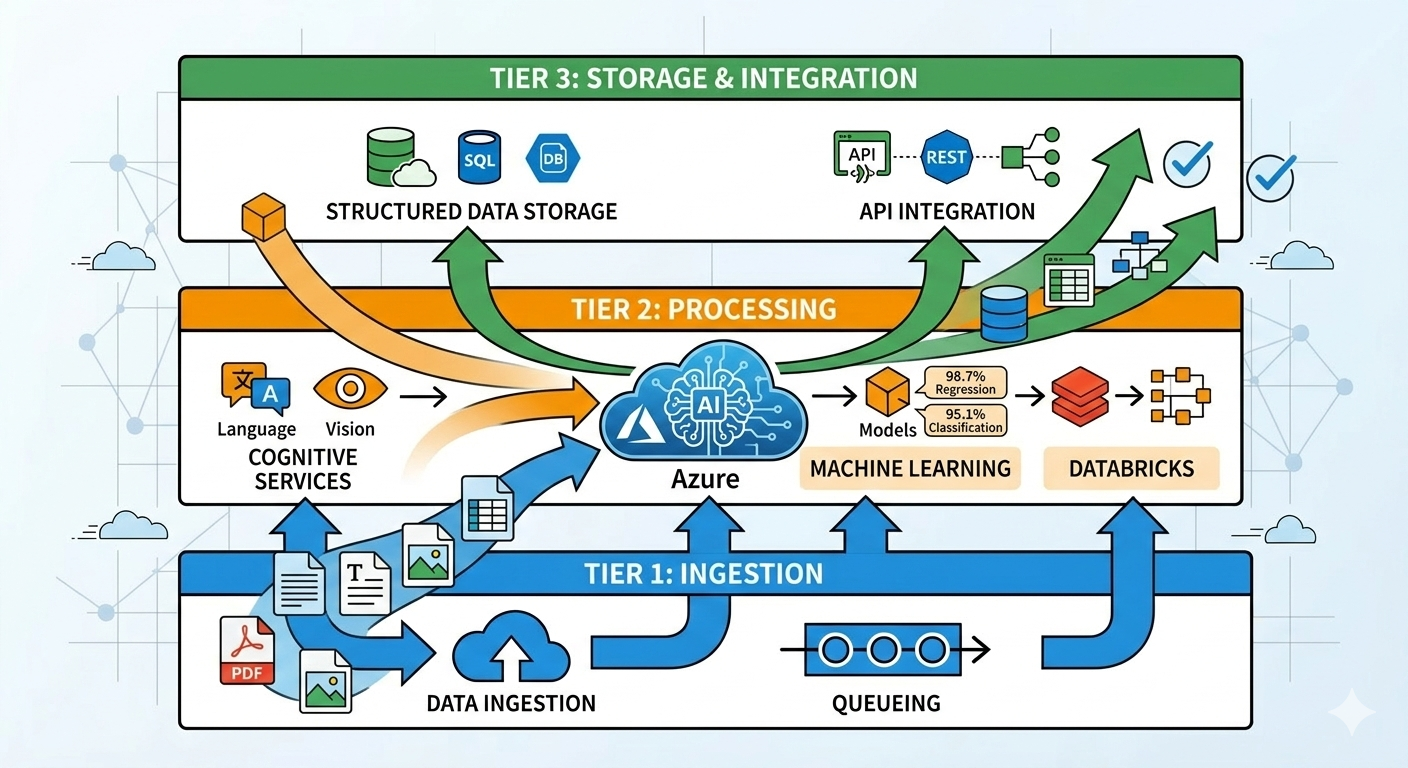
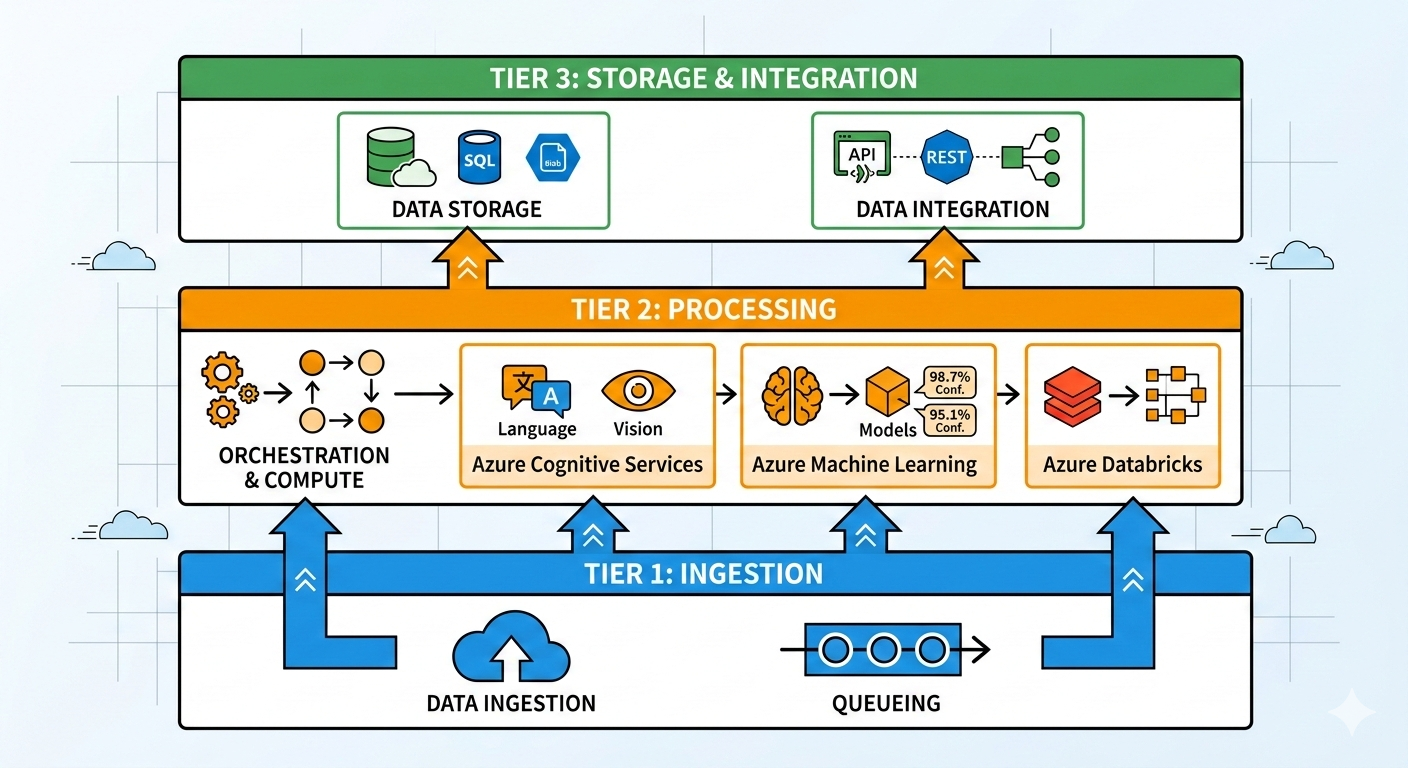
Standard three-tier architecture for production Azure AI systems based on 40+ implementations:
Ingestion tier handles document upload, validation, and queuing. Users upload files through web interface or automated process dumps files to Azure Blob Storage. Validation checks file type, size, and basic readability before processing.
Key component: Azure Storage Queue or Service Bus for processing queue. Don’t process documents synchronously during upload. Queue them, process asynchronously, return results when ready.
Melbourne accounting firm learned this the hard way. Initial implementation processed invoices synchronously - upload invoice, wait for AI processing, display results. When they uploaded 50 invoices at once, system timed out. Rebuilt with queue-based processing. Upload 500 invoices, they process in background, results appear as ready.
Processing tier runs AI services and handles orchestration. Azure Functions triggered by queue messages, calls appropriate AI services, handles retries and errors.
Critical pattern: confidence scoring and routing. AI returns results with confidence scores. High confidence (>90%)? Automatically accept. Medium confidence (70-90%)? Flag for human review. Low confidence (<70%)? Reject or route to manual processing.
Sydney insurance company processes claims forms. High confidence claims (65%) go straight through. Medium confidence (30%) reviewed by claims assessor who corrects AI errors. Low confidence (5%) processed manually from scratch. Total processing time reduced 60% compared to all-manual processing.
Storage and integration tier saves results and integrates with business systems. Processed data stored in Azure SQL Database or Cosmos DB. Integration with existing business systems via APIs or direct database writes.
Brisbane logistics company writes delivery confirmations directly to their transport management system database. AI processes document, extracts delivery details, writes to TMS. Driver scanning delivery generates automated proof-of-delivery in system without manual data entry.
Handling Errors and Confidence Scoring
AI will make mistakes. Production systems need to handle this gracefully.
Confidence thresholds based on business impact:
High-stakes decisions need high confidence thresholds. Financial transactions, legal documents, safety-critical data - set confidence threshold at 95%+ and review everything below manually.
Adelaide bank processes loan applications. AI extracts income, employment, credit history from supporting documents. Confidence threshold: 98%. Anything below gets manual review. They accept higher manual review rate (15% of documents) because incorrect data could lead to bad lending decisions.
Low-stakes decisions can accept lower confidence thresholds. Marketing content, internal categorization, preliminary analysis - threshold at 75-80% is fine. Errors cause minor inconvenience, not business problems.
Perth university categorizes research papers by topic using AI. Threshold: 75%. Miscategorized papers are annoying but don’t break anything. Researchers can recategorize if needed. System processes 1000+ papers monthly with minimal complaints.
Multi-stage confidence handling:
Stage one: automatic acceptance for high confidence (>threshold). These go straight through to business systems without human review.
Stage two: human review for medium confidence (threshold minus 10-20%). Display AI results to human reviewer, they accept or correct. Much faster than manual data entry because reviewer validates rather than creates.
Stage three: manual processing for low confidence (below threshold minus 20%). AI failed to extract data reliably, human processes document from scratch as if AI didn’t exist.
Melbourne legal firm processes service agreements:
- 70% confidence >95%: automatic acceptance
- 20% confidence 80-95%: lawyer reviews AI extraction (takes 3-5 minutes)
- 10% confidence <80%: paralegal processes manually (takes 20-30 minutes)
Total processing time: 70% × 0 minutes + 20% × 4 minutes + 10% × 25 minutes = 3.3 minutes average per document. Previously 25 minutes all manual. 87% time savings.
Error feedback loops:
When humans correct AI errors, feed corrections back to improve accuracy. Custom models can retrain with corrections. Pre-built models benefit from understanding common error patterns.
Brisbane logistics company tracks correction patterns. Initially, AI struggled with handwritten delivery notes. After six months of corrections, they trained custom model on their specific handwriting styles. Accuracy improved from 82% to 94% for handwritten notes.
Don’t expect this immediately. Collect 500-1000 correction samples before retraining custom models. Pre-built models don’t retrain but understanding error patterns helps set appropriate confidence thresholds.
Cost Optimization for Production AI
Azure AI services bill per transaction or per usage. Costs can escalate quickly if not managed properly.
Document Intelligence pricing reality:
Pre-built models (invoices, receipts, ID cards): $0.01 per page for first 500 pages monthly, $0.005 thereafter. Sounds cheap until you process 50,000 pages monthly.
Custom models: $0.04 per page training, same pricing for recognition. Plus $40/month per custom model storage.
Sydney law firm processing 8,000 contract pages monthly:
- Pre-built model: $42.50/month (500 pages at $0.01 + 7,500 at $0.005)
- Processing cost trivial compared to lawyer time saved
Perth mining company processing 120,000 inspection form pages monthly:
- Custom model: $599.50/month (500 at $0.01 + 119,500 at $0.005) + $40 model storage
- Still cheaper than 3 FTE data entry staff previously required
Azure OpenAI pricing:
GPT-4 Turbo: $0.01 per 1K input tokens, $0.03 per 1K output tokens. Expensive for high-volume use.
GPT-3.5 Turbo: $0.0005 per 1K input tokens, $0.0015 per 1K output tokens. 20x cheaper than GPT-4, good enough for many use cases.
Melbourne content company summarizes customer reviews:
- Tried GPT-4: 500-word review + 100-word summary = ~$0.006 per review × 10,000 reviews = $60/month
- Switched to GPT-3.5: same workload = $3/month
- Quality difference negligible for review summarization
Cost optimization patterns:
Cache repeated prompts. If you’re sending the same instructions to AI repeatedly, cache the system prompt. GPT-4 Turbo with prompt caching reduces costs by 50-90% for cached content.
Batch processing instead of real-time. If 30-minute latency is acceptable, queue documents and process in batches. Better Azure Functions utilization, fewer cold starts, lower costs.
Right-size your models. Don’t use GPT-4 when GPT-3.5 works fine. Don’t use custom Document Intelligence models when pre-built models suffice.
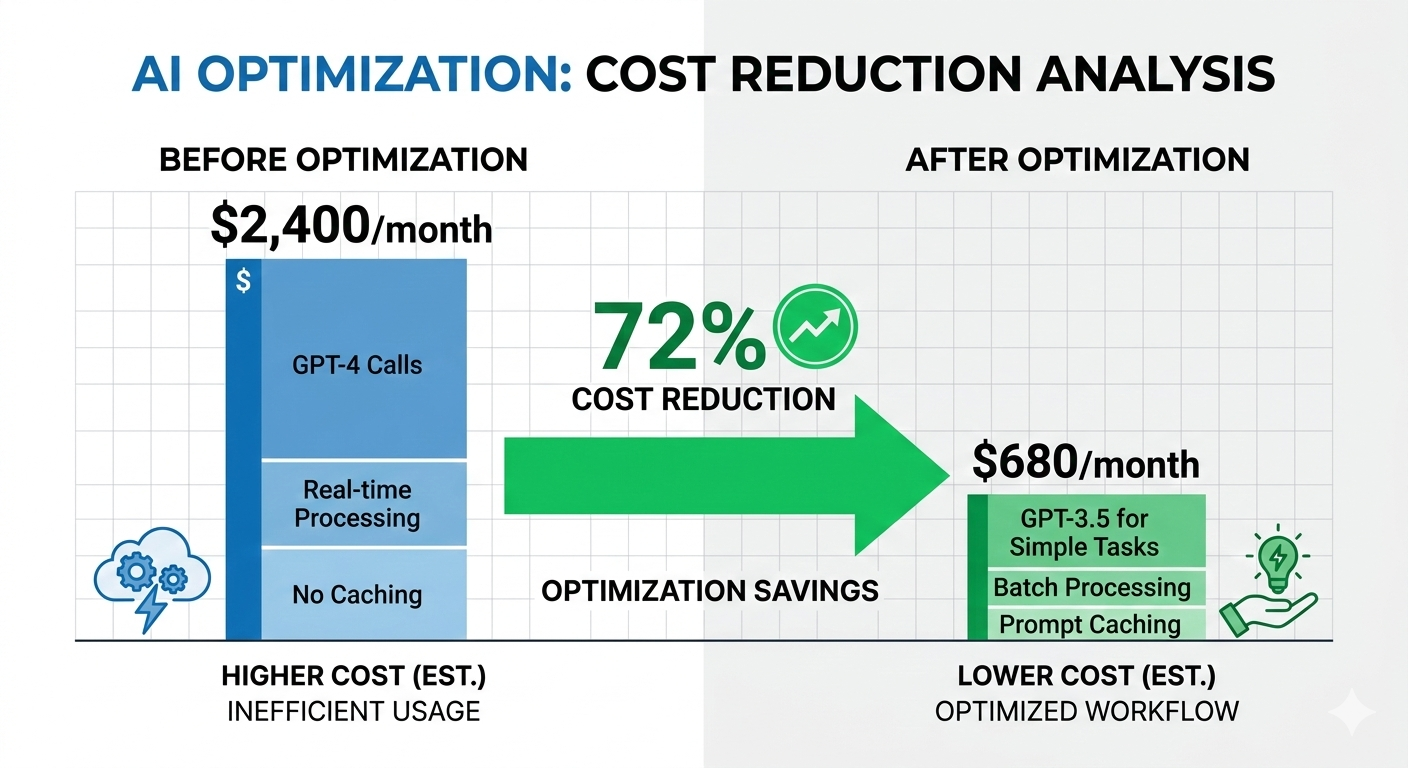
Adelaide insurance company optimized their claims processing:
- Initial implementation: all GPT-4, real-time processing, no caching
- Monthly cost: $2,400 for 50,000 claims
- After optimization: GPT-3.5 for simple claims, GPT-4 for complex only, batch processing, prompt caching
- Monthly cost: $680 for same volume
- 72% cost reduction, processing quality unchanged
Security and Data Sovereignty
Australian businesses processing Australian data have specific requirements.
Azure OpenAI in Australian regions:
Azure OpenAI available in Australia East (Sydney). Data processed and stored in Australia. Conversations don’t leave Australian datacenters.
Critical for businesses with data sovereignty requirements. Healthcare data, financial records, legal documents - need to stay in Australia.
Brisbane healthcare provider uses Azure OpenAI for clinical note summarization. Patient data stays in Australia East region. Meets Privacy Act requirements for health data.
Data retention and privacy:
Azure OpenAI Service in your subscription doesn’t use your data to train Microsoft models. Your prompts and responses stay private to your Azure tenant.
This differs from public ChatGPT where conversations might train future models. Enterprise Azure OpenAI: your data is your data.
Perth legal firm comfortable using Azure OpenAI for client matters specifically because data doesn’t train public models. Client confidentiality maintained.
Access control and audit logging:
Implement role-based access using Azure AD. Not everyone needs access to AI services or processed data.
Enable Azure Monitor for all AI service calls. Log who called which AI service, when, with what data. Required for compliance auditing.
Melbourne financial services implements:
- Developers can call AI services in test environment
- Only production service principals can call AI in production
- All production calls logged to Log Analytics with 7-year retention
- Quarterly access reviews remove unnecessary permissions
Compliance overhead: roughly $150/month for logging and retention. Necessary for financial services regulatory requirements.
Integration Patterns for Business Systems
AI processing is useful only if results flow into business systems where they’re needed.
Pattern 1: API integration
AI processes documents, exposes results via REST API. Business systems call API to retrieve processed data.
Good for modern applications with API support. Clean integration, proper error handling, easy to version and update.
Sydney transport company built API layer over Document Intelligence. Their transport management system (TMS) calls API with delivery document, receives structured delivery data. TMS developers didn’t need to understand AI - just API endpoints and data formats.
Pattern 2: Database integration
AI writes processed data directly to business system database. Existing applications read from same database, see AI-processed data alongside manually entered data.
Good for legacy systems without APIs. Works with any application reading from database. Requires careful database schema design to maintain referential integrity.
Adelaide manufacturing company processes purchase orders. AI writes extracted data to ERP database tables. ERP system treats AI-extracted orders identically to manually entered orders. ERP vendor didn’t need to modify software.
Pattern 3: File-based integration
AI generates CSV or Excel files with processed data. Business systems import files on schedule.
Simplest integration pattern. Works with any business system supporting file import. Higher latency (batch processing) but acceptable for many use cases.
Brisbane university processes student enrollment forms. AI generates nightly CSV with enrollment data. Student management system imports CSV each morning. 24-hour latency acceptable for enrollment processing.
Pattern 4: Event-driven integration
AI publishes events to Azure Service Bus or Event Grid. Business systems subscribe to events, receive notifications when AI processing completes.
Best for real-time requirements and complex workflows. Multiple systems can react to same AI processing event independently.
Perth logistics company publishes “DeliveryConfirmed” events when AI processes delivery documents. Transport management system updates delivery status. Billing system generates invoice. Customer notification system sends email. All triggered by single AI processing event.
Common Implementation Mistakes
After rescuing 15+ failed AI implementations, these patterns appear repeatedly:
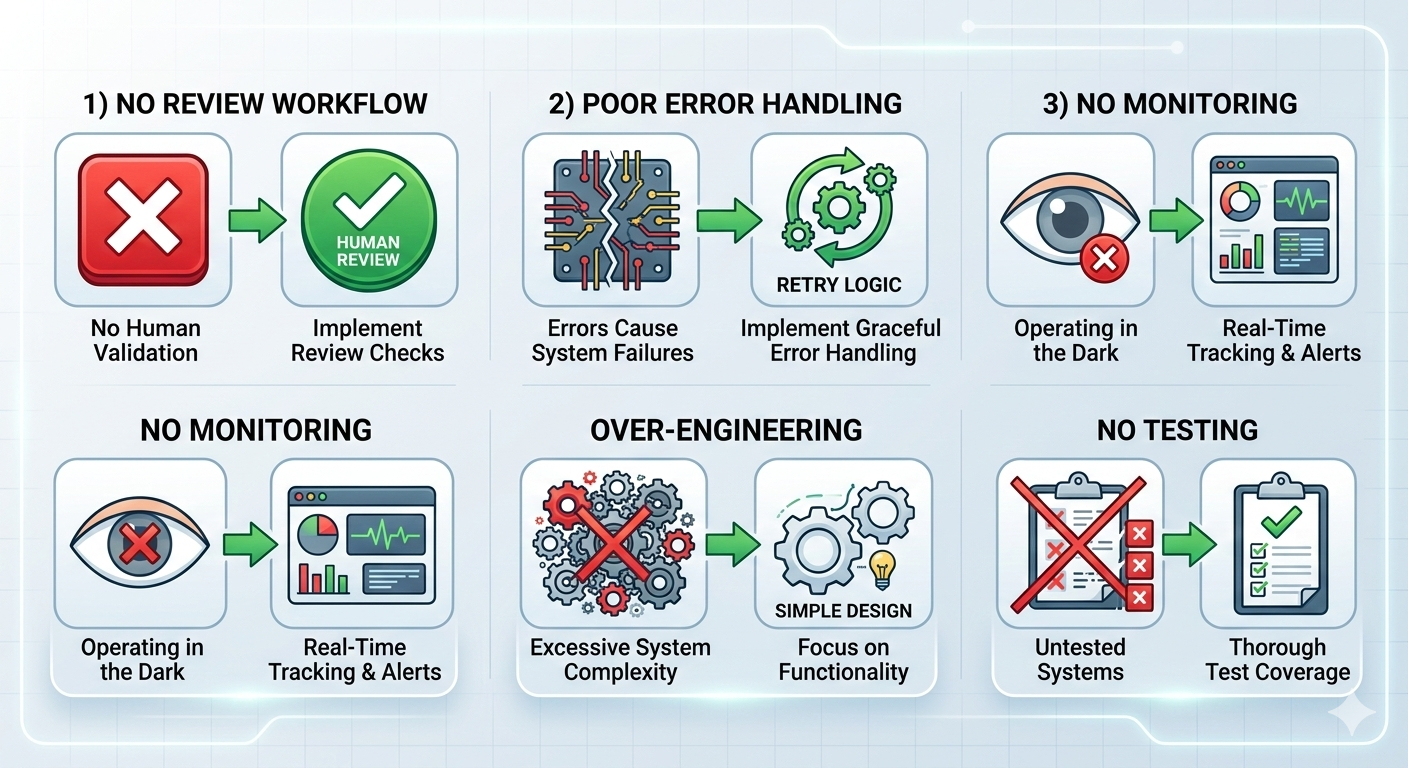
Mistake 1: No human review workflow
AI fails sometimes. Systems without human review workflow either accept all errors (bad) or route everything to manual review defeating automation purpose (also bad).
Melbourne insurance company built claims processing AI without review workflow. AI extracted claims data, wrote directly to claims system. No human validation.
Three months later, discovered AI had been consistently misreading claim amounts. Underpaid $180K in claims. Had to manually review six months of AI-processed claims and issue correction payments.
Rebuilt with confidence-based routing. High confidence claims still automated. Medium and low confidence flagged for review. Same efficiency, errors caught before payment.
Mistake 2: Insufficient error handling
AI services have rate limits, occasional timeouts, and service degradation. Systems must handle these gracefully.
Brisbane legal firm built document processing without retry logic. If Azure returned timeout or rate limit error, document processing failed silently. Lost documents, no notification.
Discovered months later when lawyer asked about missing contracts. Some contract analyses never completed, no error logged, no notification sent.
Rebuilt with exponential backoff retry, dead letter queue for failed documents, monitoring alerts for processing failures. No documents lost since implementation.
Mistake 3: Treating AI as deterministic
AI models return different results for identical inputs. This is normal AI behavior but breaks assumptions in traditional software.
Perth mining company built automated equipment categorization. Same equipment photo sometimes categorized differently depending on AI model state, random variation in processing.
Caused confusion when equipment appeared in different categories on different days. Operations team lost trust in system.
Fixed by implementing consistency checks - if same photo categorized within short timeframe, return cached result instead of re-processing. Added manual override allowing operations to lock in correct category.
Mistake 4: Inadequate monitoring
Can’t manage what you don’t measure. AI systems need monitoring for accuracy, processing times, costs, error rates.
Adelaide healthcare provider built clinical notes transcription. No monitoring of transcription accuracy or processing volumes.
Costs unexpectedly jumped from $200/month to $1,800/month. Investigation revealed doctors transcribing personal notes, family correspondence, even audiobooks using company AI system.
Added monitoring dashboards showing usage by user, cost trends, processing volumes. Implemented departmental quotas. Costs dropped to $300/month - actual clinical use plus some reasonable personal usage.
Mistake 5: Over-engineering AI complexity
Simpler solutions often work better than complex AI architectures.
Sydney legal firm wanted sophisticated contract analysis using GPT-4, custom models, multi-stage processing. Budget: $65K, timeline: 6 months.
I suggested starting simpler: pre-built Document Intelligence for data extraction, GPT-3.5 for basic summarization, human review for everything. Budget: $15K, timeline: 6 weeks.
They chose simple approach. In production three years now. Processes 2,000+ contracts annually. They never needed the complex architecture.
Start simple. Add complexity only when business requirements demand it.
Building Your First Production AI System
Practical approach based on what actually works:
Week 1-2: Scope and validate
Pick one specific process currently manual. Document what humans do, what data they extract, what decisions they make. Don’t try to automate everything - start with highest-value, lowest-complexity task.
Test with Azure AI services before committing to full implementation. Upload sample documents, see what pre-built models extract. If accuracy looks promising (>80%), continue. If accuracy poor, consider if custom model training would help or if AI isn’t right approach.
Melbourne accounting firm tested invoice processing:
- Uploaded 50 sample invoices to Document Intelligence pre-built invoice model
- Accuracy: 92% for structured invoices, 68% for complex invoices
- Decision: proceed with implementation, use custom model for complex invoice formats
- Two-week validation saved months of development on potentially unsuitable AI approach
Week 3-4: Build minimum viable automation
Implement basic processing pipeline: upload document, call AI service, store results, display for review. No complex error handling, no optimizations, no integration with business systems yet.
Goal: prove AI accuracy in real environment with real documents. Collect baseline metrics on accuracy, processing time, error types.
Brisbane logistics company built basic delivery confirmation processing:
- Week 3: upload delivery docs, call Document Intelligence, show results on screen
- Week 4: process 100 real delivery documents, measure accuracy
- Results: 88% high confidence, 10% medium confidence needing review, 2% failed entirely
- Validated AI could handle majority of documents before investing in full integration
Week 5-6: Add error handling and review workflow
Implement confidence scoring and routing. Build human review interface for medium-confidence results. Add retry logic and error monitoring.
Don’t build sophisticated review tools yet. Simple web form showing AI-extracted data next to source document is sufficient. Reviewer corrects errors, clicks approve.
Perth university built simple review interface:
- Display scanned enrollment form next to AI-extracted fields
- Reviewer corrects errors (usually just confirm data)
- Saves to database, marks document as reviewed
- 70% of documents needed zero corrections, review took under 30 seconds
- 25% needed minor corrections, average 90 seconds
- 5% needed significant work, average 8 minutes
- Average processing time: 1.5 minutes versus 15 minutes all-manual
Week 7-8: Integration with business systems
Connect AI processing to actual business applications. Start with simple integration - probably database writes or API calls.
Don’t over-engineer integration. Get data into business system using simplest approach that works. Optimize later if needed.
Adelaide healthcare provider integrated clinical notes:
- AI transcribes doctor dictation
- Writes transcription to specific field in electronic health records database
- Doctor reviews and saves note (same workflow as before, just pre-populated)
- Integration: 120 lines of Python writing to REST API
- Works reliably, processes 200+ clinical notes daily
Week 9+: Optimize and scale
Once basic system runs in production, gather real usage data. Identify bottlenecks, high-cost operations, common error patterns.
Optimize based on measured problems, not theoretical concerns. If processing is fast enough, don’t optimize speed. If costs are reasonable, don’t optimize costs. If accuracy is good enough, don’t retrain models.
Sydney insurance company ran claims processing three months before optimizing:
- Usage data showed 70% of API calls were identical repeated prompts
- Implemented prompt caching, reduced costs 65%
- Accuracy data showed specific claim types with low confidence
- Trained custom model for those claim types, improved accuracy 12%
- Both optimizations based on measured production data
Real ROI: What Success Actually Looks Like
Marketing promises transformative AI. Reality is more modest but still valuable.
Document processing ROI:
Melbourne logistics company:
- Manual processing: 8 FTE × $55K salary = $440K annually
- AI system: $18,500 build + $340/month Azure = $22,580 year one, $4,080 ongoing
- Staff reduction: 7 FTE redeployed to customer service (business growth area)
- Net annual savings: ~$385K year one, ~$436K ongoing
- ROI: 1.4 months payback period
Brisbane legal firm:
- Manual contract review: 200 hours/month paralegal time × $45/hour = $9,000/month
- AI system: $12,000 build + $180/month Azure = $14,160 year one, $2,160 ongoing
- Staff time saved: 60% = 120 hours/month = $5,400/month saved
- Net annual savings: ~$50,640 year one, ~$62,640 ongoing
- ROI: 2.5 months payback period
Workflow automation ROI:
Perth university enrollment processing:
- Manual processing: 2 FTE × $48K = $96K annually
- AI system: $8,500 build + $120/month Azure = $9,940 year one, $1,440 ongoing
- Staff reduction: 1.5 FTE redeployed to student support
- Net annual savings: ~$62,060 year one, ~$70,560 ongoing
- ROI: 1.8 months payback period
The pattern:
Typical production AI systems pay for themselves in 1-4 months. Ongoing costs trivial compared to labor savings. ROI comes from staff redeployment to higher-value work, not necessarily headcount reduction.
Key factors for strong ROI: high-volume repetitive process, clear success criteria, accurate AI models for your specific documents.
Summary: Building Production AI That Works
Key lessons from 40+ Azure AI implementations:
Start with business problem, not AI capability. Find manual process wasting significant time. Validate AI can handle it before committing to full build. Don’t implement AI looking for problems to solve.
Handle errors gracefully. Confidence scoring, human review workflows, retry logic, monitoring. These matter more than AI accuracy. Perfect AI doesn’t exist - build systems assuming AI makes mistakes.
Keep architecture simple. Three-tier pattern works for most use cases. Upload, process asynchronously, store results, integrate with business systems. Don’t over-engineer.
Optimize based on measurements. Production data reveals actual problems. Optimize costs if costs too high. Improve accuracy if accuracy insufficient. Don’t optimize theoretical concerns.
Expect 1-4 month ROI. Production AI systems typically pay for themselves quickly. If ROI longer than 6 months, reconsider if AI is right approach.
Australian data stays in Australia. Use Australia East region for Azure OpenAI and AI services. Meets data sovereignty requirements for most Australian businesses.
Want to explore AI automation for your business? I offer free 45-minute assessment calls where we review your manual processes and identify automation opportunities with realistic ROI projections.
No AI hype. No proof-of-concept demos. Just honest assessment of whether AI makes economic sense for your specific situation.