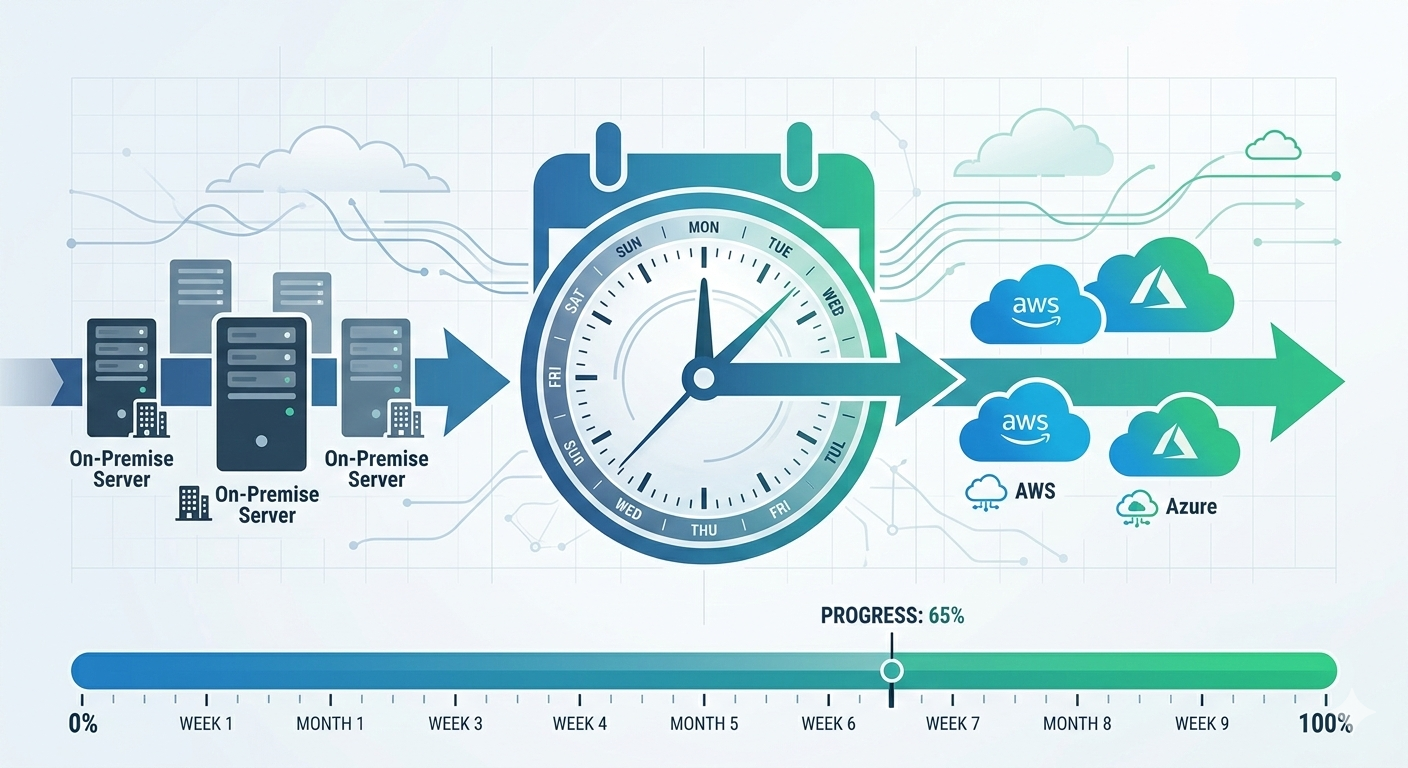
Brisbane retail company called me in January 2024. Their hosting provider was shutting down. They had six months to migrate everything to cloud.
“We need to move 40 servers, three databases, and our e-commerce platform to AWS. Can you do it in six months?”
I reviewed their environment. Simple lift-and-shift migration. Straightforward architecture. No major technical challenges.
My answer: “Yes, easily. We can complete this in 12-14 weeks.”
Their response: “Great, but we have six months. Should we wait to start?”
“No. Start now. You’ll need the buffer.”
They started immediately. Good thing too. Week four: discovered undocumented dependencies between systems. Week eight: compliance requirements for customer data needed architecture changes. Week twelve: testing revealed performance issues requiring optimization.
They went live week 18. Four weeks past my “easy” estimate. Still two months inside their deadline because they’d planned buffer time.
After 120+ cloud migrations since 2014, I’ve learned that migration timelines always expand. Technical work takes what it takes. Unexpected discoveries add time. Business requirements evolve during migration.
This guide covers realistic cloud migration timelines based on what actually happens, not vendor sales pitches or optimistic planning.
Migration Timeline Fundamentals
Cloud migrations don’t have single timeline. Duration depends on what you’re migrating and how you’re doing it.
Three primary migration strategies, three different timelines:
Lift-and-shift means moving existing servers to cloud VMs with minimal changes. Fastest approach. Typically 2-8 weeks per application depending on complexity. Works for applications that don’t need modernization immediately.
Melbourne legal firm migrated practice management system this way. Windows Server 2016, SQL Server 2017, existing application code unchanged. Discovery one week, migration two weeks, testing one week. Four weeks total, in production.
Re-platform involves some optimization without full redesign. Move to managed databases, implement auto-scaling, update configurations for cloud. Moderate timeline. Typically 6-12 weeks per application. Better cloud economics than lift-and-shift but more implementation work.
Sydney logistics company re-platformed their warehouse management system. Migrated application to Azure App Service, moved database to Azure SQL Database managed service, implemented Redis cache. Discovery two weeks, architecture design two weeks, implementation six weeks, testing two weeks. Twelve weeks total.
Re-architect means redesigning applications for cloud-native patterns. Microservices, serverless, containers. Longest timeline. Typically 3-6 months per application, sometimes longer for complex systems. Best long-term outcome but significant upfront investment.
Perth mining company rebuilt field data collection system. Microservices architecture on AWS ECS, serverless data processing with Lambda, API Gateway for mobile apps. Discovery four weeks, architecture design six weeks, development twelve weeks, testing four weeks. Twenty-six weeks total.
Single application versus full environment:
Timeline for one application: clear scope, focused work, predictable schedule. Add applications linearly or parallelize if you have resources.
Adelaide healthcare provider migrated patient management system. Single application, re-platform strategy. Twelve weeks start to finish.
Timeline for entire datacenter: dependencies between systems, shared infrastructure, coordination complexity. Can’t simply multiply single-application timeline by number of applications.
Brisbane manufacturing company migrated entire environment. Forty servers, twelve applications, shared networking and security. Could have done each application in 4-6 weeks individually. Full migration took thirty-six weeks because applications depended on each other, network infrastructure needed careful planning, security controls applied across entire environment.
Phase 1: Discovery and Assessment (2-6 Weeks)
Discovery determines what you’re migrating and identifies potential problems before they become expensive surprises.
What discovery actually involves:
Inventory all servers, applications, databases, storage. Document configurations, dependencies, integrations. Identify compliance requirements, security controls, performance baselines.
For small environments (under 10 servers): one to two weeks. Manual inventory acceptable, limited dependencies to trace.
For medium environments (10-50 servers): two to four weeks. Automated discovery tools help, dependency mapping becomes important.
For large environments (50+ servers): four to six weeks. Automated tools essential, complex dependency mapping required, compliance considerations multiply.
Common discovery findings that extend timelines:
Undocumented dependencies appear frequently. Application talks to database everyone knows about plus three other databases nobody documented. Migration plan assumed single database, actual migration requires four databases moved together.
Melbourne financial services discovered during assessment their loan processing application connected to seven databases, not two documented. Changed migration from two-week timeline to six-week timeline because all databases needed migration coordination.
Compliance requirements emerge during discovery. Business didn’t mention they store customer credit card data. PCI DSS compliance requirements change architecture significantly.
Sydney retail company discovered during discovery they needed PCI DSS compliant environment. Added four weeks to timeline for compliant architecture design and implementation.
Technical debt surfaces during assessment. Server running unsupported OS version, application using deprecated libraries, custom configurations nobody remembers why they exist.
Brisbane logistics found warehouse management system running on Windows Server 2008 with custom DLL nobody could explain. Had to recompile application for modern OS, extended migration by three weeks for testing.
Discovery outputs driving timeline:
Detailed inventory document: every server, every application, every dependency. This becomes migration execution plan.
Risk assessment: technical risks, business risks, compliance risks. Each risk might add time to timeline as mitigation strategies implemented.
Effort estimate: based on actual discovered complexity, not assumptions. This is realistic timeline businesses should plan to.
Perth mining company’s discovery revealed twice the server count initially estimated (40 actual versus 20 assumed), undocumented Oracle RAC cluster, and data sovereignty requirements. Initial timeline estimate: six weeks. Revised timeline after discovery: eighteen weeks. Discovery saved them from committing to impossible timeline.
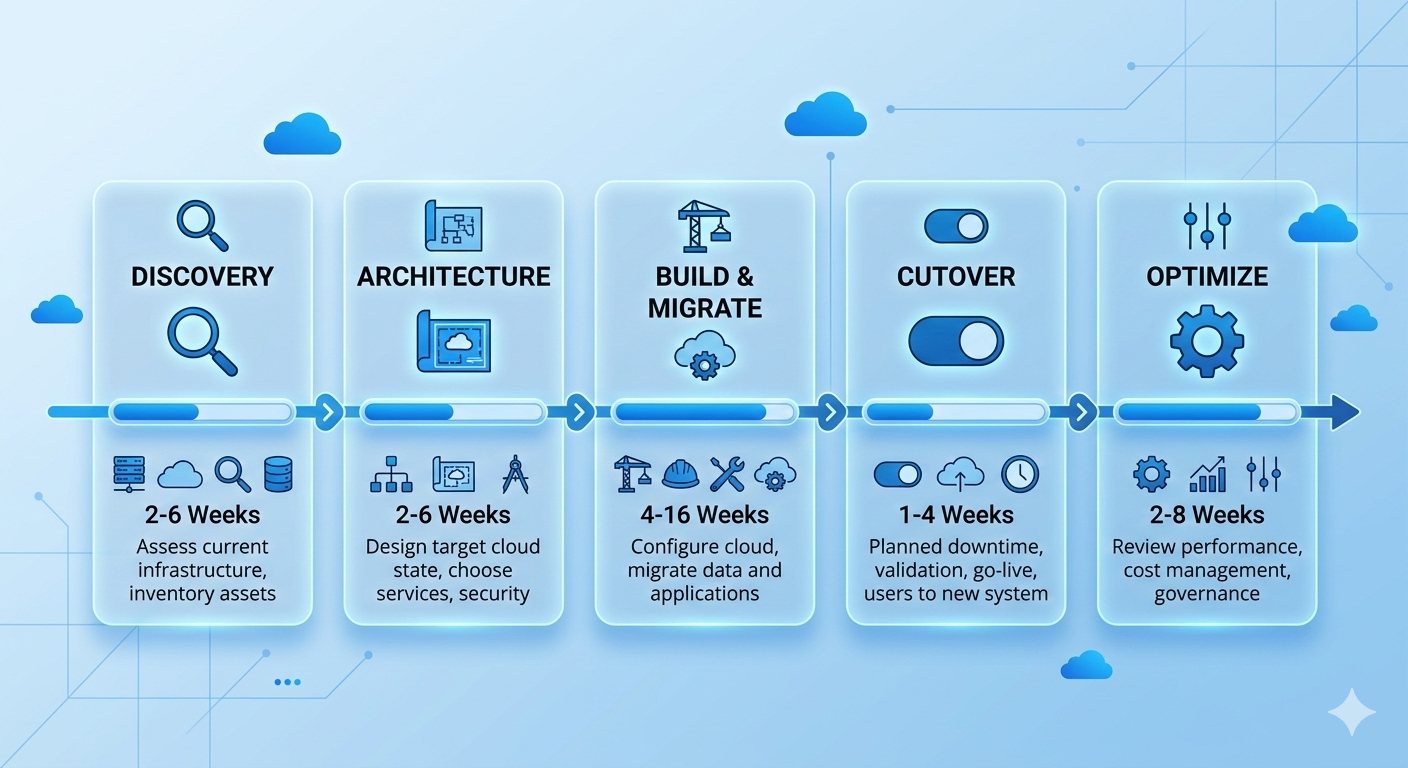
Phase 2: Architecture and Planning (2-6 Weeks)
Designing cloud architecture and migration approach determines how everything will work in cloud.
Architecture design considerations affecting timeline:
Simple lift-and-shift architecture: minimal design work. Map on-premise infrastructure to equivalent cloud resources. One to two weeks for straightforward environments.
Adelaide accounting firm migrated three servers to Azure. Standard VMs, standard networking, standard storage. Architecture design: four days. Simple spreadsheet mapping on-premise to Azure resources.
Re-platform architecture: moderate design work. Choose managed services, design auto-scaling, plan performance optimization. Two to four weeks depending on application complexity.
Melbourne healthcare provider re-platformed patient system. Chose Azure SQL Database managed service instead of SQL Server on VMs, implemented App Service for web tier, designed backup and DR strategy. Architecture design: three weeks.
Cloud-native re-architecture: significant design work. Microservices decomposition, serverless functions, event-driven patterns, container orchestration. Four to six weeks minimum, sometimes longer for complex applications.
Sydney e-commerce company redesigned order processing system. Microservices architecture, AWS Lambda for order processing, DynamoDB for state management, SQS for event queuing. Architecture design: seven weeks. Included multiple design iterations and proof-of-concept testing.
Planning activities extending timeline:
Migration runbook creation takes time but prevents problems during actual migration. Step-by-step procedures, rollback plans, validation checkpoints. For simple migrations: one week. For complex migrations: two to three weeks.
Test environment planning often overlooked. Need test environment matching production for migration rehearsal. Setting up test environment adds one to two weeks before starting actual migration work.
Cutover planning for production switch requires careful scheduling. Coordinate with business users, plan for outages or minimal downtime approach, prepare rollback procedures. Simple cutover planning: three to five days. Complex zero-downtime cutover: two to three weeks planning.
Brisbane retail company planned zero-downtime migration for e-commerce platform. Required database replication strategy, DNS cutover planning, session state migration approach, rollback procedures. Cutover planning alone: twelve days. But actual cutover executed smoothly with zero customer-facing downtime.
Phase 3: Build and Migration (4-16 Weeks)
Actually building cloud environment and migrating applications is bulk of migration timeline.
Infrastructure setup timing:
Basic infrastructure (networking, security, monitoring): one to two weeks for standard configurations. Set up VPCs or VNets, configure firewalls, implement monitoring, establish connectivity to on-premise environment.
Advanced infrastructure (multiple regions, complex networking, hybrid connectivity): three to four weeks. Express Route or Direct Connect takes time to provision. Multi-region configurations require careful planning.
Perth mining company implemented hybrid connectivity between on-premise datacenter and AWS. Express Route provisioning from Telstra: three weeks. Network configuration and testing: one week. Total infrastructure setup: four weeks.
Application migration execution:
Per application lift-and-shift: one to three weeks. Server replication to cloud, validation testing, minor configuration adjustments.
Per application re-platform: three to eight weeks. Database migration to managed services, application deployment to PaaS, integration testing, performance optimization.
Per application re-architecture: eight to twenty weeks. Application redesign, new code development, comprehensive testing, integration validation.
Parallel versus sequential migration:
Sequential migration handles one application at a time. Simpler, less coordination, easier rollback. Takes longer overall but lower risk.
Melbourne professional services migrated applications sequentially. Sixteen applications, average four weeks each. Total timeline: sixteen months if strictly sequential. Actually completed in ten months using limited parallelization (two applications simultaneously when dependencies allowed).
Parallel migration handles multiple applications simultaneously. Faster overall but requires more resources, increases coordination complexity, higher risk of issues.
Sydney logistics migrated twelve applications in parallel batches. Four applications per batch, three batches total. Each batch: eight weeks. Total timeline: twenty-four weeks instead of ninety-six weeks if sequential. Required larger team and careful dependency management.
Common factors adding time during migration:
Data volume affects migration duration significantly. Small databases (under 100GB): hours to migrate. Large databases (multi-TB): days to weeks for initial migration plus ongoing replication during cutover.
Adelaide healthcare provider migrated 8TB patient records database. Initial database copy: four days. Delta replication setup: two days. Testing and validation: three days. Total database migration: nine days of the three-week application migration timeline.
Application configuration complexity creates unforeseen delays. Simple applications with standard configurations: minimal adjustment. Complex applications with custom settings, environment variables, integration points: significant troubleshooting time.
Brisbane manufacturing discovered application relied on specific server hostname and IP address hardcoded in dozens of configuration files. Required finding and updating all references before application worked in cloud. Added one week to migration timeline.
Testing and validation often takes longer than planned. Functional testing finds issues needing fixes. Performance testing reveals optimization requirements. Security testing identifies configuration problems.
Perth university planned one-week testing for student management system. Testing discovered performance issues under load, security misconfiguration allowing excessive permissions, integration problem with identity provider. Extended testing and fixes to four weeks.
Phase 4: Cutover and Go-Live (1-4 Weeks)
Final cutover moves production traffic to cloud and completes migration.
Cutover approach affects timeline:
Simple cutover with downtime takes shortest time but requires maintenance window. Schedule downtime, migrate final data, switch DNS, validate, bring online. Typically one to three days.
Melbourne accounting firm migrated after business hours. Friday 6pm: stop on-premise application. Migrate final database changes. Update DNS. Validate in cloud. Monday 6am: users back online. Total downtime: 60 hours. Users barely noticed (weekend downtime).
Zero-downtime cutover takes longer to plan and execute but avoids business interruption. Database replication, gradual traffic shifting, validation in parallel. Planning two to three weeks, execution three to seven days.
Sydney e-commerce company couldn’t afford downtime during peak season. Implemented database replication to cloud. Gradually shifted traffic using weighted DNS. Monitored for issues. Complete cutover over five-day period with zero customer-facing downtime. Planning and execution: four weeks total.
Phased cutover moves different user groups or functions gradually. Pilot group first, broader rollout next, complete migration last. Lowest risk but longest timeline. Typically two to four weeks.
Brisbane healthcare provider migrated clinic-by-clinic. Five clinics, one per week. Allowed fixing issues in early clinics before affecting later ones. Total cutover: six weeks. But issues discovered in first clinic prevented problems in remaining four clinics.
Post-cutover validation and stabilization:
First week post-cutover typically reveals minor issues. Performance tuning needed, configuration adjustments required, user training gaps filled.
Adelaide legal firm experienced slow query performance first week after migration. Database statistics needed rebuilding, indexes required optimization, query cache needed proper configuration. Performance issues resolved by day five, users satisfied by week two.
Plan for two to four weeks stabilization period after cutover. Don’t schedule another major project immediately after migration. Leave buffer time for addressing issues.
Rollback planning:
Every cutover needs rollback plan. If major problems emerge, can you switch back to on-premise? How quickly?
Perth mining company maintained on-premise environment running for two weeks after cloud cutover. If serious issues emerged, could switch back to on-premise within hours. No issues emerged, decommissioned on-premise environment after two-week safety period.
Rollback capability affects timeline. Maintaining parallel environments during cutover period adds cost but provides insurance against problems.
Phase 5: Optimization and Decommission (2-8 Weeks)
Migration isn’t complete when applications run in cloud. Optimization and cleanup complete the project.
Cloud optimization post-migration:
Right-sizing VMs based on actual usage typically saves 20-40% of costs. Initial migration often over-provisions resources conservatively. Monitor actual usage first month, adjust sizing based on reality.
Melbourne logistics company initially provisioned all VMs with 16GB RAM matching on-premise servers. After monitoring, discovered most applications used 6-8GB. Downsized VMs, reduced costs 35%.
Implementing auto-scaling where appropriate improves both cost and performance. Applications with variable load benefit from scaling up during peaks, scaling down during quiet periods.
Sydney retail company implemented auto-scaling for e-commerce platform after migration. Peak shopping hours: eight instances. Night time: two instances. Average daily cost reduced 45% while handling peak loads better.
Storage optimization moves infrequently accessed data to cheaper storage tiers. Immediately after migration, everything typically in standard storage. Reviewing access patterns identifies data suitable for cool or archive storage.
Brisbane healthcare provider moved historical patient records (older than 7 years) to Azure Cool Storage after three months in cloud. Reduced storage costs 60% for historical data while maintaining required 15-year retention.
On-premise decommissioning:
Don’t rush to decommission on-premise environment. Maintain for at least one month after successful cutover, ideally two to three months.
Adelaide accounting firm kept on-premise servers running two months post-migration. Discovered month six that they needed archived emails from old system. Still had servers running, could retrieve needed data. Decommissioned after three months when confident no data gaps existed.
Decommissioning activities: backup all data, document any needed archival, return leased equipment, cancel contracts, properly wipe drives. Typically one to two weeks spread over month or two.
Knowledge transfer and documentation:
Updating documentation for cloud environment takes time but prevents future problems. Network diagrams, runbooks, disaster recovery procedures, security documentation all need updates reflecting cloud reality.
Perth university spent three weeks post-migration updating IT documentation. Investment paid off when new IT staff joined - proper documentation accelerated onboarding significantly.
Training IT staff on cloud operations extends timeline but necessary for ongoing success. Azure or AWS training, cloud monitoring tools, cost management, security best practices. Budget one to two weeks for training activities.
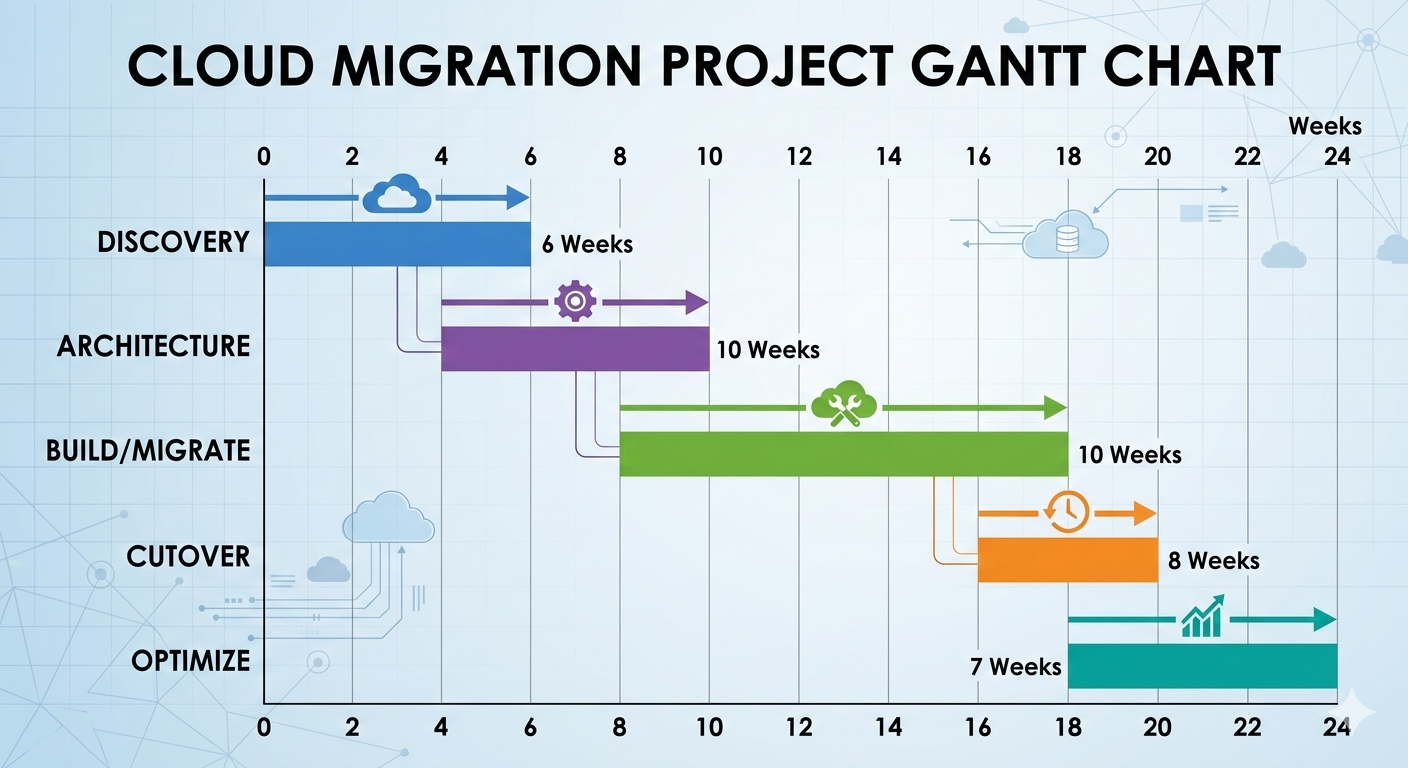
Real Migration Timeline Examples
Actual timelines from recent migrations showing what’s realistic:
Small business (3 servers, simple applications):
Melbourne dental practice:
- Discovery: 1 week
- Planning: 1 week
- Build and migrate: 3 weeks
- Cutover: 3 days
- Optimization: 2 weeks
- Total: 8 weeks
Medium business (20 servers, moderate complexity):
Brisbane logistics company:
- Discovery: 3 weeks
- Planning: 3 weeks
- Build and migrate: 10 weeks
- Cutover: 1 week
- Optimization: 4 weeks
- Total: 21 weeks (5 months)
Large business (50+ servers, complex applications):
Sydney financial services:
- Discovery: 5 weeks
- Planning: 6 weeks
- Build and migrate: 28 weeks (parallel migration)
- Cutover: 3 weeks (phased approach)
- Optimization: 8 weeks
- Total: 50 weeks (12 months)
Enterprise (100+ servers, mission-critical applications):
Perth mining company:
- Discovery: 8 weeks
- Planning: 8 weeks
- Build and migrate: 48 weeks (phased batches)
- Cutover: 8 weeks (gradual rollout)
- Optimization: 12 weeks
- Total: 84 weeks (20 months)
Common Timeline Killers
Things that extend migration timelines beyond original estimates:
Undiscovered dependencies add weeks when found late. System talks to database not in original scope. Migration can’t complete until dependency addressed.
Prevention: thorough discovery phase with automated dependency mapping. Budget 20% timeline buffer for unexpected dependencies.
Scope creep during migration extends timeline when businesses request additional changes. “Since we’re migrating, can we also upgrade to latest version?” Reasonable request, adds weeks to timeline.
Prevention: clear scope definition upfront. Separate migration project from enhancement projects. Complete migration first, enhancements second.
Vendor delays for connectivity, licensing, or third-party services add time outside your control. Express Route provisioning, software license transfers, third-party API access.
Prevention: identify vendor dependencies early. Start vendor processes before actual migration work. Build vendor delays into timeline estimates.
Testing discovering issues extends timeline when problems found late. Performance issues, security gaps, functionality problems.
Prevention: test early and often. Don’t leave all testing until end. Incremental testing catches issues when easier to fix.
Staff availability affects timeline when key people unavailable. Subject matter experts on vacation, developers busy with production issues, business users unavailable for testing.
Prevention: confirm availability before committing to timeline. Build staff availability assumptions into project plan. Have backup contacts for critical knowledge.
Building Realistic Timeline Estimates
How to create accurate migration timeline for your environment:
Start with baseline estimates:
Simple lift-and-shift application: 2-4 weeks
Re-platform application: 6-12 weeks
Re-architect application: 12-24 weeks
Multiply by number of applications, then adjust for:
Complexity multipliers:
Legacy applications (10+ years old): add 40% time Applications with external integrations: add 30% time Applications with compliance requirements: add 30% time Large databases (>1TB): add 25% time
Parallelization factors:
If migrating sequentially: add timelines linearly If migrating in parallel: 60-70% of linear timeline with adequate resources Don’t assume perfect parallelization - dependencies limit parallel work
Buffer time:
Add 25-35% buffer for unexpected issues on top of technical estimates. Not padding, realistic buffer for unknowns discovered during project.
Adelaide healthcare provider estimated 12 weeks technical work for patient system migration. Added 4 weeks buffer (33%). Actual timeline: 15 weeks. Buffer absorbed unforeseen issues without missing deadline.
Summary: Planning Migration Timeline That Works
Key principles for realistic cloud migration timelines:
Invest in thorough discovery. Two weeks extra in discovery saves months of problems during migration. Don’t rush assessment phase.
Plan for reality, not best case. Technical estimates are minimums. Real projects encounter issues. Buffer time isn’t waste, it’s insurance.
Start earlier than you think necessary. Business deadlines don’t move. Technical timelines do. Extra time at start provides flexibility later.
Test incrementally, not at end. Waiting until end to test finds problems when expensive to fix. Test as you go.
Communicate timeline honestly. Stakeholders need realistic expectations. Optimistic timeline followed by delays worse than conservative timeline achieved successfully.
Don’t rush cutover. Getting to 90% complete is different from actual production cutover. Final 10% deserves adequate time.
Most importantly: cloud migration timeline depends entirely on what you’re migrating and how you’re doing it. Simple migrations complete in weeks. Complex migrations take months. Realistic planning based on actual complexity beats optimistic promises every time.
Need help estimating timeline for your cloud migration? I offer free 45-minute assessment calls where we review your environment and provide realistic timeline estimates based on actual migration complexity.
No sales pressure. No unrealistic promises. Just honest assessment of how long your migration will actually take.