Power Platform gets dismissed as “toys for IT departments” or “not real development.” I’ve heard this from CTOs, IT managers, even developers who should know better.
Then I show them what a Melbourne accounting firm built in three weeks: an entire client onboarding system that replaced five manual processes, cut onboarding time from 8 days to 2, and cost $4,200 to implement. Try doing that with custom .NET development.
After implementing Power Platform solutions for 40+ Australian businesses over the past six years, I’ve seen it transform operations for companies that can’t justify (or wait for) custom development. The key is understanding what it’s actually good for versus where you need real code.
This guide covers everything you need to know about Power Platform for business automation - when it works, when it doesn’t, what it actually costs, and how to avoid the mistakes that sink most implementations.
What Is Microsoft Power Platform? (The Real Answer)
Microsoft markets Power Platform as “low-code tools for citizen developers.” That’s partially true and mostly misleading.
Here’s what it actually is:
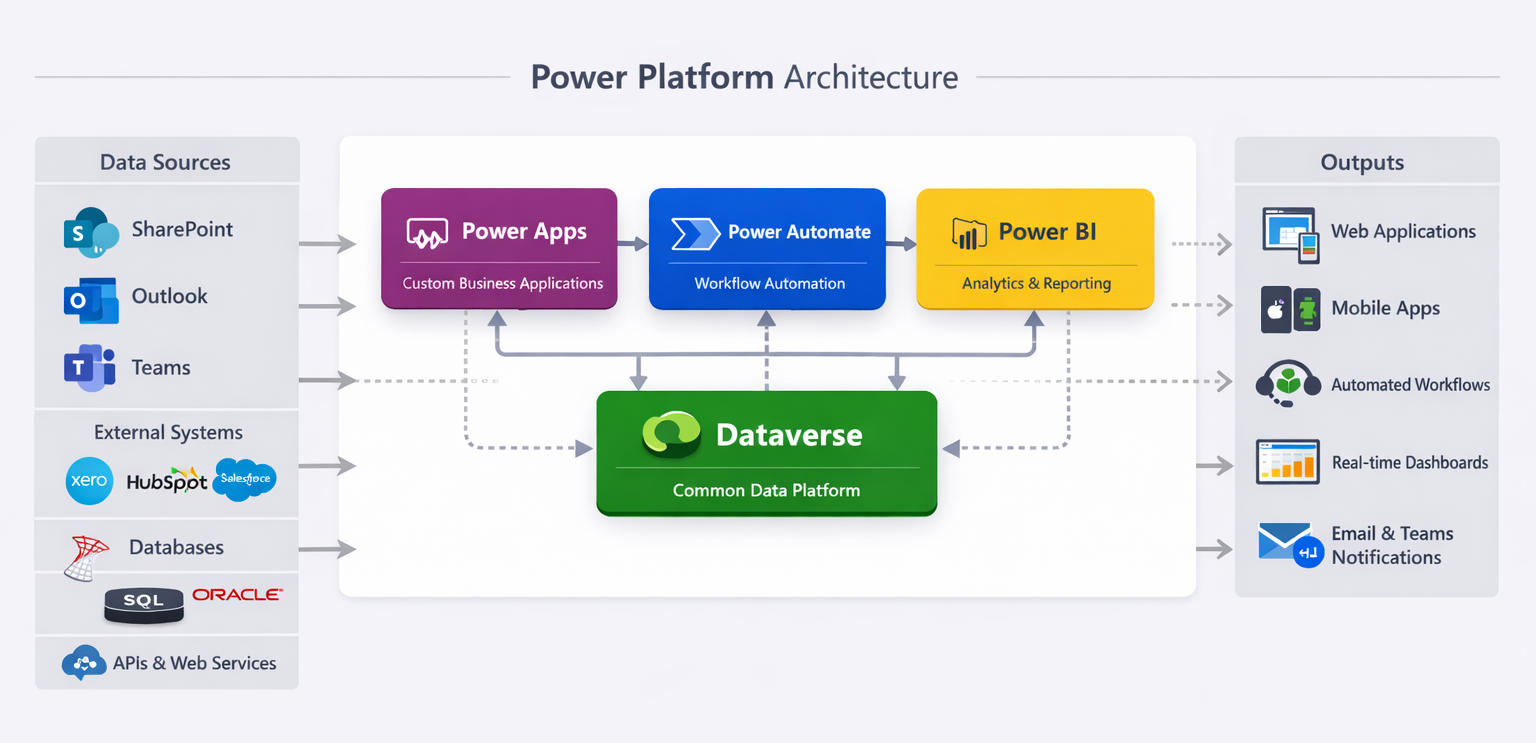
A suite of four integrated tools that let you automate business processes and build business applications without writing traditional code:
- Power Apps - Build custom business applications (web and mobile)
- Power Automate - Automate workflows and integrate systems
- Power BI - Create dashboards and reports
- Dataverse - Database that ties everything together
Think of it as a productivity layer on top of Microsoft 365 that connects to your other systems.
What makes it different from traditional development:
- Visual designer instead of code files
- Built-in connectors to 400+ services (Xero, HubSpot, SharePoint, SQL Server)
- Deploys instantly (no servers, no DevOps pipelines)
- Works seamlessly with Microsoft 365 (Outlook, Teams, SharePoint)
- Costs are predictable (per-user licensing vs. unpredictable dev hours)
The honest trade-off:
You give up some flexibility and control. In return, you get speed and lower cost for specific types of business applications.
When Power Platform Makes Sense (And When It Doesn’t)
Most businesses approach this backwards. They ask “Can Power Platform do X?” when they should ask “Is X the right problem for Power Platform?”
Perfect Use Cases (Where I’ve Seen 5-10X ROI):
1. Replacing Manual Data Entry and Spreadsheets
Melbourne professional services firm - 35 staff. They were managing project timesheets in Excel, manually emailing them to accounts every Friday, then re-entering into their accounting system.
Built a Power App for timesheet entry, Power Automate to sync with Xero automatically. Project cost: $3,800. Time saved: 6 hours per week. ROI hit in 8 weeks.
2. Connecting Systems That Don’t Talk to Each Other
Brisbane logistics company had three systems: WMS for warehouse, TMS for transport, accounting in MYOB. Manually reconciling invoices between all three daily.
Power Automate flows now sync data between systems automatically. Reconciliation went from 90 minutes daily to 10 minutes weekly review. Cost: $5,200. ROI: 12 weeks.
3. Standardizing Business Processes Across Teams
Healthcare provider (120 staff) with inconsistent patient intake across five clinics. Each clinic used different forms, different approval processes.
Single Power App deployed to all clinics. Standardized data capture, automated approvals, fed directly into their practice management system. Compliance improved, data quality up 40%.
4. Creating Custom Apps When Budget/Timeline Don’t Support Full Development
Civil construction firm needed equipment booking system. Custom .NET solution quoted at $45K, 16 weeks. Power Apps solution cost $8,500, delivered in 5 weeks.
Does it have every feature the custom solution would have? No. Does it solve the business problem? Completely.
Where Power Platform Struggles (Don’t Use It For):
Complex Business Logic
If your workflow has 15+ conditional branches or complex calculations, you’ll hit limits fast. I’ve seen businesses try to build inventory management systems in Power Apps. It technically works but becomes unmaintainable.
High-Volume Transaction Processing
Power Platform has API call limits. Brisbane manufacturer tried using it for real-time production tracking (500+ updates per hour). Hit limits immediately, had to rebuild in .NET.
Customer-Facing Public Applications
Power Apps requires user licenses. You can’t build a public-facing customer portal unless you want to buy licenses for every customer (you don’t).
Mission-Critical Systems Requiring Absolute Control
If downtime costs you $10K per hour, you want infrastructure you control completely. Power Platform is managed by Microsoft - when they have issues, you wait.
Complex UI/UX Requirements
Power Apps gives you decent-looking business applications. It doesn’t give you pixel-perfect custom designs. If your brand team has strong opinions about every button color, this isn’t the tool.
The Four Components Explained (What They Actually Do)
Power Apps: Building Custom Business Applications
Think “create a database-backed application without coding.” Not “build anything you can imagine.”
Two types of Power Apps:
Canvas Apps - Start with blank canvas, drag components onto it. Like building a PowerPoint presentation that connects to data. Good for mobile apps, simple data entry, specific workflows.
Model-Driven Apps - Start with your data model, app generates automatically based on tables and relationships. Good for complex data management, CRM-like applications.
Real example - Client Onboarding App:
Melbourne accounting firm, built in 3 weeks:
- New client fills form on iPad during first meeting
- Data saves to Dataverse automatically
- Power Automate triggers:
- Creates client in Xero
- Sends welcome email with document checklist
- Creates tasks in Planner for onboarding team
- Schedules follow-up in Outlook
All connected through built-in connectors. No API integration code needed.
Power Automate: Workflow Automation
“If this happens, do that” at enterprise scale.
Three main capabilities:
- Cloud Flows - Automated workflows triggered by events (new email, form submission, schedule)
- Desktop Flows - Robotic Process Automation (RPA) for legacy systems without APIs
- Process Mining - Analyze existing processes to find automation opportunities
Real example - Invoice Processing:
Brisbane logistics company processes 200+ supplier invoices monthly:
Before:
- Email arrives → manual download → data entry into accounting system → file in SharePoint → email approval → manual payment processing
- Time: 15 minutes per invoice = 50 hours monthly
After Power Automate:
- Email arrives → attachment auto-saved to SharePoint → OCR extracts data → creates draft invoice in accounting system → sends for approval in Teams → approved invoices auto-scheduled for payment
- Time: 2 minutes review per invoice = 6.5 hours monthly
Flow cost to build: $2,800. Monthly savings: 43.5 hours @ $45/hour = $1,957. ROI: 6 weeks.
Power BI: Analytics and Reporting
If you’ve ever thought “I wish I could see our data in one place instead of six different spreadsheets,” Power BI solves this.
What it connects to:
- Excel, SharePoint Lists, SQL databases, Azure services
- Xero, MYOB, HubSpot, Salesforce (400+ connectors)
- Your Power Apps and Dataverse data
Real example - Operations Dashboard:
Civil construction company with project data scattered across:
- Financial data in Xero
- Project schedules in MS Project
- Equipment tracking in SharePoint
- Site photos in OneDrive
Power BI dashboard now shows:
- Real-time project profitability
- Equipment utilization rates
- Schedule adherence by site
- Cost trending week-over-week
Project manager checks dashboard every Monday morning instead of assembling data from five sources. Preparation time: 4 hours → 15 minutes.
Dataverse: The Foundation That Makes It All Work
This is the part most people ignore until they need it.
What is Dataverse?
A cloud database that’s pre-integrated with Power Platform. Think “SQL Server that Power Apps and Power Automate already know how to talk to.”
Why it matters:
Without Dataverse, your data lives in SharePoint lists or Excel files. Fine for simple apps. Falls apart when you need:
- Relationships between tables (customers → projects → invoices)
- Role-based security (sales sees leads, finance sees billing)
- Audit trails and compliance
- Complex data validations
When you need Dataverse:
Melbourne healthcare provider tried building patient management in SharePoint. Worked fine for 2 clinics. At 5 clinics with 15K patient records, SharePoint performance died.
Migrated to Dataverse: immediate performance improvement, proper security model, full audit trail for compliance.
Cost reality:
Dataverse requires premium Power Apps licenses ($14 USD per user/month vs. $5 for standard). But trying to scale without it costs more in workarounds and performance issues.
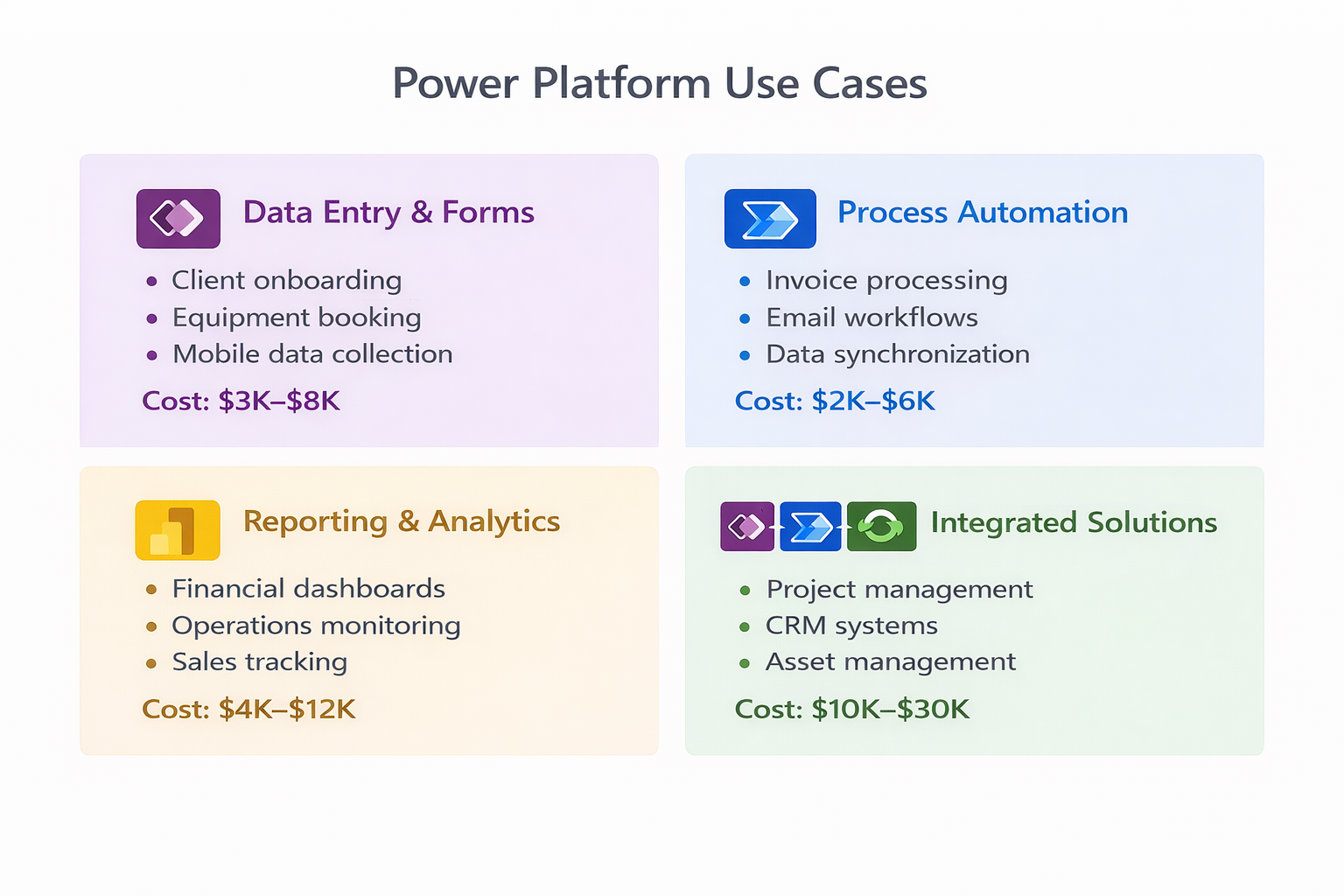
What Power Platform Actually Costs (Australian Pricing 2025)
Microsoft’s pricing page makes this unnecessarily complicated. Here’s what you actually pay:
Licensing Options:
Per-User Plans:
-
Power Apps per user - $14 USD/user/month
- Unlimited Power Apps access
- Limited Power Automate flows (2,000 runs/month)
- No Dataverse included (uses SharePoint)
-
Power Apps per user with Dataverse - $35 USD/user/month
- Everything in per-user plan
- 250MB Dataverse storage per user
- 2GB file storage per user
-
Microsoft 365 E3/E5 - Includes basic Power Platform
- Already have this? You can build simple apps at no extra cost
- Limited to SharePoint as data source
- Limited automation runs
-
Power Automate per user - $24 USD/user/month
- Unlimited cloud flows
- Limited desktop flows (attended RPA only)
Per-App Plans:
Power Apps per app - $7 USD/user/month
- Access to ONE specific app only
- Good for large user bases using single application
- Example: 100 field workers using equipment booking app
Real Cost Examples:
Example 1: Simple Data Entry App (No Dataverse)
Melbourne accounting firm, 12 users:
- Built custom client onboarding app
- Data stored in SharePoint
- License cost: $0 (included in Microsoft 365 E3 they already had)
- Development cost: $4,200 (3 weeks part-time)
- Total year 1: $4,200
Example 2: Process Automation (Power Automate)
Brisbane logistics, 25 users:
- Invoice processing automation
- Document approval workflows
- Email notifications
- License cost: 5 admin users × $24/month = $120/month = $1,440/year
- Development cost: $2,800
- Total year 1: $4,240
- Ongoing years: $1,440/year
Example 3: Integrated Solution (Apps + Automate + Dataverse)
Healthcare provider, 45 users:
- Patient intake app
- Automated appointment reminders
- Compliance reporting dashboard
- License cost: 45 users × $35/month = $1,575/month = $18,900/year
- Development cost: $15,000
- Total year 1: $33,900
- Ongoing years: $18,900/year
Hidden Costs to Watch:
Dataverse Storage Overages
- Included: 250MB per user
- Additional: $60 USD per GB/month
- Brisbane manufacturer hit 50GB storage, paying $3K/month extra
API Call Limits
- Power Automate has daily limits per user
- High-volume automations can hit limits
- Premium connectors add cost ($100-$200/month per connector)
Desktop Flow (RPA) Licenses
- Attended RPA: $24/user/month
- Unattended RPA: $240/bot/month
- Melbourne firm automated legacy system interaction, needed 3 unattended bots = $720/month
Development and Maintenance
- Initial build: $2K-$30K depending on complexity
- Ongoing changes: Budget 10-15% of build cost annually
- Internal training: 4-8 hours per power user
Common Implementation Mistakes (And How to Avoid Them)
I’ve debugged 20+ failed Power Platform projects. Same mistakes every time.
Mistake 1: Building Without Understanding the Business Process
What happened:
Melbourne professional services firm hired a contractor to “build a project management app in Power Apps.”
Contractor built what was asked for. Launched to 40 users. Nobody used it.
Why? It didn’t match how they actually worked. Required more clicks than their spreadsheet. Missed critical workflow steps.
The fix:
Spend 1-2 weeks mapping the actual process first:
- Shadow people doing the work
- Document every step, every decision point
- Identify pain points (where errors happen, where time is wasted)
- THEN design the app around real workflow
My approach:
First week is always discovery:
- Interview 3-5 people who do the work daily
- Watch them work for 2-4 hours
- Map process on whiteboard
- Identify top 3 pain points
- Prototype solution on paper before touching Power Apps
Mistake 2: Treating It Like Custom Development
What happened:
Brisbane logistics company wanted “full featured TMS replacement” in Power Apps. Spec’d 40+ features, complex reporting, integrations with 6 systems.
Four months in, project was 60% over budget, app performed poorly, team was frustrated.
The problem:
Power Platform isn’t for building complex enterprise systems from scratch. It’s for connecting existing systems and automating processes between them.
The fix:
Start with minimum viable automation:
- Pick ONE process that wastes the most time
- Build THAT in 2-4 weeks
- Get people using it
- Add features based on real usage
- Stop trying to replace enterprise systems
Better approach:
Brisbane company pivoted:
- Kept TMS for core transport management
- Built Power Apps for driver assignments (pain point #1)
- Power Automate syncs data between systems
- Delivered in 3 weeks, under budget
- Now looking at phase 2
Mistake 3: Skipping Governance and Standards
What happened:
Melbourne healthcare provider gave 15 people Power Apps licenses. “Let’s empower citizen developers!”
Six months later:
- 23 apps built, 8 still in use
- No naming conventions
- No documentation
- No one knows what half the apps do
- Security concerns (patient data in unsecured apps)
The fix:
Set up governance BEFORE rolling out widely:
-
Environment strategy
- Dev environment for testing
- Test environment for UAT
- Production for live apps
- Don’t let people build directly in production
-
Naming conventions
- Apps:
[Department]-[Purpose]-App(e.g., HR-Onboarding-App) - Flows:
[Trigger]-[Action]-[System](e.g., EmailReceived-CreateTask-Planner)
- Apps:
-
Documentation requirements
- Business purpose
- Data connections
- Key users
- Maintenance contact
-
Security review
- Data Loss Prevention policies
- Connector restrictions
- Regular access reviews
-
Center of Excellence (CoE)
- 2-3 people own Power Platform
- Review new apps before production
- Provide templates and training
- Monitor usage and performance
Mistake 4: Underestimating Data Model Complexity
What happened:
Civil construction company built equipment tracking app. Started simple: equipment list, booking calendar.
Then they needed:
- Maintenance schedules
- Service history
- Cost tracking per piece of equipment
- Availability based on maintenance status
- Multi-site equipment transfers
SharePoint list structure became unmaintainable. Performance tanked. Had to rebuild in Dataverse.
The fix:
If your app needs ANY of these, start with Dataverse:
- Relationships between data (customers → projects → invoices)
- More than 3-4 data tables
- Audit history requirements
- Complex security (different people see different data)
- More than 2,000 records
Don’t try to make SharePoint work for complex data. It won’t.
Mistake 5: Ignoring Performance and Scale
What happened:
Melbourne professional services firm built client portal. Tested with 50 records. Worked great.
Launched to production: 15,000 client records. App took 45 seconds to load. Unusable.
The problem:
Power Apps loads ALL data by default. With large datasets, this kills performance.
The fix:
-
Delegation - Let data source do filtering (not Power Apps)
- Use Filter() with delegation-friendly formulas
- Avoid complex calculations in formulas
- Test with production data volumes
-
Lazy loading - Load data only when needed
- Don’t load all records on app start
- Use search/filter to narrow results first
- Paginate large lists
-
Collections - Cache frequently-used data
- Load reference data once into collections
- Use collections for dropdown lists
- Clear collections when not needed
-
Performance testing - Test with real data volumes
- Don’t test with 100 records if production has 100,000
- Monitor app performance in Power Apps analytics
- Set performance budgets (e.g., screens load < 3 seconds)
Real numbers:
Brisbane logistics app:
- Naive approach: 45 seconds load time with 20K records
- After optimization: 2.3 seconds load time with same data
- Changes: delegated filtering, lazy loading, strategic collections
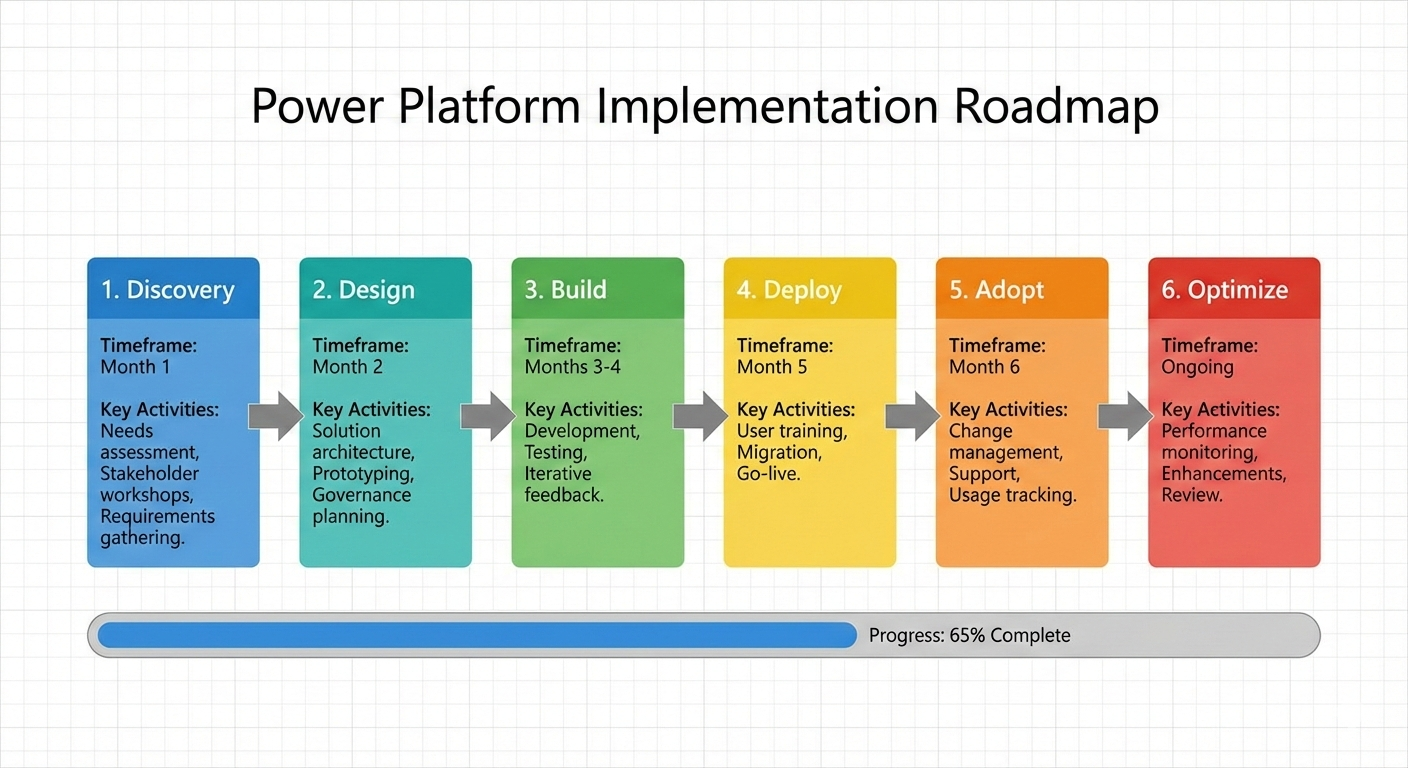
Implementation Timeline and Process
Week 1-2: Discovery and Design
- Map current processes
- Identify pain points and automation opportunities
- Design solution architecture
- Estimate licensing requirements
- Create wireframes and data model
Week 3-4: Build and Test (Phase 1)
- Build core functionality
- Create Power Apps screens
- Develop Power Automate flows
- Set up Dataverse tables if needed
- Internal testing with project team
Week 5: User Acceptance Testing
- Deploy to test environment
- Train 3-5 power users
- Gather feedback
- Refine based on real usage
- Performance testing with production data volumes
Week 6: Launch and Training
- Deploy to production
- Train all users (typically 2-hour session)
- Create documentation and quick reference guides
- Set up support process
- Monitor usage and performance
Weeks 7-8: Refinement
- Address issues identified in production use
- Add minor enhancements based on user feedback
- Optimize performance if needed
- Document lessons learned
Typical project durations:
- Simple app (data entry, basic workflow): 3-4 weeks
- Medium complexity (multi-table, automation): 5-8 weeks
- Integrated solution (apps + flows + BI): 10-16 weeks
Getting Started: Your First Power Platform Project
Don’t start by building an app. Start by identifying the right problem.
Step 1: Find a High-Value, Low-Complexity Process
Look for processes that are:
- Manual and repetitive (done weekly or daily)
- Time-consuming (waste 3+ hours per week)
- Error-prone (mistakes happen regularly)
- Not mission-critical (can fail without business stopping)
- Limited scope (affects one department initially)
Good first projects:
- Equipment or room booking
- Leave requests and approvals
- Client intake forms
- Simple inventory tracking
- Report distribution automation
Bad first projects:
- Core business system replacement
- Customer-facing applications
- Complex workflows with 10+ approval steps
- Anything mission-critical
Step 2: Map the Current Process
Spend 2-3 days understanding how it works now:
- Who does what?
- What information is needed?
- Where does data come from?
- Where does it go?
- What decisions are made?
- Where do errors happen?
Create a simple process map. I use sticky notes on whiteboard. Low-tech works.
Step 3: Design the Minimum Viable Solution
Don’t try to solve every problem. Pick the top 1-2 pain points.
Example - Equipment Booking:
Current state:
- Shared Excel file in OneDrive
- Email requests to facilities manager
- Manual updates to spreadsheet
- Conflicts happen regularly
- No visibility into upcoming bookings
Pain points identified:
- Booking conflicts (biggest problem)
- No mobile access
- No automated notifications
Minimum viable solution:
- Power App with booking form
- Power Automate to check availability and send confirmations
- Simple calendar view of bookings
Features NOT included in v1:
- Recurring bookings
- Resource usage reporting
- Integration with accounting
- Equipment maintenance scheduling
Build version 1. Get people using it. Add features based on real usage, not theoretical needs.
Step 4: Build, Test, Refine
Week 1-2: Build
- Create Power App screens
- Set up data storage (SharePoint or Dataverse)
- Build automation flows
- Basic testing
Week 3: Test with Real Users
- 3-5 people use it for real work
- Gather feedback daily
- Fix issues immediately
- Adjust workflow based on usage
Week 4: Launch
- Deploy to everyone
- 1-hour training session
- Quick reference guide
- Support channel (Teams or email)
Week 5-6: Stabilize
- Monitor usage
- Address issues
- Make small improvements
- Gather enhancement requests
Step 5: Measure and Learn
Track metrics:
- Time saved per week
- Error reduction
- User adoption rate
- Support requests
Brisbane logistics equipment booking:
- Before: 12 booking conflicts per month, 6 hours monthly admin time
- After: 1 conflict per month, 45 minutes monthly admin time
- ROI: 5.25 hours saved monthly × $45/hour = $236/month
- Build cost: $3,200
- ROI reached: 14 months
Not spectacular, but solid. Built confidence for next project.
When to Bring in External Help
You can build simple Power Platform solutions internally. Here’s when to bring in expertise:
You need external help if:
- Complex integrations - Connecting to systems without standard connectors (legacy databases, custom APIs)
- Dataverse architecture - Setting up proper table relationships, security model
- Performance optimization - App is slow, hitting delegation limits
- Governance setup - Need CoE, DLP policies, environment strategy
- Training and adoption - Internal team needs upskilling
- First major project - Want to build internal capability while delivering value
Cost expectations:
- Basic consulting (process mapping, architecture): $1,500-$3,000
- Implementation (build + deploy): $3,000-$30,000 depending on complexity
- Training (power users): $1,200-$2,000 per day
- Ongoing support: 10-15% of build cost annually
Red flags when hiring:
- Promises everything can be done in Power Platform (it can’t)
- No discovery phase (jumping straight to building)
- Fixed price for undefined scope
- No governance or documentation discussion
Power Platform vs. Custom Development: The Real Decision
Had this conversation with a Melbourne CFO last month. Their IT vendor quoted $65K for a custom invoice approval system. I showed them a Power Automate solution for $4,500.
“Why wouldn’t we always choose Power Platform then?”
Good question. Here’s the honest answer:
Choose Power Platform When:
- Timeline is tight (need solution in 4-8 weeks, not 4-8 months)
- Budget is limited (under $20K for the solution)
- Process is relatively standard (approval workflows, data entry, reporting)
- Users are primarily internal Microsoft 365 users
- Requirements will evolve (can modify Power Platform solutions easily)
- Need to test concept before committing to larger investment
Choose Custom Development When:
- Complex business logic (15+ decision points, intricate calculations)
- High performance requirements (thousands of transactions per hour)
- Customer-facing applications (don’t want licensing costs per customer)
- Need absolute control (mission-critical systems)
- Specific UX requirements (brand-critical design)
- Integration with systems Power Platform can’t easily connect to
Real Example - When We Chose Both:
Brisbane manufacturer needed production tracking:
What we built in Power Platform:
- Supervisor dashboard (Power BI)
- Production reporting workflows (Power Automate)
- Equipment downtime logging (Power Apps)
- Cost: $12,000
What we built custom:
- Real-time production line monitoring
- Machine integration via OPC-UA
- Complex scheduling algorithms
- Cost: $85,000
Total: $97K instead of $150K all-custom solution. Power Platform handled 60% of requirements at 15% of custom development cost.
The smart approach: Use each tool for what it’s good at.
Summary and Next Steps
Power Platform delivers ROI when used correctly:
✅ Automating manual processes (data entry, approvals, notifications)
✅ Connecting disconnected systems
✅ Building internal business applications quickly
✅ Creating visibility through dashboards and reporting
✅ Standardizing processes across teams
It struggles with:
❌ Complex enterprise system replacement
❌ Customer-facing public applications
❌ High-volume transaction processing
❌ Anything requiring pixel-perfect custom UI
Typical costs:
- Simple automation: $2K-$6K
- Business application: $4K-$15K
- Integrated solution: $10K-$30K
- Licensing: $5-$35 per user/month
Getting started:
- Identify one manual process wasting 3+ hours weekly
- Map current process and pain points
- Design minimum viable solution
- Build and test with small group
- Launch and refine based on real usage
Common mistakes to avoid:
- Building without understanding the process
- Trying to replace complex systems
- Skipping governance
- Underestimating data complexity
- Ignoring performance at scale
Want to explore if Power Platform makes sense for your business? I offer free 45-minute assessment calls where we review your processes and identify automation opportunities.
No pitch, no pressure. Just honest assessment of whether Power Platform (or something else) solves your problem.