Everyone wants to bolt the latest GPT model onto their business processes. Fewer people ask the question that actually determines whether it works: what happens when the model call fails, the output doesn’t match what a downstream system expects, or someone asks it something it has no business answering?
Azure OpenAI Service solves the “how do I access the model” problem reasonably well. It doesn’t solve the “how do I build something that survives contact with a real business process” problem. That part is architecture, and it’s where most implementations either hold up or fall over.
A quick naming note before we get into it: Microsoft has been consolidating its AI tooling under the Microsoft Foundry umbrella, and Azure OpenAI Service now sits inside that platform rather than as a fully separate product. The service itself, and everything in this guide, still works the same way. If you’re setting this up for the first time, don’t be surprised to find yourself provisioning through the Foundry portal rather than a standalone Azure OpenAI blade.
This is a practical guide to the second part.
Why Azure OpenAI Service, Specifically
For Australian businesses already on Microsoft’s stack, Azure OpenAI Service has a few advantages over calling the OpenAI API directly.
Data residency is the big one. Azure OpenAI is available in Australia East, which matters a lot if you’re touching anything with privacy or compliance obligations. Your prompts and completions don’t need to leave the country, which sidesteps a conversation that otherwise eats weeks of a project timeline.
It also sits inside your existing Azure AD tenant, so authentication, RBAC, and network isolation all use tooling your team already knows. No separate API key floating around in a config file that someone forgets to rotate.
And it integrates natively with the rest of the Azure ecosystem, Logic Apps, Functions, API Management, Cognitive Search, which matters more than it sounds like once you’re past the proof of concept and into “this needs to actually run in production.”
None of that makes it the only option. If you’re not on Azure already, this entire argument doesn’t apply and OpenAI’s own API might be the simpler path. But for a business already running on Microsoft infrastructure, the integration story is genuinely stronger.
A Reference Architecture That Holds Up
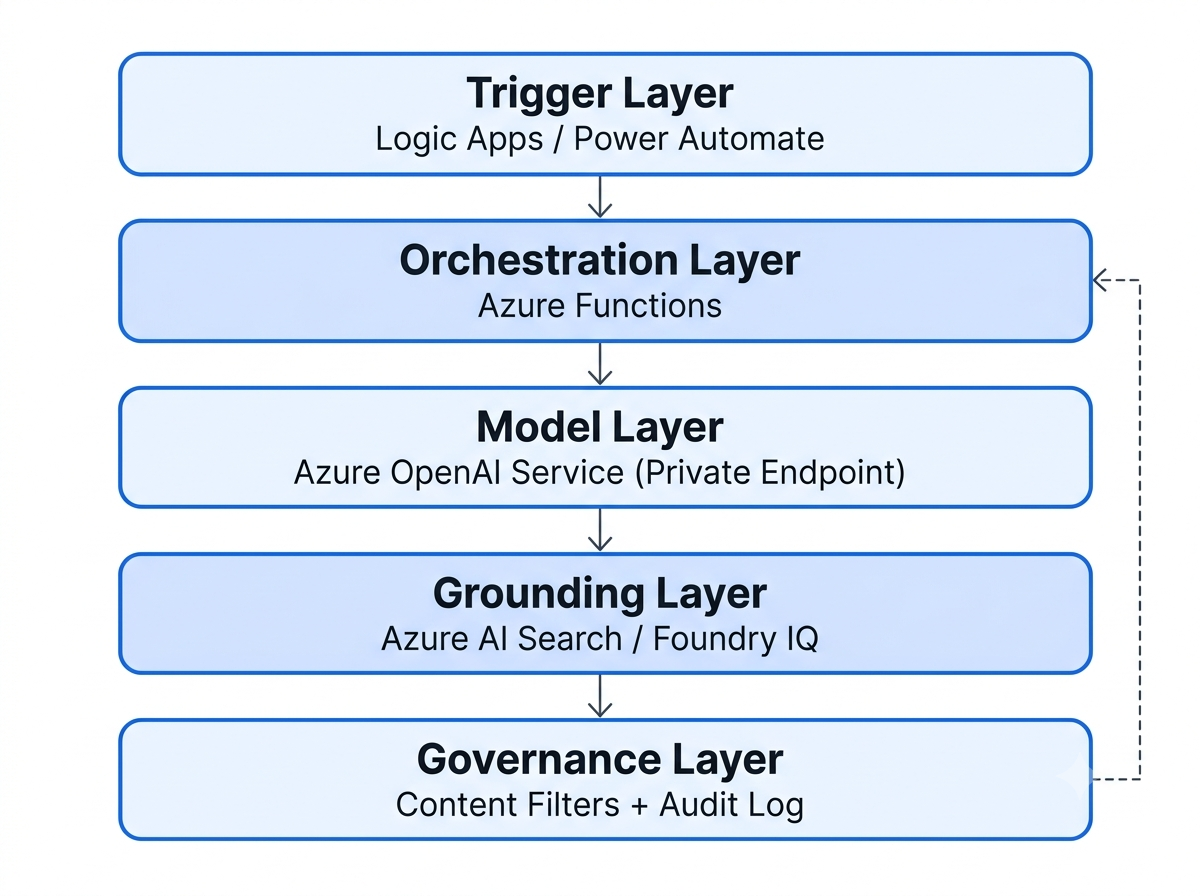
A pattern that works well for business process automation looks roughly like this:
Trigger layer: Logic Apps or Power Automate, watching for the event that kicks off the process. An email arriving, a document landing in SharePoint, a record updating in Dataverse.
Orchestration layer: Azure Functions, handling the actual logic. Retry policies, input validation, and the decision of when to call the model versus when to skip it entirely.
Model layer: Azure OpenAI Service, accessed through a private endpoint rather than the public internet. This is non-negotiable for anything touching business data.
Grounding layer: Azure AI Search, if the use case needs the model to reason over your own documents rather than just general knowledge. Microsoft now markets this capability under the Foundry IQ banner, the underlying service is the same, just wrapped in newer tooling for knowledge bases and agentic retrieval. This is the retrieval-augmented generation pattern, and for most business automation use cases, you’ll need it. A model with no grounding will confidently make things up about your own business processes.
Governance layer: Content filters (built into Azure OpenAI), plus your own logging and audit trail sitting in Application Insights or a dedicated Log Analytics workspace.
The mistake I see most often is skipping the orchestration layer entirely, wiring Power Automate directly to the model and hoping for the best. It works in the demo. It falls over the first time the model returns something malformed, the API times out, or the input contains something the prompt wasn’t designed to handle.
Implementation, Step by Step
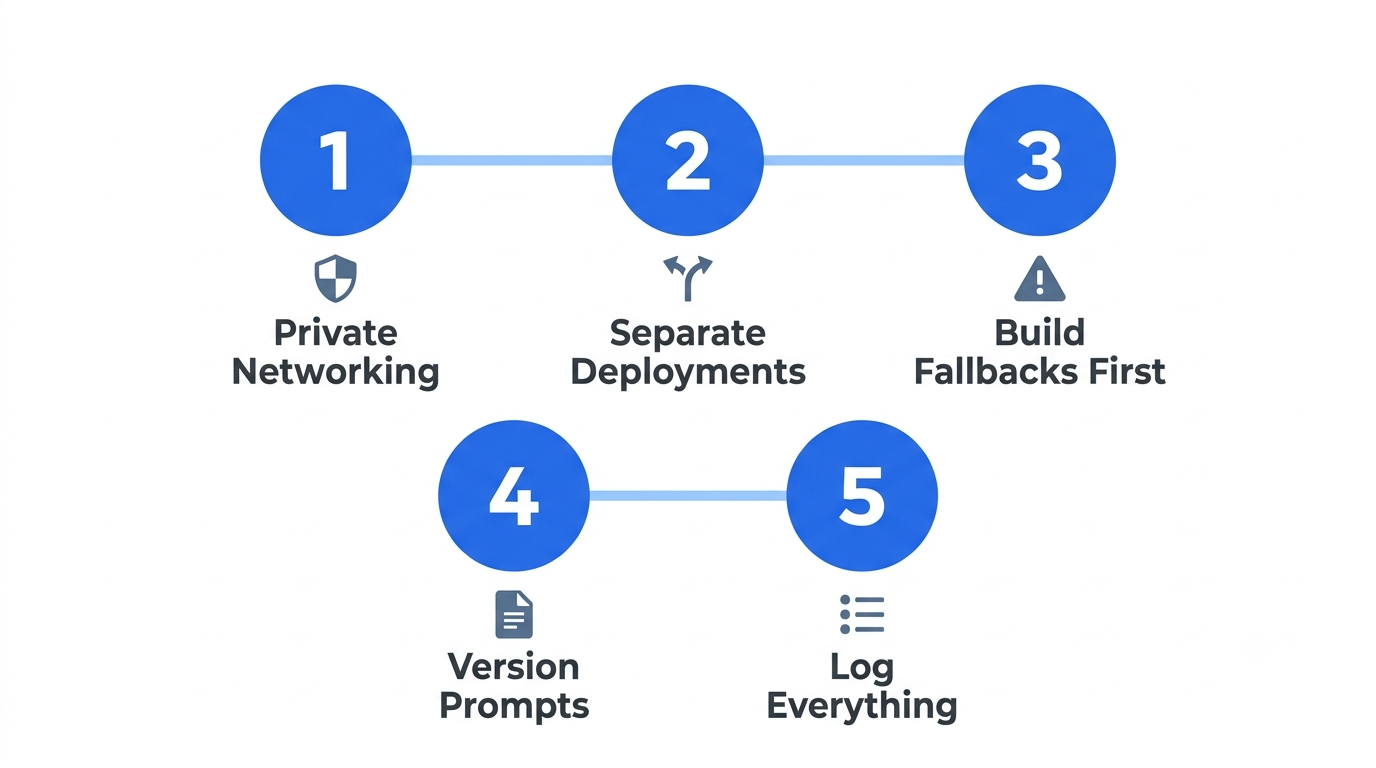
1. Provision with private networking from day one.
Set up the Azure OpenAI resource with a private endpoint inside your existing virtual network, not the default public endpoint you get if you click through the portal without thinking about it. Retrofitting network isolation after a project has “just one more thing to launch” attached to it is a miserable exercise. Do it upfront.
2. Separate deployments by use case, not by team.
Azure OpenAI lets you create multiple model deployments under one resource. Use that. A deployment handling customer-facing summarisation should be separate from one handling internal document classification, different rate limits, different content filter configurations, different monitoring thresholds. Mixing them together makes it hard to tell which use case is burning through your quota when something spikes.
3. Build the fallback path before you build the happy path.
What happens when the model call times out? What happens when it returns something that doesn’t parse as valid JSON, even though you asked it to? These aren’t edge cases, they’re Tuesday. Build explicit handling for both before you consider the integration done, not after the first production incident.
4. Treat prompts as versioned artifacts, not inline strings.
Store prompts outside your application code, in Blob Storage or a config table, with versioning. Prompt behaviour drifts as models get updated behind the scenes, and you’ll want to know exactly what prompt was live when a particular output was generated, especially if anyone ever asks you to explain a decision the system made.
5. Log the input, the output, and the model version, every time.
Not for compliance theater, for your own sanity when something goes wrong three weeks after launch and you need to reconstruct what actually happened.
Cost Control That Doesn’t Require Constant Babysitting
Token costs add up faster than people expect, particularly with retrieval-augmented patterns where every request drags a chunk of context along with it.
A few things that make a real difference:
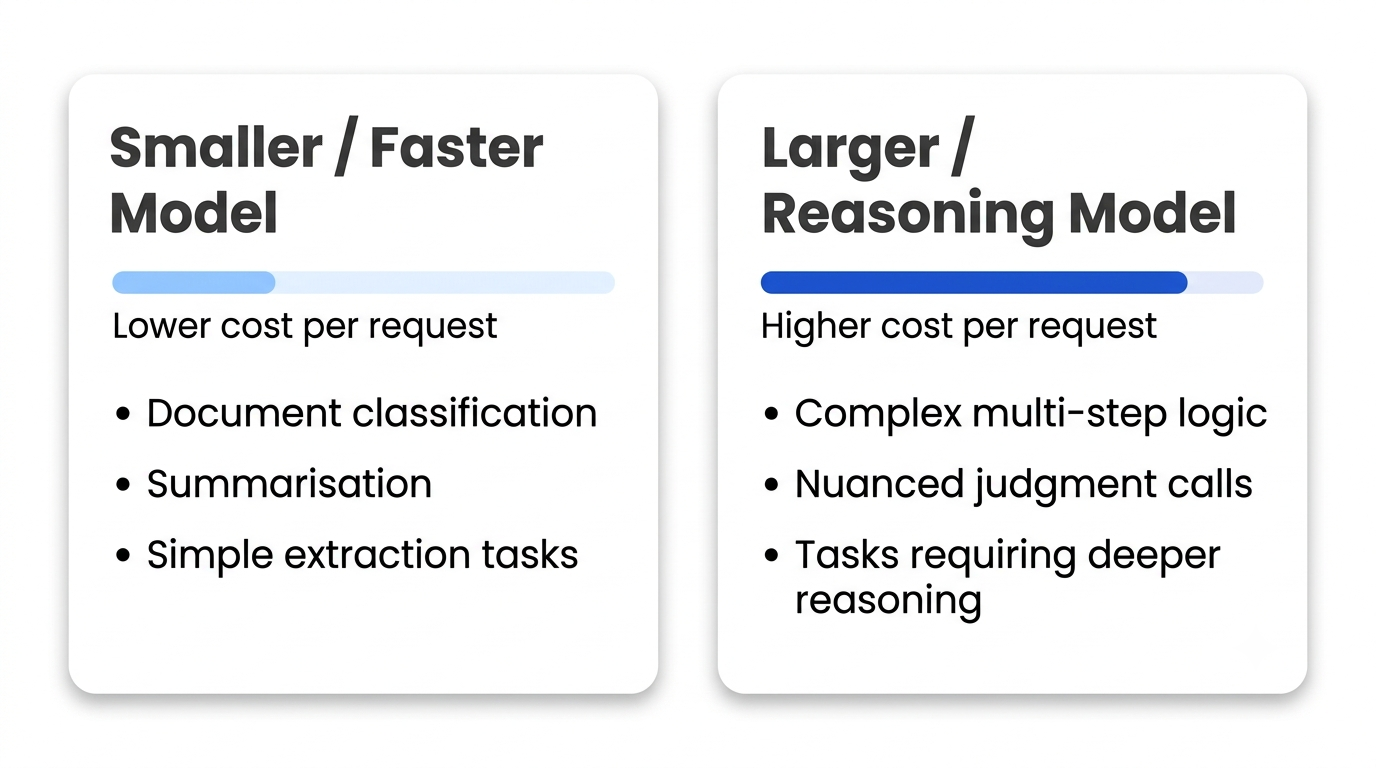
Model selection matters more than most people assume. A smaller, faster model handles document classification and summarisation perfectly well. Save the larger models for tasks that genuinely need the reasoning depth, complex multi-step logic, nuanced judgment calls. Running everything through the most capable (and most expensive) model available is the single most common way businesses overspend on this.
Cache aggressively where inputs repeat. If you’re processing similar document types or answering variations of the same question, there’s usually no reason to hit the model fresh every single time.
Set budget alerts in Azure Cost Management before launch, not after the first invoice arrives looking wrong. It takes ten minutes and saves an uncomfortable conversation.
Governance, Without Slowing Everything Down
The instinct with AI governance is often to route every single decision through a human, which defeats the point of automating anything.
A more workable split: low-stakes, reversible decisions (categorising an email, drafting a first-pass summary) can run fully automated. Anything touching money, contracts, or customer-facing communication gets a human review step before it goes anywhere. Where exactly that line sits depends on your risk appetite and what regulatory obligations you’re carrying, but the line needs to exist and be written down somewhere, not decided ad hoc by whoever’s on call that week.
Azure’s built-in content filters catch the obvious problems, but they don’t replace actually testing your specific use case against adversarial inputs before launch. Someone will eventually try to get the system to do something it shouldn’t. Better to find that in testing than in production.
Where This Goes Wrong in Practice
A few patterns show up repeatedly across Azure OpenAI implementations that don’t make it past the first few months:
No baseline before launch. Teams get excited, build the integration, ship it, and only then start wondering whether it’s actually saving time. Without a documented “before” state, hours spent, error rate, turnaround time, there’s no way to prove the automation changed anything, even when it clearly did. Capture the baseline before you touch a single workflow.
Treating rate limits as a launch-day problem instead of a design constraint. Provisioned throughput units and the standard pay-as-you-go tier have real limits, and a process that works fine for ten documents a day can hit a wall at two hundred. Model the expected volume before you commit to a tier, not after your busiest week grinds to a halt.
Skipping the “what if the model is wrong” conversation. Every model produces confidently incorrect output occasionally. If nothing downstream checks for that, plausible-sounding errors flow straight into whatever system receives them. A lightweight validation step, even something as simple as checking that a categorisation matches one of your known categories, catches a surprising amount of this before it causes damage.
Building for the current model version and forgetting models change. Microsoft updates the underlying models behind a deployment periodically, and behaviour shifts, sometimes subtly. Prompts that worked well against one version occasionally need adjustment against the next. Treating this as a one-and-done build rather than something with an ongoing maintenance cost catches teams out later.
A Realistic Starting Point
None of this means the first implementation needs to be enterprise-grade from day one. It means being honest about scope.
A sensible first project: pick one process that’s manual, repetitive, and not mission-critical if something goes slightly wrong. Document classification, first-pass email triage, draft summarisation that a human still reviews before anything happens. Build the orchestration layer properly even for something this small, the fallback handling and logging habits you build here are the ones that carry over when the next process is more consequential.
Get that running cleanly for a month before reaching for anything more ambitious. It’s a less exciting pitch than “we’re automating everything with AI,” but it’s the version that’s still running, and trusted, twelve months later.
What Actually Determines Success
Most of what determines whether an Azure OpenAI integration holds up has very little to do with the model itself. It’s whether someone thought through the failure modes before launch, whether the architecture has a proper orchestration layer instead of a direct wire from trigger to model, and whether cost and governance were designed in rather than bolted on afterwards.
The model is genuinely capable. Whether that capability turns into something reliable enough to trust with a real business process is entirely down to the plumbing around it.