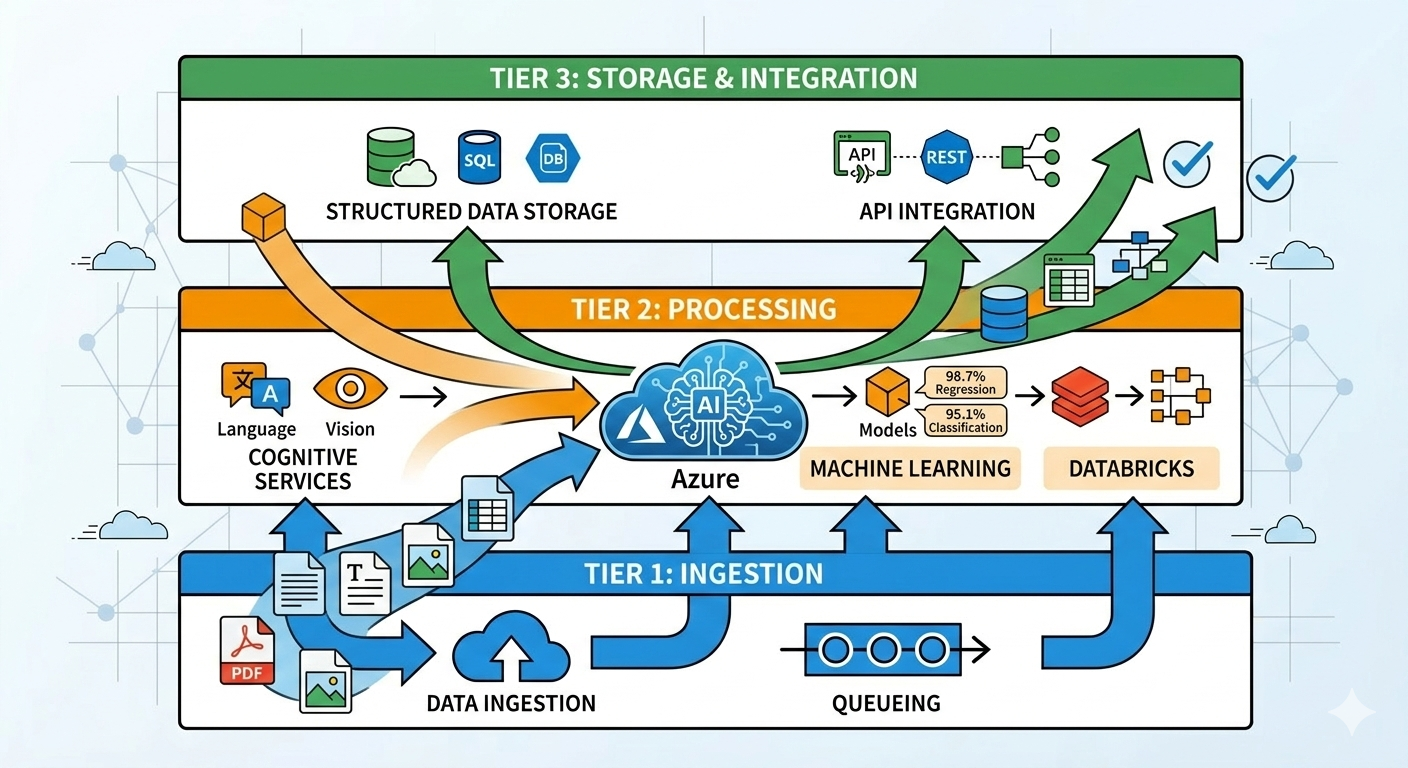
Sydney healthcare provider called me in 2022. They’d migrated their patient management system to Azure six months earlier.
Everything worked technically. Performance was good. Costs were reasonable.
Then they had their compliance audit.
The auditor asked one question that stopped everything: “Where is your patient data actually stored? Which Azure regions?”
The answer: “Umm… we’re not sure. Wherever Azure puts it?”
Wrong answer.
Three months and $47,000 later, they’d re-architected everything to ensure data stayed in Australia, implemented proper audit logging, and documented their compliance controls.
They met their requirements. But it would have cost $8,000 if done correctly during the initial migration instead of fixing it later.
After helping 120+ Australian businesses navigate cloud compliance since 2014, I’ve seen this pattern repeatedly. Companies focus on technical migration and forget that data sovereignty and compliance requirements don’t disappear just because you’re in the cloud.
This guide covers what Australian businesses actually need to know about data sovereignty and compliance in cloud environments - not the vendor marketing version, the real requirements and how to meet them.
Understanding Australian Data Sovereignty
Data sovereignty sounds complicated. It’s actually simpler than vendors make it seem.
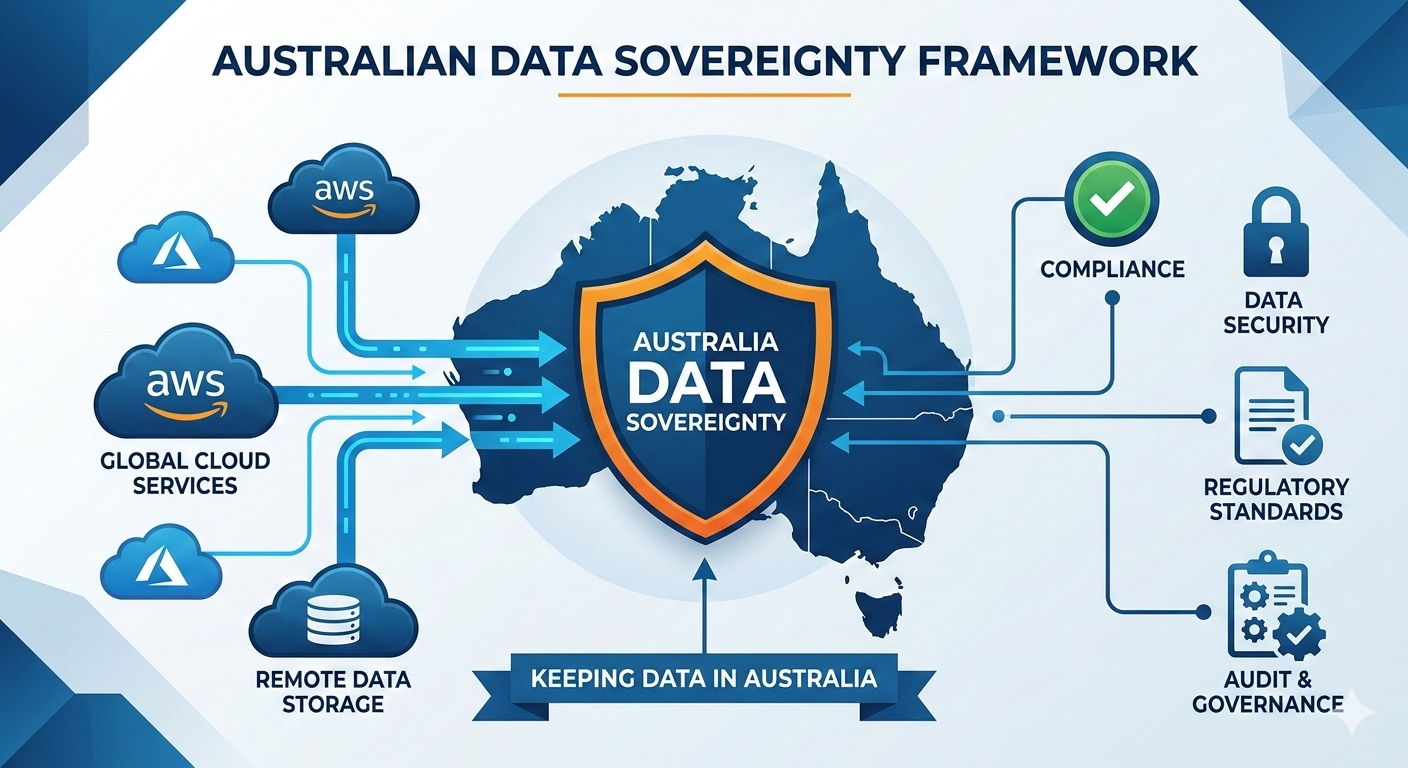
The core concept: Australian data stays in Australia, subject to Australian law.
When you move data to the cloud, three things matter: where it’s stored physically, where it’s processed, and who can access it under what legal frameworks.
Why this matters for Australian businesses:
The Privacy Act 1988 requires Australian businesses to take reasonable steps to protect personal information. When you send data overseas, you’re still responsible if something goes wrong. You can’t outsource legal liability to your cloud provider.
For government contractors and regulated industries, it’s more explicit. IRAP requires data classified as PROTECTED or above to stay in Australia. APRA requires financial services data to remain accessible and auditable in Australia. Healthcare data under the Privacy Act needs to stay local unless you have explicit consent to send it overseas.
Sydney legal firm learned this the expensive way. They used a practice management system that stored data in US AWS regions. Fine for general business data. Problem: they held client data subject to Australian legal professional privilege. Technically this data shouldn’t leave Australia without client consent.
Their insurance company noticed during a policy renewal. Required them to either move data back to Australia or get explicit consent from every client. Moving the data cost $34,000. Getting consent from 850 clients? Impossible.
They migrated to Australian Azure regions. Should have been architected correctly from day one.
Australian Regions: What You Actually Get
Both AWS and Azure have Australian regions. But “Australian region” doesn’t automatically mean “compliant.”
AWS in Australia:
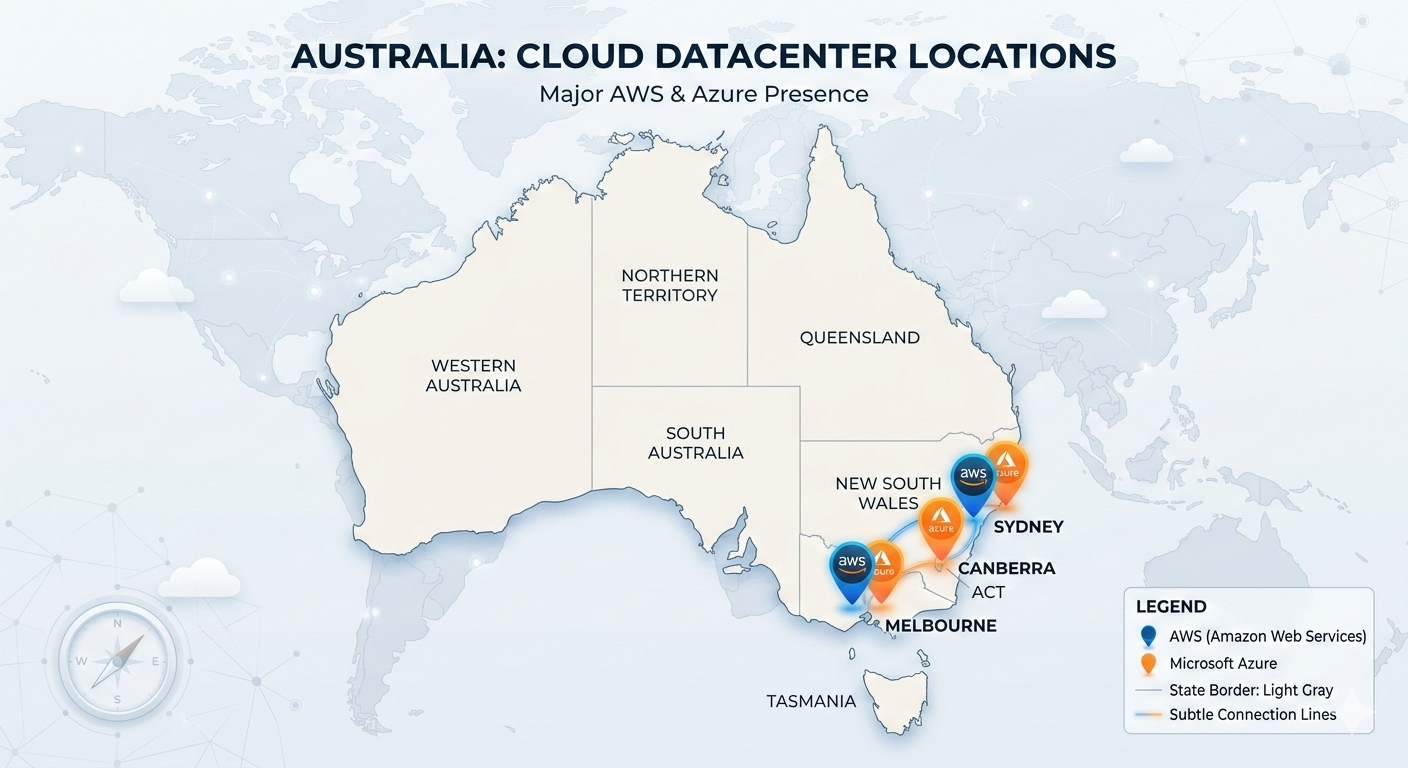
AWS has two regions: Sydney (ap-southeast-2) and Melbourne (ap-southeast-4). Both are physical datacenters in Australia. Data stored in these regions stays in Australia unless you configure it otherwise.
Sydney region launched 2012. Mature, full service availability. Melbourne region launched late 2022. Fewer services initially, expanding rapidly.
For compliance purposes, both work. Choose Sydney for maximum service availability. Choose Melbourne if you want geographic diversity within Australia or if your business is Melbourne-based and latency matters.
Azure in Australia:
Azure has three regions: Australia East (Sydney), Australia Southeast (Melbourne), and Australia Central (Canberra). The Canberra regions are purpose-built for government and regulated industries - they have additional physical security and operate under Australian government oversight.
For most businesses, Sydney or Melbourne regions work fine. For government contractors needing PROTECTED certification, Canberra regions plus IRAP assessment give you the compliance framework you need.
What “Australian region” doesn’t prevent:
Even with Australian regions, data can leave Australia if you’re not careful. Backups might replicate to other regions. Monitoring data might go to global services. Support access might route through overseas teams. Compliance logs might aggregate globally.
Melbourne financial services company migrated to Azure Australia East. Configured everything correctly. Data stayed in Sydney. Then they enabled Azure Monitor with default settings. Monitoring data started flowing to global aggregation services in Southeast Asia.
Not a huge problem for most monitoring data. Big problem when that monitoring data included customer transaction details for audit purposes. Compliance violation.
Fixed by configuring Azure Monitor to keep all data in Australian regions. Should have been configured correctly initially.
IRAP and Government Cloud Requirements
IRAP (Information Security Registered Assessors Program) is how Australian government assesses cloud services for security.
If you’re a government contractor or handle government data, you need IRAP-assessed cloud services at the appropriate classification level.
The classification levels that matter:
OFFICIAL is most government data. Doesn’t require special controls beyond good security practices. AWS and Azure both support OFFICIAL without special certification.
OFFICIAL: Sensitive needs stronger controls. Still doesn’t require IRAP assessment, but you need documented security controls. Most AWS and Azure services work fine with proper configuration.
PROTECTED is where IRAP assessment becomes mandatory. This covers data that could cause damage to national security, organizations, or individuals if compromised. Both AWS and Azure have PROTECTED-level IRAP assessments for their Australian regions.
SECRET and TOP SECRET require specialized environments. Few businesses deal with this level. Not covered by standard AWS/Azure services.
What IRAP assessment actually means:
IRAP assessment doesn’t make your environment compliant. It certifies that the cloud provider’s infrastructure can support compliant environments if you configure them correctly.
You still need to implement proper controls, document your architecture, maintain audit logs, and get your own assessment if required.
Brisbane state government contractor assumed “IRAP certified” meant automatic compliance. Deployed systems to Azure Australia Central (which has PROTECTED IRAP assessment). Didn’t implement network isolation. Didn’t configure proper access controls. Didn’t maintain audit logs.
Failed their security audit. IRAP certification of the infrastructure didn’t help because they hadn’t actually implemented required controls in their environment.
Real PROTECTED compliance requirements:
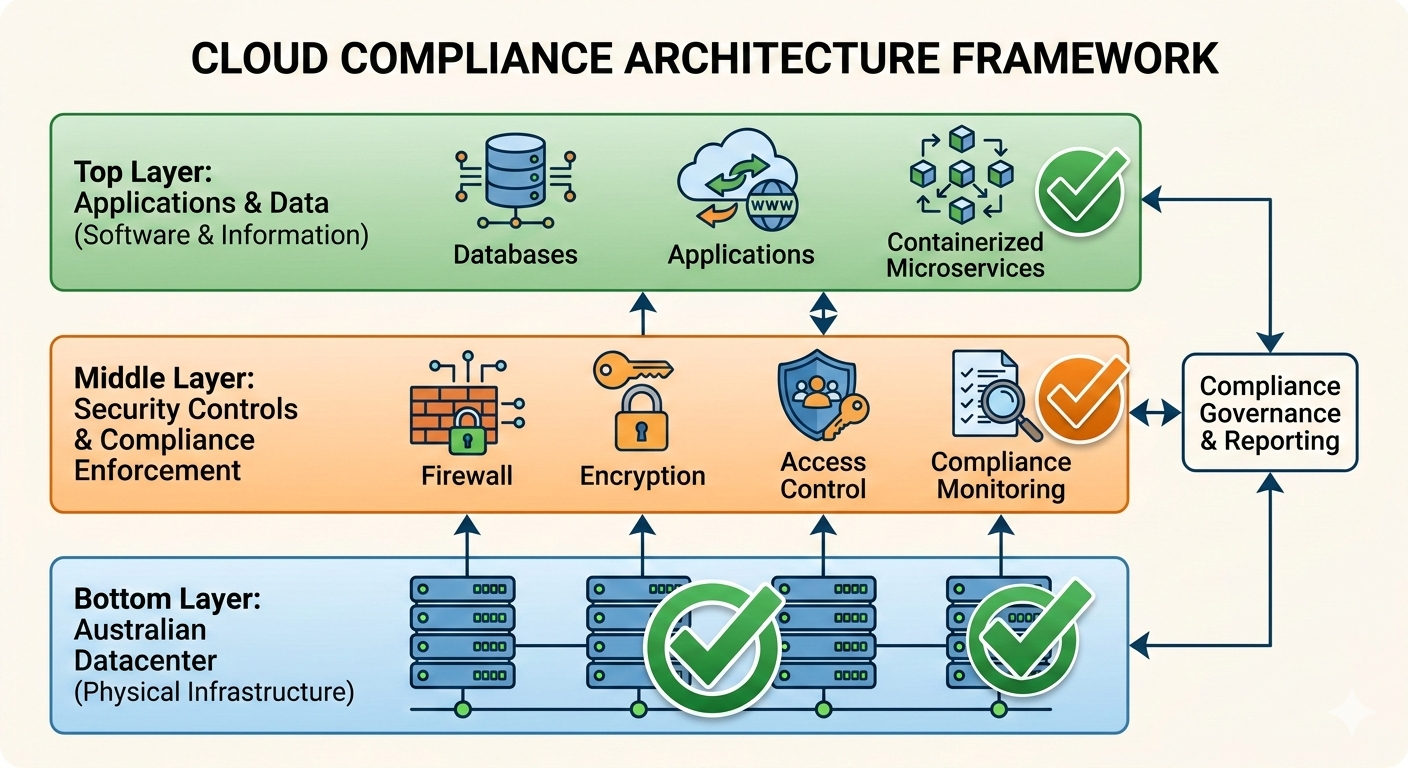
Physical security - your data needs to be in datacenters with appropriate physical controls. Australian Azure Canberra regions and AWS Sydney region both meet this.
Network isolation - your environment needs proper network segmentation. You implement this using VPCs, network security groups, and proper firewall rules.
Access control - multi-factor authentication, role-based access, privileged access management. You configure this using Azure AD or AWS IAM with appropriate policies.
Audit logging - comprehensive logging of all administrative actions, security events, and data access. You implement using CloudTrail (AWS) or Azure Monitor with proper retention.
Encryption - data encrypted at rest and in transit. Both AWS and Azure provide this, you need to enable it and manage keys properly.
Perth defense contractor needed PROTECTED compliance. They implemented everything correctly: Australian regions, network isolation, strong access controls, comprehensive logging, encryption everywhere. Passed their assessment.
Cost was $23,000 for initial architecture and implementation plus ~$400/month ongoing for additional controls. But they can now bid on government contracts requiring PROTECTED handling. Worth it for their business.
Privacy Act and Healthcare Data Requirements
Privacy Act 1988 applies to most Australian businesses holding personal information. Healthcare adds another layer through Australian Privacy Principles with specific requirements for health information.
The key question: can you send personal information to cloud providers, and what controls do you need?
Privacy Act doesn’t prohibit cloud:
Common misconception: “Privacy Act means we can’t use cloud.” Wrong.
Privacy Act requires reasonable steps to protect personal information. Cloud can actually provide better protection than on-premise if implemented correctly. But you need to understand what you’re responsible for.
The shared responsibility confusion:
Cloud providers love talking about “shared responsibility model.” They’re responsible for security of the cloud. You’re responsible for security in the cloud.
What this actually means: AWS or Azure secure their physical infrastructure, network, and core services. You secure your applications, data, access controls, and configurations.
For Privacy Act compliance, you’re responsible for everything related to data protection, regardless of whose infrastructure it runs on.
Healthcare-specific requirements:
Healthcare data under Australian Privacy Principles needs stronger protections. You can use cloud, but you need:
Data stays in Australia unless you have explicit consent. Use Australian regions only, disable any services that replicate outside Australia.
Access controls match role requirements. Doctors see different data than reception staff. Implement granular permissions using cloud IAM tools.
Audit trails for all health data access. Log who accessed which patient records when. Retain logs for required period (typically 7 years for healthcare).
Encryption for data at rest and in transit. Healthcare data should never be stored or transmitted unencrypted.
Incident response procedures documented. Know what you’ll do if there’s a breach. Privacy Act requires notification of breaches affecting health information.
Real example - Adelaide medical practice:
15 doctors, 40,000 patient records. Migrated practice management system to Azure Australia East.
What they implemented correctly:
Storage configured to Australia East only, with explicit blocking of replication to other regions. This prevents patient data leaving Australia.
Role-based access using Azure AD integrated with their practice management software. Reception staff can book appointments and see basic demographics. Doctors see full medical records. Billing sees financial data only.
Azure Monitor configured to log all data access with 7-year retention. Every time someone opens a patient record, it’s logged with timestamp, user, and what was accessed.
Encryption at rest using Azure Storage Service Encryption with Microsoft-managed keys. Encryption in transit using TLS 1.2 minimum for all connections.
Incident response plan documented and tested annually. They know who to notify, how to assess impact, and what notifications are required under Privacy Act.
Total implementation cost: $6,800 initial setup, $180/month ongoing for logging and retention.
Compliance cost in context: They spend $4,200/month on the practice management system itself. The compliance overhead is 4% of their software cost. Reasonable.
APRA Requirements for Financial Services
APRA (Australian Prudential Regulation Authority) regulates banks, insurance companies, and superannuation funds. If you’re APRA-regulated or provide services to APRA-regulated entities, you have specific cloud requirements.
CPS 234 Information Security:
APRA’s Prudential Standard CPS 234 covers information security, including cloud services. The key requirements for cloud:
Information assets remain accessible - APRA needs to be able to audit your data even if it’s in the cloud. This means you can’t rely on vendor-controlled systems where you lose access if there’s a dispute.
Incident notification timelines - you must notify APRA of material information security incidents within 72 hours. Your cloud monitoring needs to detect incidents fast enough to meet this requirement.
Business continuity arrangements - your cloud architecture needs disaster recovery capability. APRA wants to see tested recovery procedures and documented RTO/RPO objectives.
Third-party risk management - using cloud is outsourcing. You need proper due diligence on your cloud provider and ongoing monitoring of their security posture.
What APRA actually checks:
Sydney superannuation fund migrated member data to AWS. APRA audit focused on:
Can you access your data independently of AWS? They wanted to see documented data extraction procedures and tested backup restoration. The fund demonstrated quarterly backup restoration tests to on-premise storage.
How quickly do you detect security incidents? They needed proof of real-time monitoring and alerting. The fund showed CloudWatch alarms configured for suspicious access patterns with immediate notification to security team.
What’s your recovery capability? They wanted documented RTO (Recovery Time Objective) and RPO (Recovery Point Objective) plus evidence of testing. The fund had 4-hour RTO, 15-minute RPO, tested quarterly.
How do you manage AWS as a third party? They wanted evidence of AWS security assessment, contract review, and ongoing monitoring. The fund had comprehensive vendor management documentation.
The fund passed. Their cloud implementation actually demonstrated better controls than their previous on-premise setup.
Common APRA compliance mistakes:
Relying entirely on cloud provider controls without independent verification. APRA wants to see your controls, not just AWS/Azure controls.
Not testing disaster recovery procedures. Having a DR plan isn’t enough. APRA wants evidence you’ve actually tested it.
Inadequate monitoring and incident detection. Real-time alerting is required, not monthly log reviews.
Missing documentation of third-party risk assessment. You need formal evaluation of your cloud provider’s security.
Practical Compliance Implementation
Theory is interesting. Implementation is what actually matters.
Step 1: Classification and Requirements Mapping
Before migrating anything, document what data you have and what requirements apply.
Melbourne professional services firm did this properly:
Client personal information (names, addresses, contact details) - Privacy Act applies. Needs Australian residency, access controls, audit logging.
Financial records (invoices, payments, tax information) - Privacy Act applies. 7-year retention required. Australian residency preferred but not mandatory.
Business operations data (internal emails, documents, project files) - no specific compliance requirements. Can use any region.
Client confidential information (legal advice, strategic plans, IP) - contractual confidentiality obligations. Australian residency required per client agreements.
With this classification, they could make informed decisions about what goes where and what controls are needed.
Step 2: Architecture for Compliance
Design your cloud architecture to meet requirements, not retrofit compliance later.
Brisbane healthcare provider architected correctly from start:
Data storage in Azure Australia East exclusively. All storage accounts configured with region restrictions preventing replication outside Australia.
Network segmentation using Azure Virtual Networks with separate subnets for web tier, application tier, and data tier. Network security groups enforcing strict traffic rules.
Access control through Azure AD with conditional access policies. MFA required for all access. Privileged access requires additional approval workflow.
Logging and monitoring using Azure Monitor with Log Analytics workspace in Australia East. All logs retained 7 years with immutable storage preventing deletion.
Encryption everywhere - Azure Storage Service Encryption for data at rest, TLS 1.2 minimum for data in transit. Keys managed through Azure Key Vault in Australia East.
Cost of compliance architecture: $12,000 initial design and implementation, $650/month ongoing for additional logging, monitoring, and security controls.
Step 3: Operational Controls and Procedures
Compliance isn’t just architecture. You need operational procedures.
Perth financial services company implemented:
Regular access reviews - quarterly review of who has access to what. Remove access that’s no longer needed. Documented in access control policy.
Incident response procedures - documented process for security incidents. Who gets notified. How to assess impact. What notifications are required. Tested annually.
Change management - all architecture changes reviewed for compliance impact before implementation. Documented in change tickets.
Vendor management - annual review of AWS/Azure security assessments and certifications. Any changes to cloud provider terms trigger legal review.
Audit trail maintenance - automated backup of all audit logs to immutable storage. Quarterly verification that logging is working correctly.
This operational overhead: roughly 4 hours per month for a company with 80 employees. Mostly access reviews and log verification.
Common Compliance Mistakes to Avoid
After helping businesses through 120+ cloud migrations, these mistakes appear repeatedly:
Mistake 1: Assuming Region Selection Equals Compliance
Choosing Australian regions is necessary but not sufficient.
Adelaide government contractor selected Azure Australia Central (Canberra region). Assumed this meant automatic PROTECTED compliance since the region has IRAP assessment.
Deployed systems with default security settings. No network isolation. Weak access controls. Minimal logging.
Failed security assessment. The IRAP-assessed infrastructure didn’t help because they hadn’t implemented required controls.
Region selection is step one. Implementing proper controls is step two. Both are necessary.
Mistake 2: Not Understanding Backup and DR Implications
Sydney law firm migrated to AWS Sydney region. Configured everything to stay in Australia.
Then enabled automated backups using default AWS Backup settings. Backups started replicating to AWS Singapore region for “disaster recovery.”
Compliance violation. Client data leaving Australia without consent.
Fixed by reconfiguring AWS Backup to stay within Australian regions only. Added Sydney-to-Melbourne replication for DR while keeping data in Australia.
Always check default settings for backup and DR services. Many default to global replication.
Mistake 3: Ignoring Support Access Patterns
Melbourne healthcare provider needed 24/7 support. Purchased AWS Enterprise Support.
Didn’t realize enterprise support routes tickets through global support teams. AWS support staff in US and India could potentially access their patient data during troubleshooting.
Not technically a breach of Australian data residency (data still physically in Australia), but raised questions during compliance audit about who has access.
Resolved by implementing support access controls - AWS support requires specific approval before accessing production data, all access logged and reviewed.
Support access needs consideration in your compliance model.
Mistake 4: Weak Access Control and Authentication
Brisbane superannuation fund migrated member data to Azure. Implemented basic username/password authentication.
Compliance audit asked about MFA (multi-factor authentication). They didn’t have it implemented.
APRA CPS 234 requires strong authentication for access to material information assets. Username/password isn’t sufficient.
Added Azure AD with MFA required for all access. Cost: $6 per user per month. Should have been implemented from day one.
Don’t skip basic security controls. MFA is table stakes for any compliance framework.
Mistake 5: Inadequate Documentation
Perth government contractor built compliant architecture. Implemented all required controls correctly.
Failed compliance assessment because they couldn’t demonstrate controls were working.
No documentation of security architecture. No procedure documentation. No evidence of testing. No audit trail of security reviews.
The controls existed and functioned correctly. But without documentation and evidence, auditors couldn’t verify compliance.
Spent three months creating documentation retroactively. Would have taken two weeks if done during implementation.
Document as you go. Every architectural decision, every control implementation, every procedure, every test.
Costs of Compliance in Cloud
Compliance costs money. How much varies significantly based on requirements and how you implement.
Basic Privacy Act compliance:
For a small business (20-50 employees) with personal information in the cloud:
Australian region selection - no cost difference versus other regions Basic encryption - included with AWS/Azure at no extra cost Access controls - minimal cost, using built-in IAM tools Audit logging - $50-150/month for adequate logging and retention Compliance documentation - $2,000-4,000 initial setup, minimal ongoing
Total annual cost: roughly $600-2,400 in additional cloud costs plus initial documentation effort.
PROTECTED-level IRAP compliance:
For government contractor handling PROTECTED data:
Australian government-specific regions - no cost premium Enhanced network security - $150-300/month for additional network controls Advanced access controls - $200-400/month for privileged access management Comprehensive logging - $300-600/month for detailed audit trails Regular security assessments - $8,000-15,000 annually for IRAP assessments Documentation and procedures - $15,000-25,000 initial, $3,000-5,000 annual maintenance
Total annual cost: roughly $12,000-25,000 in additional cloud costs plus assessment costs.
APRA-regulated financial services:
For superannuation fund or bank:
Multi-region DR architecture - $800-1,500/month for proper disaster recovery Advanced monitoring - $500-1,000/month for real-time security monitoring Incident response capability - $2,000-4,000/month for 24/7 security operations Compliance reporting - $400-800/month for automated compliance dashboards Regular audits - $20,000-40,000 annually for security and compliance audits Documentation and governance - $30,000-50,000 initial, $8,000-12,000 annual
Total annual cost: roughly $50,000-95,000 in additional cloud costs plus audit costs.
Compliance cost in context:
Melbourne healthcare practice spends $4,200/month on practice management software. Compliance costs $180/month. That’s 4% overhead for compliance.
Brisbane government contractor spends $8,500/month on cloud infrastructure. Compliance costs $2,100/month. That’s 25% overhead for PROTECTED requirements.
Sydney superannuation fund spends $45,000/month on cloud infrastructure. Compliance costs $6,200/month. That’s 14% overhead for APRA requirements.
Higher security classification means higher compliance costs. But the percentages are manageable if architected correctly from the start.
Multi-Cloud and Hybrid Compliance
Some businesses use multiple cloud providers or hybrid on-premise and cloud. This complicates compliance.
Multi-cloud data sovereignty:
Perth mining company uses both AWS and Azure. Different systems in different clouds. All need PROTECTED compliance.
Challenge: consistent security controls across different platforms. AWS uses IAM and CloudTrail. Azure uses Azure AD and Monitor. Different tools, same requirements.
Solution: implemented centralized security monitoring aggregating logs from both platforms. Used common SIEM (Security Information and Event Management) tool to collect logs from AWS CloudTrail and Azure Monitor into single platform.
Cost: additional $2,800/month for SIEM platform. Benefit: unified view of security across both clouds, easier auditing.
Hybrid cloud compliance:
Adelaide financial services keeps sensitive data on-premise, migrates less-sensitive systems to cloud.
Challenge: ensuring consistent controls between on-premise and cloud environments. Different architectures, different tools, same compliance requirements.
Solution: documented security baseline applicable to both environments. On-premise implements baseline using traditional tools. Cloud implements baseline using native cloud services. Both meet same requirements, different mechanisms.
Regular cross-platform security assessments verify both environments meet requirements.
Cost: additional audit complexity adds roughly $8,000 annually to compliance costs. Benefit: flexibility to choose right platform for each workload.
The compliance complexity trade-off:
Multi-cloud and hybrid increase compliance complexity. Each additional platform adds overhead for security monitoring, access management, and audit processes.
Brisbane healthcare provider evaluated multi-cloud. Decided single cloud (Azure) simplified compliance. One security framework, one set of tools, one audit process.
Saves roughly $3,000/month in compliance overhead versus multi-cloud approach. Trade-off: locked into single vendor.
Perth mining company accepted multi-cloud complexity because they need specific services from both AWS and Azure. Different workloads have different optimal platforms.
Spends extra $2,800/month on unified security monitoring. Trade-off: complexity for technical capability.
No universal answer. Depends on your specific requirements and risk tolerance.
Vendor Lock-in and Compliance Exit Strategies
Compliance requirements can create vendor lock-in. Plan for potential cloud provider changes.
Data portability for compliance:
Melbourne legal firm implemented data export procedures as part of their compliance architecture. Every month, automated export of all client data to on-premise storage in standard formats.
Purpose: if they need to leave AWS, they have current data in portable format. If AWS relationship deteriorates, they’re not dependent on AWS cooperation to access their data.
APRA specifically requires this for regulated financial institutions. Principle applies more broadly: maintain ability to access your data independently of cloud provider.
Compliance framework portability:
Brisbane government contractor architected compliance controls using infrastructure-as-code (Terraform). Their PROTECTED environment documented as code that can deploy to either AWS or Azure.
Never used multi-cloud capability. But having compliance architecture in portable format means they could switch providers if needed without complete redesign.
Cost: additional $8,000 initial investment in infrastructure-as-code implementation. Benefit: reduced vendor lock-in risk.
When compliance enables lock-in:
Perth financial services obtained APRA approval for specific AWS architecture. Documented controls, tested procedures, approved implementation.
Changing cloud providers would require re-doing entire APRA compliance assessment with new architecture. Estimated cost: $40,000 plus 6 months timeline.
Effective lock-in: switching providers is technically possible but economically painful.
Mitigation: maintain good relationship with cloud provider, negotiate long-term pricing, ensure contract terms protect your interests.
Future-Proofing Compliance Architecture
Compliance requirements evolve. Architecture should accommodate future changes.
Emerging requirements to consider:
Digital identity verification standards changing. Current authentication might not meet future requirements. Implement flexible authentication framework that can adapt to new standards.
Cross-border data flow regulations tightening globally. Even if Australian requirements don’t change, your customers might operate in jurisdictions with stricter requirements. Design for potential future restrictions.
Audit and transparency requirements increasing. Regulators want more detailed insight into cloud security controls. Implement comprehensive logging now, even if current requirements are minimal.
AI and automated decision-making regulation coming. If you process personal data using AI/ML, future regulations likely require explainability and bias assessment. Design AI systems with auditability from the start.
Building adaptable compliance architecture:
Sydney healthcare provider designed their Azure environment with extra network segmentation they don’t currently need. Future requirement for stronger isolation? Already architected for it.
Extra cost: roughly $200/month for additional network security groups not currently required. Benefit: can adapt to stricter requirements without major architecture changes.
Brisbane government contractor implemented logging beyond current PROTECTED requirements. Collecting more detailed audit data than strictly necessary.
Extra cost: $400/month additional log storage. Benefit: if requirements increase, they’re already compliant. If requirements don’t change, they have better security visibility anyway.
The over-engineering risk:
Perth mining company implemented extensive compliance controls anticipating future requirements that never materialized.
Over-engineered security architecture cost $4,000/month for controls that weren’t required. After three years, simplified architecture and reduced costs.
Balance future-proofing against current needs. Implement core compliance controls properly. Add reasonable buffer for likely future requirements. Don’t implement speculative controls for regulations that might never exist.
Summary: Navigating Australian Cloud Compliance
Key takeaways from 120+ compliant cloud migrations:
Data sovereignty fundamentals:
Australian regions keep data in Australia, but configuration matters. Default settings often don’t meet compliance requirements. Explicitly configure region restrictions, backup locations, and service settings to ensure data stays where it needs to be.
Compliance frameworks:
IRAP for government, Privacy Act for personal information, APRA for financial services. Each has specific requirements but share common themes around access control, audit logging, encryption, and incident response.
Implementation approach:
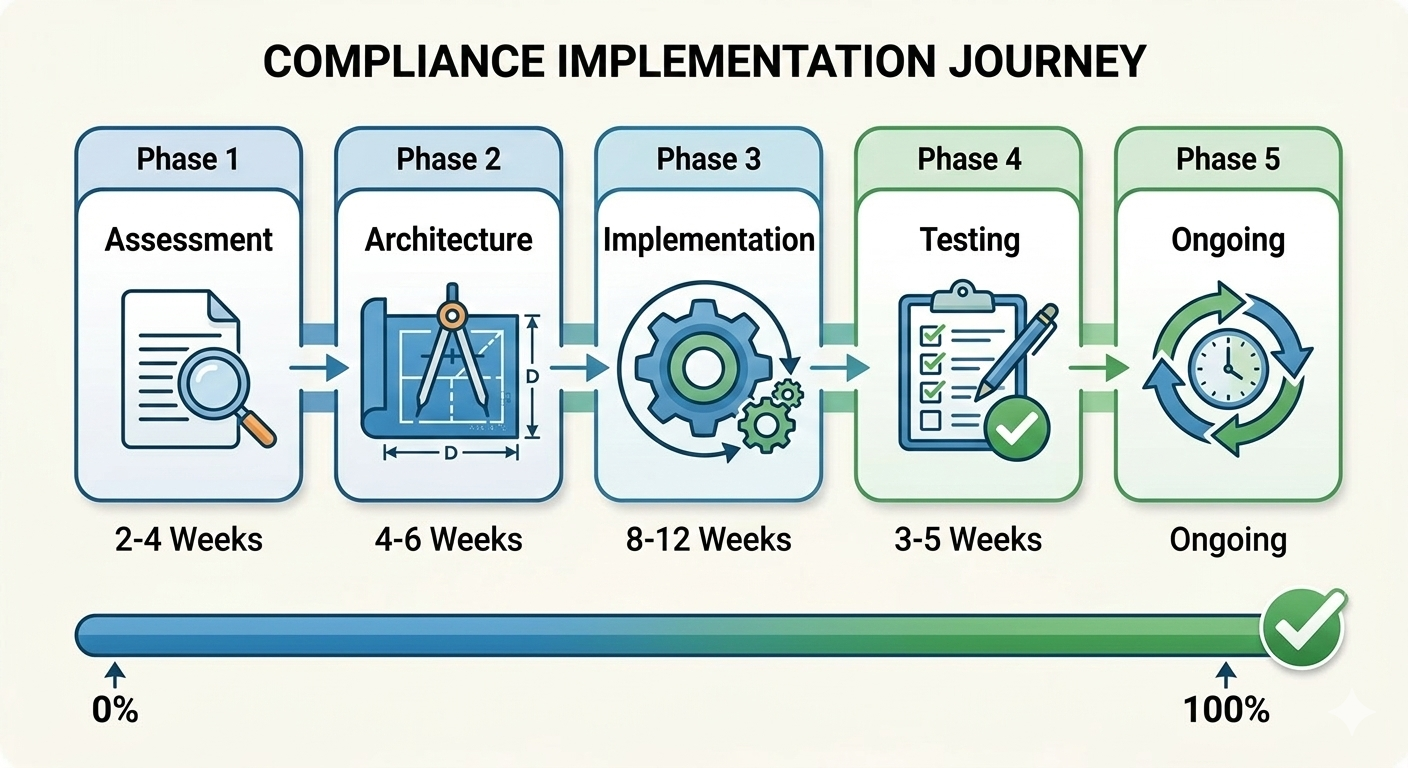
Classify your data first. Understand what compliance requirements apply. Design architecture to meet requirements. Implement operational controls and procedures. Document everything. Test regularly.
Cost considerations:
Compliance costs 4-25% additional cloud spend depending on requirements. Privacy Act compliance is relatively cheap. PROTECTED IRAP costs more. APRA-regulated environments cost most. But costs are manageable with proper architecture.
Common mistakes:
Assuming region selection equals compliance, ignoring backup and DR implications, weak access controls, inadequate documentation. All preventable with proper planning and implementation.
The reality:
Cloud can meet Australian compliance requirements. Often provides better controls than on-premise if implemented correctly. But requires deliberate architecture, proper configuration, and ongoing operational discipline.
Don’t treat compliance as checkbox exercise. Implement actual security controls that protect your data and meet regulatory requirements. Document what you implement. Test that it works. Review regularly.
Need help navigating compliance requirements for your cloud migration? I offer free 45-minute assessment calls where we review your compliance obligations and design architecture that actually meets requirements.
No compliance theater. No checkbox auditing. Real security controls for real requirements.