Brisbane manufacturing company called me last year. They wanted to migrate everything to AWS.
Their CFO had read an article about “cloud transformation” and decided: we’re moving to the cloud. All of it. By end of quarter.
I spent three hours reviewing their environment.
My recommendation? Don’t migrate.
Not yet, anyway. Maybe not ever for some workloads.
They were surprised. Consultants don’t usually talk clients out of projects, right?
But here’s the thing: after 120+ cloud migrations since 2014, I’ve learned that forcing the wrong workloads into the cloud costs more than leaving them on-premise. Sometimes significantly more.
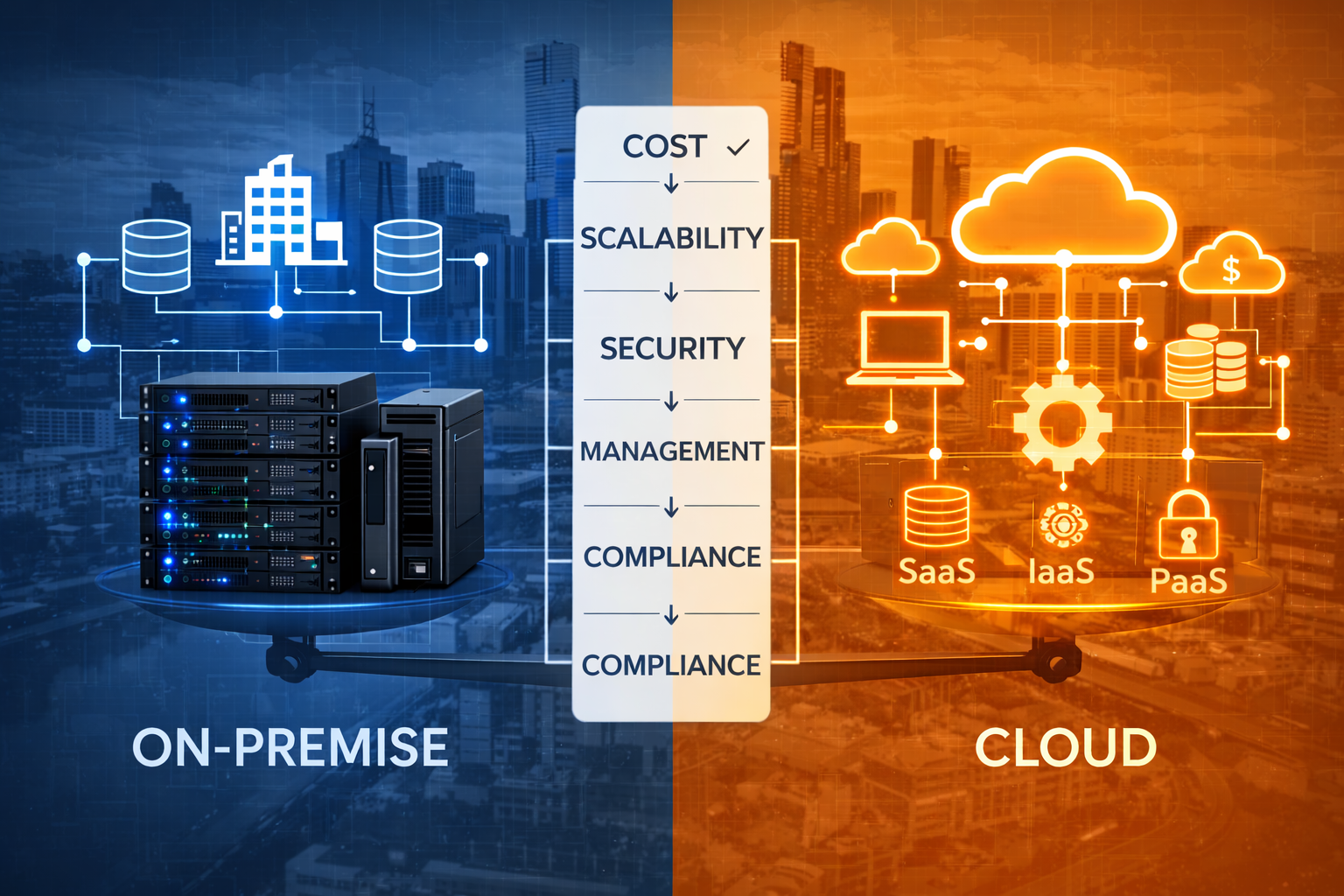
This isn’t anti-cloud. I’ve built my business on cloud migrations. But the industry’s obsession with “cloud-first” ignores basic economics and operational reality.
This guide covers when staying on-premise makes more sense - not because of fear or resistance to change, but because the numbers and operational requirements actually favor it.
The Cloud-First Fallacy
“Cloud is always cheaper. Cloud is always better. Cloud is inevitable.”
I hear this constantly. From vendors, from articles, from executives who attended a conference.
It’s wrong.
Cloud can be cheaper. Cloud can be better. But “always” is doing a lot of heavy lifting in those statements.
Real example - Melbourne healthcare provider:
They migrated their patient management system to Azure in 2021. Cloud-first strategy. Modern architecture. Everything by the book.
Three years of Azure costs: $284,000
On-premise costs for same period (hardware refresh included): $127,000
Performance? About the same. Maybe slightly worse due to latency for branch offices.
They’re now migrating back. Expensive lesson.
What went wrong?
Nothing technical. The migration was executed well. The problem was simpler: the business case never actually made sense for this particular workload.
High data volume. Predictable workload. No need for elastic scaling. Located in Australia with data sovereignty requirements.
Perfect candidate for staying on-premise. Not a cloud migration.
When On-Premise Makes More Sense
Here are the scenarios where I regularly advise against cloud migration, backed by actual cases and financial analysis.
Scenario 1: Stable, Predictable Workloads with High Utilization
The pattern:
- Runs 24/7 at consistent capacity
- No seasonal spikes
- No need for rapid scaling
- High resource utilization (70%+ average)
Why on-premise wins:
Cloud economics favor variable workloads. You pay for flexibility and scale-on-demand. If you don’t need that flexibility, you’re overpaying.
Real example - Sydney financial services:
Core banking system:
- Runs 24/7/365
- Consistent load (85% CPU utilization average)
- Peak usage only 10% higher than baseline
- 16 cores, 128GB RAM, 4TB storage
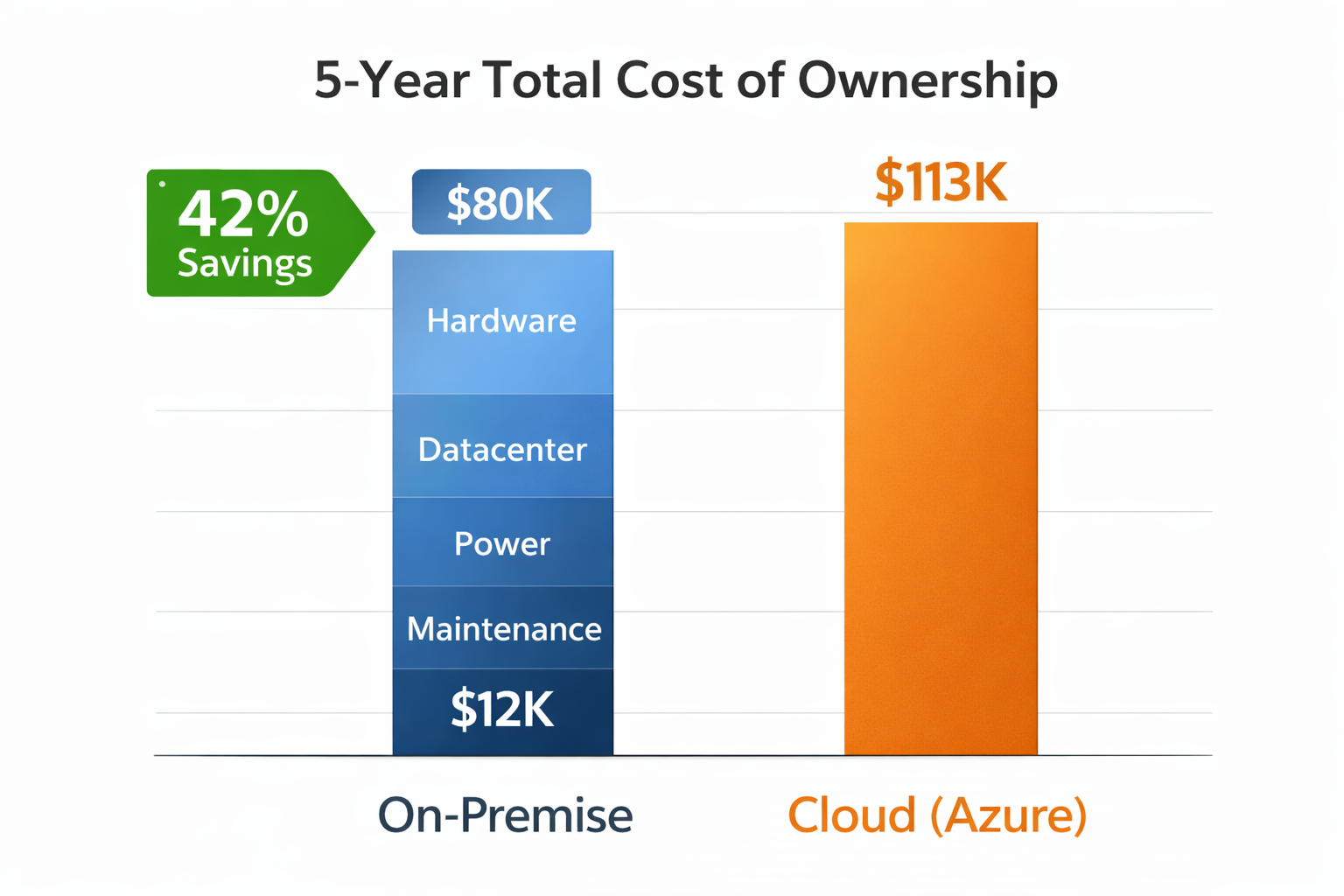
On-premise (5-year cost):
- Hardware: $45,000
- Datacenter space: $15,000
- Power: $8,000
- Maintenance: $12,000
- Total: $80,000 ($16K/year)
Azure equivalent (5-year cost):
- VM: E16s v5 (similar specs)
- Monthly cost: $1,890
- Total: $113,400 ($22,680/year)
Difference: $33,400 more expensive in cloud (42% cost increase)
And that’s before considering:
- Data egress costs (they have significant reporting)
- Backup storage
- Premium support
The utilization is too high and too consistent. Cloud’s flexibility advantage doesn’t matter here.
Scenario 2: Data-Intensive Applications with Significant Egress
The pattern:
- Large datasets (multi-TB)
- Frequent data transfer out of cloud
- Analytics, reporting, or data distribution
- Users/systems outside cloud accessing data regularly
Why on-premise wins:
Cloud egress costs kill you. Slowly. Predictably. Expensively.
Real example - Melbourne media company:
Video production and distribution:
- 45TB of video assets
- 8-12TB monthly egress (client downloads, CDN distribution)
- Multiple editors accessing files daily
Cloud costs (AWS Sydney):
- S3 storage: 45TB × $0.025/GB = $1,125/month
- Egress: 10TB average × $114/TB = $1,140/month
- Total: $2,265/month ($27,180/year)
On-premise storage (equivalent):
- NAS system: $28,000 (one-time)
- 1Gbps internet: $450/month
- Year 1: $33,400
- Years 2-5: $5,400/year
- 5-year total: $54,000
Cloud 5-year total: $135,900
Savings staying on-premise: $81,900
The egress cost alone ($13,680/year) pays for the hardware in 2 years.
After year 2, on-premise is just internet and maintenance costs. Cloud continues at full rate forever.
Scenario 3: Legacy Applications That Can’t Be Modernized
The pattern:
- Custom software built 10+ years ago
- Original developers no longer available
- Tightly coupled to specific hardware or OS versions
- Business-critical but low change frequency
- Modernization cost exceeds remaining useful life
Why on-premise wins:
Sometimes the “right” answer is “if it ain’t broke, don’t fix it.”
Real example - Adelaide manufacturing:
Warehouse management system built in 2008:
- Written in VB6
- SQL Server 2005 database
- Specific printer drivers for label systems
- Custom hardware integration
Works perfectly. Handles everything they need.
Cloud migration estimate:
- Rewrite application: $180,000-250,000
- Or run on cloud VMs with compatibility layers: $850/month
Reality check:
System will be replaced in 3-4 years when they implement new ERP.
Migrating makes zero financial sense. Keep it running on-premise until replacement.
Current on-premise cost: ~$200/month (hardware amortization + power + maintenance)
Why pay $850/month or spend $200K+ for a system that’s being retired anyway?
Scenario 4: Extremely Latency-Sensitive Applications
The pattern:
- Sub-10ms response requirements
- Real-time processing
- Trading systems, industrial control, medical devices
- User experience degrades noticeably with latency
Why on-premise wins:
Physics matters. Distance adds latency. Can’t outsource physics to AWS.
Real example - Perth mining company:
Real-time equipment monitoring:
- 200+ sensors on mining equipment
- Data processed every 100ms
- Safety-critical decisions based on data
- Equipment located in remote WA sites
Cloud scenario (nearest region: Sydney):
- Perth to Sydney: 45-60ms latency
- Add processing time: 70-90ms total
- Unacceptable for safety-critical systems
On-site edge computing:
- Processing at site: <5ms latency
- Data aggregated to central datacenter hourly
- Safety systems respond immediately
This isn’t a cost decision. It’s a “cloud can’t meet the requirements” decision.
Some workloads need to be close to where they’re used. Period.
Scenario 5: Highly Regulated Data with Extreme Compliance Requirements
The pattern:
- Government classified data
- Healthcare data with specific technical controls
- Financial data requiring physical security controls
- Export-controlled technology
Why on-premise can win:
Not all compliance requirements map cleanly to cloud shared responsibility model.
Real example - Defense contractor (can’t name client):
System handling PROTECTED-level data:
- Requires IRAP certification
- Physical security requirements
- Network air-gapping
- Specific audit trail requirements
Cloud challenges:
- AWS/Azure meet most requirements
- But some physical security controls don’t map
- Shared responsibility model creates gaps
- Auditors uncomfortable with some cloud patterns
Solution:
- Kept classified systems on-premise
- Migrated non-classified systems to cloud
- Hybrid approach based on actual requirements
Not every compliance challenge has a cloud answer. Sometimes the friction and risk of mapping requirements to cloud controls exceeds the benefits.
The Decision Framework: Cloud vs. On-Premise
Use this framework to evaluate each workload:
Cost Analysis (5-year TCO)
Calculate both scenarios honestly:
On-Premise:
- Hardware purchase + warranty
- Datacenter space/colocation
- Power and cooling
- Network connectivity
- Staffing (fraction of IT team time)
- Maintenance and support
- Hardware refresh (year 5)
Cloud:
- Monthly compute costs
- Storage costs
- Data transfer (especially egress)
- Backup and disaster recovery
- Support/premium services
- Cost inflation (typically 3-5% annual)
If on-premise is less than 70% of cloud cost, seriously consider staying on-premise.
Why 70%? Because cloud provides other benefits (flexibility, managed services). But if on-premise is <70%, those benefits rarely justify the cost delta.
Operational Requirements Matrix
| Requirement | Favors Cloud | Favors On-Premise |
|---|---|---|
| Variable workload (>30% difference peak to baseline) | ✓ | |
| Rapid scaling needs (minutes to provision) | ✓ | |
| Geographic distribution (multiple regions) | ✓ | |
| High utilization (>70% average) | ✓ | |
| Significant data egress (>1TB/month) | ✓ | |
| Sub-20ms latency required | ✓ | |
| Stable workload (minimal growth) | ✓ | |
| Legacy applications (can’t modernize) | ✓ | |
| Specific compliance requirements | Depends | Depends |
Score your workload. If “Favors On-Premise” column has more checks, question the cloud assumption.
Strategic Considerations
Beyond costs and operations:
Consider cloud when:
- Planning significant growth (>50% in 2 years)
- Need disaster recovery (DR) capabilities you don’t have
- Want to reduce IT staffing focus on infrastructure
- Enabling remote work or distributed teams
- Testing new business models requiring flexibility
Consider on-premise when:
- Workload mature and stable
- Strong existing datacenter investment
- Skilled team managing infrastructure well
- Regulatory environment unclear for cloud
- Organization culturally not ready for cloud operational model
The Hybrid Reality: Most Businesses Need Both
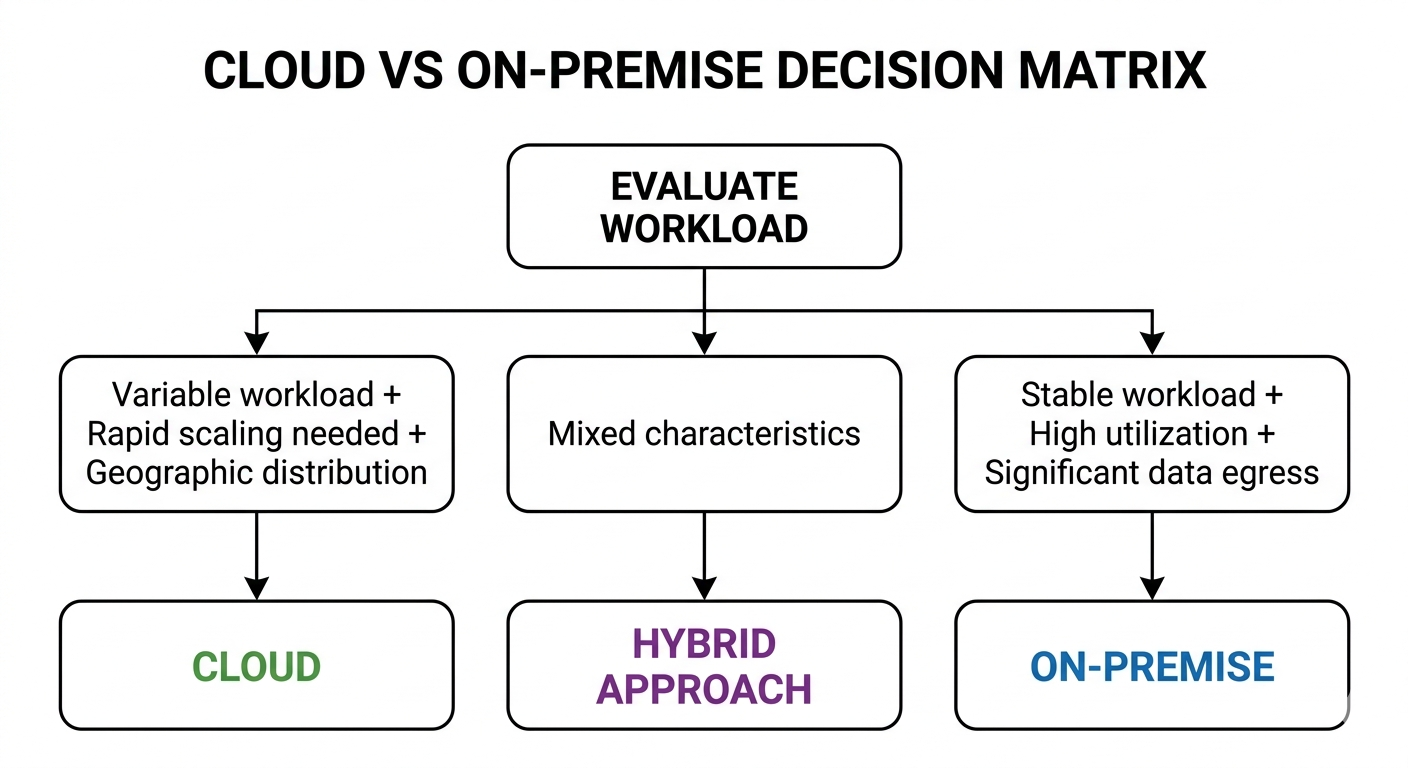
Here’s what I actually recommend to most clients: hybrid approach based on workload characteristics.
Example - Professional services firm, 150 employees:
Migrated to cloud:
- Microsoft 365 (email, SharePoint, Teams)
- CRM system (Salesforce)
- Development/test environments
- Customer-facing web applications
- Business intelligence/reporting
Kept on-premise:
- Core financial system (ERP)
- Document management (massive storage, high egress)
- VDI infrastructure (latency-sensitive)
- Legacy custom applications
Result:
- Got cloud benefits where they matter
- Avoided cloud costs where they don’t make sense
- Reduced overall IT spend by 18% vs. all-cloud scenario
- Better performance for latency-sensitive applications
Don’t let “cloud-first” become “cloud-only.” Evaluate each workload independently.
Common Mistakes When Staying On-Premise
If you decide to keep workloads on-premise, avoid these traps:
Mistake 1: Assuming Current State is Optimal
Just because you’re staying on-premise doesn’t mean you shouldn’t modernize.
Melbourne manufacturing company:
- Kept ERP on-premise (correct decision)
- But running on 8-year-old hardware
- No virtualization
- Manual backups
- Single point of failure
Staying on-premise shouldn’t mean staying stagnant.
Better approach:
- Refresh hardware
- Implement virtualization
- Automate backups
- Build redundancy
- Monitor and optimize
Treat on-premise infrastructure with same rigor you’d apply to cloud architecture.
Mistake 2: Ignoring Disaster Recovery
“We can’t afford cloud” often means “we can’t afford DR either.”
This is dangerous.
Cost-effective hybrid DR:
- Production on-premise
- DR failover in cloud (powered off, minimal cost)
- Replicate critical data to cloud storage
- Test annually
Brisbane logistics company:
- Production: On-premise ($15K/year)
- DR: Azure VMs (powered off): $200/month
- Cloud storage replication: $150/month
- Total: $19,200/year
Much cheaper than dual datacenter. Gets you DR capability.
Mistake 3: Not Planning for Hardware Refresh
Hardware doesn’t last forever.
When calculating on-premise costs, include replacement cycles:
- Servers: 5 years
- Storage: 5-7 years
- Network equipment: 7-10 years
Perth healthcare provider made this mistake:
- Hardware purchased 2019
- Needs replacement 2024
- Didn’t budget for it
- Now forced into expensive emergency hardware purchase
Plan and budget for refresh cycles.
When to Reconsider: Triggers for Re-Evaluation
Even if on-premise makes sense today, circumstances change.
Re-evaluate cloud migration when:
-
Workload growth exceeds 50% annually
- Variable costs might become favorable
- Scaling on-premise becomes complex
-
Hardware reaches end of life
- Refresh point is natural time to reconsider
- Compare refresh cost vs. cloud migration
-
Business model changes significantly
- Geographic expansion
- Remote work adoption
- New product lines requiring flexibility
-
Staffing changes
- Key infrastructure person leaves
- Difficulty hiring/retaining infrastructure skills
- Team wants to focus on business value, not infrastructure
-
Regulatory environment shifts
- Compliance requirements change
- Cloud providers add needed certifications
- Industry moves to cloud standards
Sydney professional services firm:
- Kept practice management on-premise (2021)
- Hardware end-of-life approaching (2024)
- Team reduced by 2 people
- Re-evaluated: cloud now makes sense
- Migrating mid-2026
Nothing wrong with changing your mind when circumstances change.
Making the Decision: A Practical Checklist
Use this checklist for each workload:
☐ 5-Year TCO Analysis Complete
- Honest on-premise costs calculated
- Realistic cloud costs estimated
- Difference >30%? Which direction?
☐ Workload Characteristics Assessed
- Utilization pattern documented
- Scaling requirements understood
- Data transfer patterns known
- Latency requirements defined
☐ Operational Capabilities Evaluated
- Current team skills assessed
- Management overhead estimated
- DR/backup requirements defined
- Monitoring and maintenance planned
☐ Strategic Alignment Confirmed
- Business growth plans considered
- Organizational readiness assessed
- Timeline and resources available
- Executive buy-in obtained
☐ Exit Strategy Defined
- Re-evaluation triggers identified
- Migration path documented if needed
- Not locked into permanent decision
If you can’t check these boxes, you’re not ready to make the decision.
Summary: It’s About Right-Sizing, Not Ideology
Key takeaways from 120+ migration assessments:
Cloud makes sense for:
- Variable workloads needing elastic scaling
- Applications requiring geographic distribution
- Development/test environments
- New projects without existing infrastructure
- Organizations wanting to reduce infrastructure focus
On-premise makes sense for:
- Stable, highly-utilized workloads
- Data-intensive applications with high egress
- Latency-sensitive systems
- Legacy applications nearing end-of-life
- Specific compliance scenarios
Most organizations need hybrid:
- Cloud-first for new workloads
- Evaluate existing workloads individually
- Keep what makes sense on-premise
- Migrate what benefits from cloud
- Re-evaluate as circumstances change
The real question isn’t “cloud or on-premise?”
It’s “which workloads belong where, and why?”
That’s a more interesting question. One that requires actual analysis instead of following trends.
Want help evaluating your workloads? I offer free 45-minute assessment calls where we review your environment and run the numbers honestly.
No pressure to migrate. No vendor bias. Just realistic assessment of whether cloud makes sense for your specific situation.