If your staff retype the same details into several systems or portals, you can automate data entry into web forms. It’s rarely as hard as it looks, but the right approach depends on what is actually causing the retyping.
I’m a developer, and my approach to this kind of problem has three steps. Understand the process first. Identify the real problem. Then choose the simplest technology that solves it. Most of the value is in the first two steps.
Why the same details get typed again and again
Imagine an office where a client’s details are collected once, then entered into three or four other systems: a quoting portal, a supplier site, a government form, an internal tool. Each of those belongs to someone else. Each is built differently, asks for slightly different fields and has no interest in talking to the others.
So people retype. It’s slow, it’s dull, and it’s where typos creep in. It persists because no single fix is obvious. You can’t change someone else’s portal, and the work is never big enough in one go to justify a project.
That is exactly what makes it a good candidate for automation, as long as you pick the right fix.
The mistake I’d avoid is jumping straight to a tool. “Automate form filling” and “automate data entry with AI” sound like the same request, but they can lead to very different projects. One is a small, predictable piece of software. The other brings in a model that has to be checked and maintained. Which one you need depends on the problem, not on what’s fashionable.
Understand the process before you automate it
Before choosing any technology, I’d want to know four things.
Where does the data originate? Which copy is the source of truth, the one you’d trust if two versions disagreed? What changes between destinations, such as field names, formats or required fields? And who checks the entry, and when?
If the answers are vague, stop there. Automating data entry from an unclear source just copies the confusion into more places. In my last article on which processes are worth automating, I called that automating confusion. The fix is to agree on the source of truth and the basic rules first, then automate.
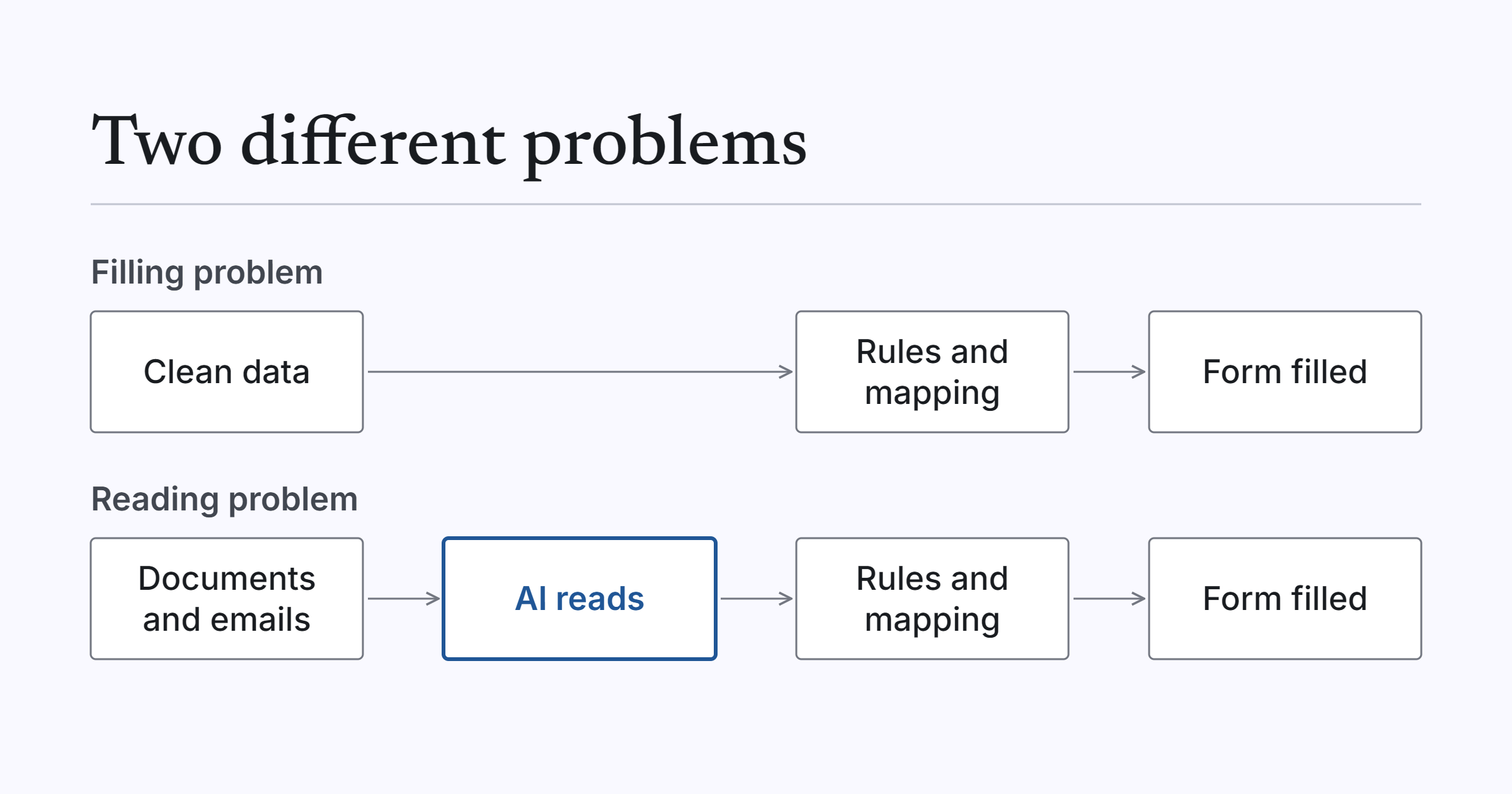
Filling problem or reading problem
Once the process is clear, the real problem is usually one of two things.
A filling problem is when the data is already clean and structured, perhaps in a database or a spreadsheet, but has to be re-keyed into other systems. Nothing needs interpreting. It just needs to get from A to B.
A reading problem is when the data arrives as documents, emails or PDFs and has to be read and understood before anyone can enter it. Someone has to work out what the document says first.
These are different problems and they need different tools. It’s tempting to reach for AI when the problem is plainly a filling problem. In my experience, that adds cost and unpredictability to a job that fixed rules would do better.
Choosing the simplest tool that works
Here’s how I’d match the problem to the tool.
| Situation | Simplest option |
|---|---|
| The destination offers an integration or API | Connect to it directly, with workflow automation handling the steps in between |
| The destination only has a web form | A browser extension or form-filling tool that maps your data to the fields |
| Input arrives as documents, emails or PDFs | AI to read and extract the details, then pass them on |
| A wrong entry would matter | A person reviews before anything is submitted |
If a destination offers a proper integration, use it. It’s more stable than anything that works through the screen. When it only has a web form, filling the form automatically is a perfectly reasonable answer.
The important point is that the filling step should be deterministic: a clear mapping from your data to each field, with validation. AI belongs in the reading step, when the input is messy. Once the details have been extracted and checked, rules should do the entering. That’s the same principle I’d apply anywhere: use AI where interpretation is needed, and conventional automation everywhere else. If your input is documents, AI document processing is the reading half of the job.
A worked example: quoting portals
One project shows the filling problem well. A regional independent insurance agency quotes each client with several insurers. Every insurer has its own online quoting portal, and each asks for largely the same client details. Staff were retyping that information into each portal by hand.
The portals are built differently, so one simple script couldn’t fill them all. We built a proof of concept: a Chrome extension that reads the client record from the agency’s existing Airtable base and fills in the quoting form in the browser. It included a field-mapping engine that handles the different kinds of form controls the portals use, from plain HTML forms to portals built with Angular Material and Kendo UI components, which behave differently from ordinary fields.
Sign-in is handled through Auth0. An early version kept database credentials inside the extension, and proper sign-in replaced that.
This was a filling problem. The client data was already structured in Airtable, so nothing needed reading, and we solved it without AI. It was a proof of concept and has not been rolled out as a production system. It showed that client details can be entered once and carried across several portals, and that one mapping approach can work across portals built on different technologies. The full write-up is in the case study.
What tends to go wrong
This is judgement from experience rather than data, but a few things catch people out.
Portals change their forms. Anything that fills a page depends on that page staying the same, so plan for someone to maintain the mapping.
Credentials get handled carelessly. Logins and database access should never sit inside a tool that runs on staff machines. The early version in the example above is a good reminder of why sign-in matters.
There’s no human check before submit. Where a wrong entry matters, let the automation fill the form and let a person press the button.
And people automate before agreeing the source of truth. If two systems disagree about a client’s address, a tool that fills forms will just spread the disagreement.
Where to start
Pick one repeated entry task and answer the four questions above. Then decide whether it’s a filling problem, a reading problem or both, and choose the simplest tool for each part.
If you’d like help with that, our Automation Discovery looks at the whole process before anything is built. Discovery is from $2,000. If you have a process in mind, ask us to assess it.